People make images in ChatGPT out of habit: it’s to hand, it understands Russian, it’s already paid for. But there has long been more than one AI image generator. Artyom Simonenko’s talk at AI Tuesday on 3 November (in Russian) had a fitting title, “Not by ChatGPT alone”: he tested what you lose if you never look beyond ChatGPT. He took four tasks — a film still, an advertising banner with Russian text, an artistic illustration and photorealism — and wrote a detailed prompt of about 5,000 characters for each. Five models got the same prompt, and then their results were compared side by side.
Below: what the test showed, how to tell a usable generation from a dud yourself, what aggregators and video cost, and which techniques Artyom uses in his work. We checked the figures quoted in the room against sources and corrected them where needed.
One caveat before any conclusions. There is one result per model and task, the prompt wasn’t adapted to each model, and no references were given. This is an “out of the box” snapshot, not a ranking: with a refined prompt and references any of the five will do better. But it’s precisely “out of the box” that a model’s weak spot shows most clearly.
Which AI image generator to choose for the task
| Task | Start with | Why |
|---|---|---|
| Film still | Seedream 5, Nano Banana 2.1 | depth, warm firelight, a focused hero |
| Advertising banner with text | GPT Image 2.5, Seedream 5, Nano Banana 2.1 | the route, the offer and the button are readable; GPT has the brightest colours |
| Artistic illustration | Seedream 5, Nano Banana 2.1 | Seedream has glow and painterly texture, Nano Banana crisp stylisation |
| Lifestyle photo | GPT Image 2.5, Seedream 5 | natural textures: GPT gives more of the setting, Seedream a closer shot |
| Realistic people | Seedream 5 with references | without a reference the skin looks “plastic”; with one it’s the most controllable model |
| Geometry and space | GPT Image 2.5, Seedream 5 | better than the others at keeping object scale and the layout of the scene |
Ideogram 4.5 and FLUX 3 didn’t make the shortlist for any task. Their typical failures are light and shadows that don’t match the scene, excessive detail and stray objects in the frame.
Which AI models were compared
All five models are recent, between one and nine months old. GPT Image 2.5 is OpenAI’s model; in ChatGPT it’s called ChatGPT Images 2.5 and came out on 8 September 2026. Seedream 5 is a model from ByteDance, the company behind TikTok and CapCut; the line came out in February, and a Pro version appeared by summer. Nano Banana 2.1 from Google came out on 6 October. Ideogram 4.5 on 30 September, FLUX 3 Image from Germany’s Black Forest Labs on 1 October.
They were compared on six criteria, covered in detail below: materials, light, anatomy, composition, text and how accurately the brief was carried out. Alibaba’s Qwen-Image-2.0 wasn’t in the test — we wrote about it separately (in Russian).
Test 1. A chef and a flambé
The brief: a cinematic medium shot of a chef tossing vegetables at the moment of flambé, hands and pan in focus, a calm face, eyes on the food rather than the fire. Warm light, steam, 85 mm lens, Kodak Portra 400 film colour.
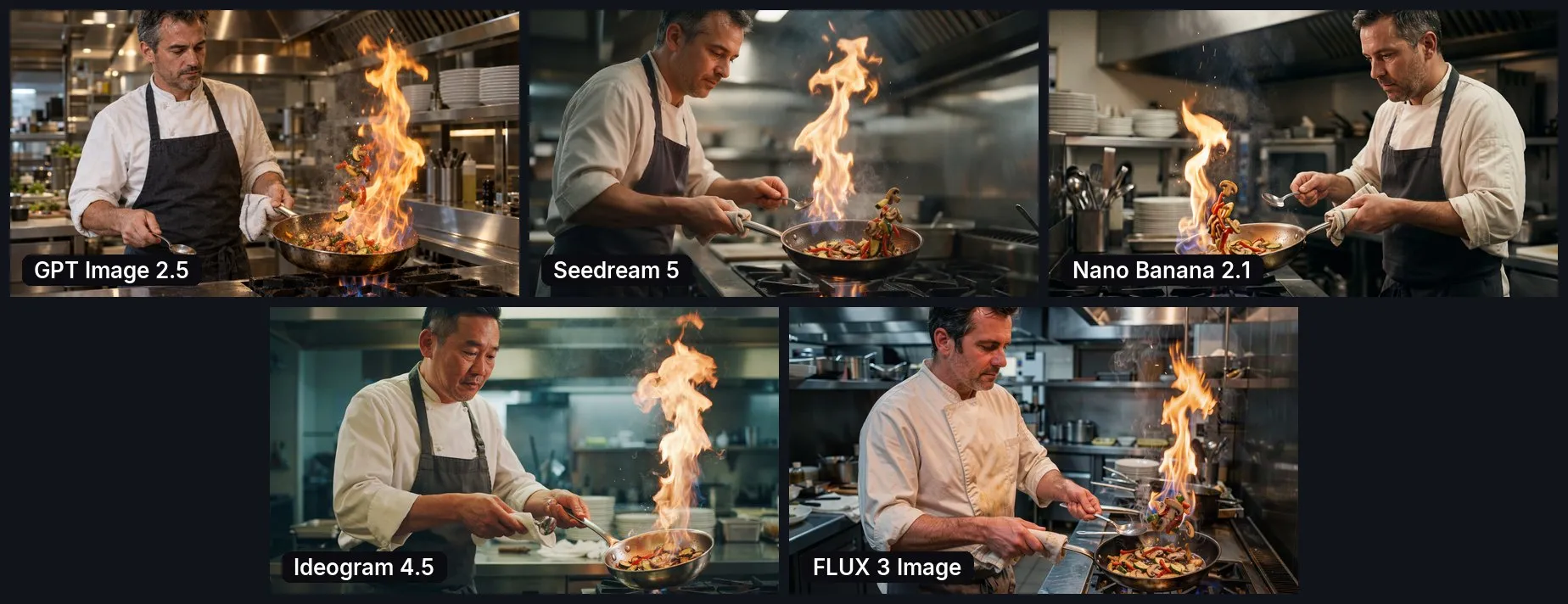
GPT Image composed the shot well, but with its trademark grain: a fine ripple across the whole picture, strongest on fabric and skin. Close up it reads as dirt, and a shot like that gives the generation away even without expert scrutiny. On top of that, the pan is gigantic, and there’s so much fire that the extractor hood would catch fire. Seedream produced good light and composition, but the skin and materials look plastic. Nano Banana managed without noise, but its kitchen is toy-like: the chef is squeezed into a cramped triangular space, and the hood isn’t hanging over the hob. The model tries to add as many details as possible and gets buried in them.
Ideogram has less plastic, the fabric creases naturally, the gaze is directed exactly right, but the ladle is twisted. In FLUX, some of the vegetables have flown out of the pan, the mushroom and spoon are disproportionately large, and the light comes from inside the hood, as if there were a lamp in it. For advertising, that’s a reject.
Where GPT’s grain comes from was debated in the room. Artyom suggested this is how OpenAI marks its images. The marks do exist: since May 2026 OpenAI has embedded Google’s invisible SynthID watermark and C2PA metadata in its images. But both are designed to be invisible to the eye, and nobody has confirmed a link between them and the visible grain. The practical conclusion doesn’t change: the grain is there, and you’ll have to remove it.
Test 2. An advertising banner with Russian text
A 16:9 banner for targeted ads: a transfer from Bangkok airport to Pattaya, a yellow and graphite background, and a mascot — Kiki the elephant in an orange turtleneck and yellow glasses, holding a flight schedule tablet. The wording was specified exactly, in Russian: the route, “No prepayment. Meet at the exit.”, “From 1,200฿” and “Book now”.
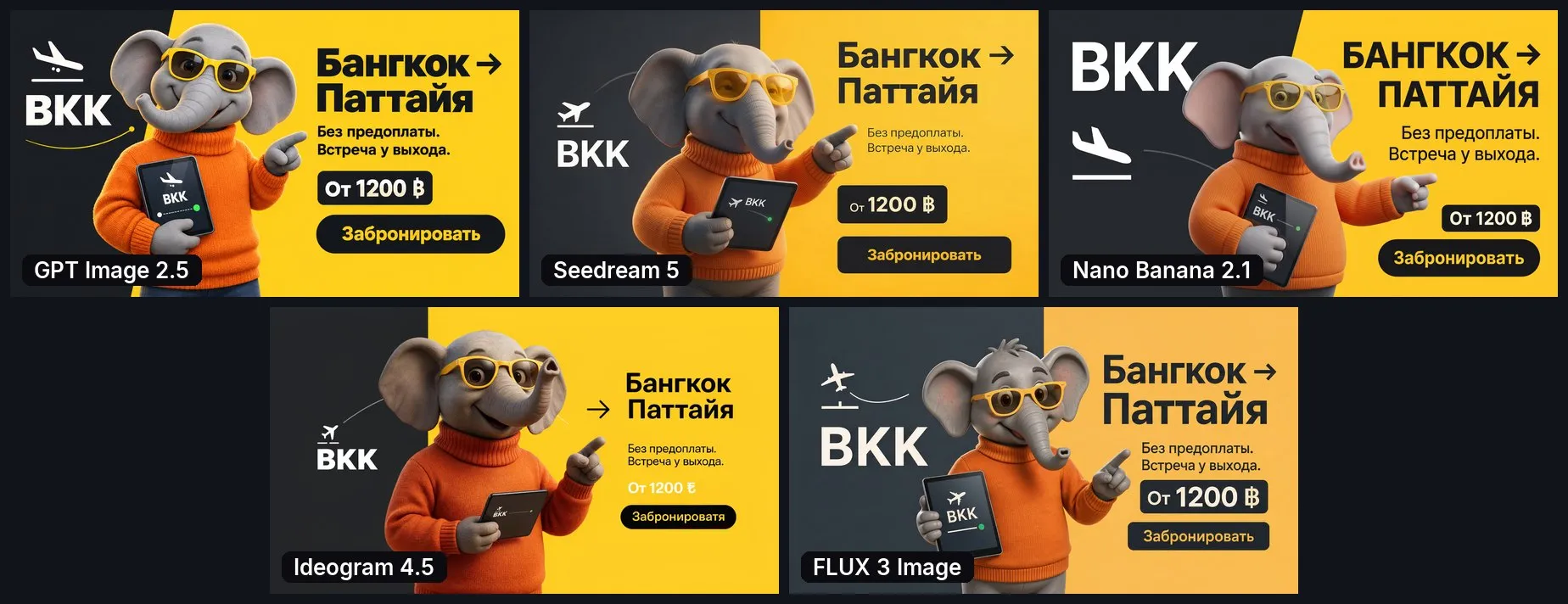
The headline result of this test: Cyrillic is no longer a problem. All five models wrote the Russian text, and that used to be the biggest pain of image generation. The best result is GPT’s: rich, almost neon colours, exactly what a banner needs to stop a thumb scrolling the feed. On a projector you can’t see it; on a monitor it jumps out. The font came out plain, but in Artyom’s experience you can describe the font you want in the prompt and the model will take it into account.
Seedream’s elephant is plastic. The room noticed that the elephants had four fingers each and inconsistent clothing: in some versions the elephant wears jeans, in others shoes but seemingly no trousers. Nano Banana is close to the first two, with a cleaner, “Disney” elephant. Ideogram has the most “human” elephant with the most realistic clothes, but the text let it down: the button says “Zabronirovatya”, a garbled spelling of the Russian word for “Book now”, and instead of the baht sign there’s a Turkish lira symbol. FLUX turned the plane the wrong way: the prompt was only about ninety per cent fulfilled.
The habit worth taking away from this test: check captions, figures and the currency sign letter by letter, even if at first glance everything read fine. A mistake in the price on a banner costs more than in any other image: you pay for impressions of that creative. If the offer needs to be accurate to the character, it’s more reliable to generate the scene and overlay the price and button in an editor.
Test 3. An artistic illustration
A dancer in a tropical garden at the blue hour. The loose end of her silk scarf turns into five floating fish. Painterly texture; gold, coral, turquoise and indigo; no lettering.
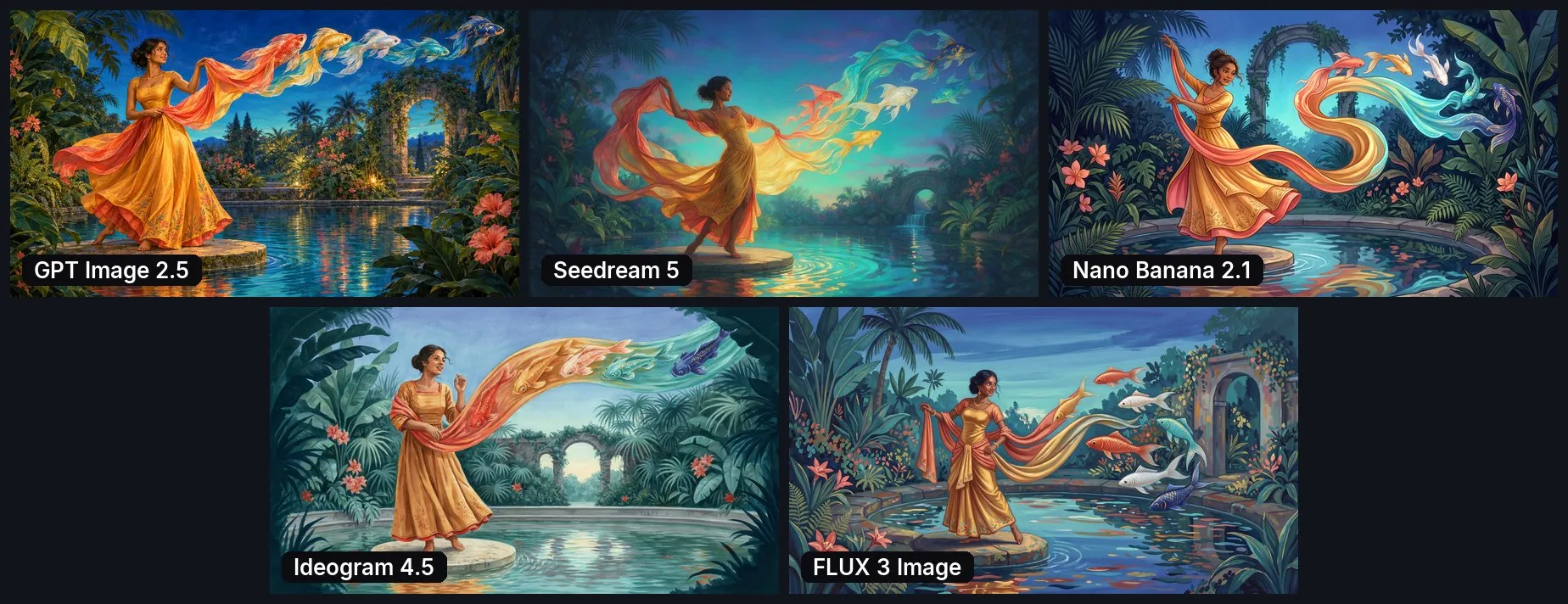
GPT followed the brief most accurately: all five fish are there and grow out of the scarf. But the grain is more noticeable here than anywhere: the fine foliage makes the whole picture ripple. Plus there are problems with the feet and toes. Seedream built a foreground and background, but the fish have come away from the fabric and swim on their own, and reflections on the water appeared out of nowhere. Nano Banana went for a cartoonish style, lost a leg and made the fish white. Ideogram and FLUX overdid the colour and detail so much that the room unanimously called the result “Bollywood”.
Test 4. Photorealism: surfing and a Volkswagen
A shot for a surf magazine: a young woman in a turquoise one-piece swimsuit with a board next to a vintage Volkswagen T2, the ocean, warm daylight, wet hair, natural skin. The scale and geometry of the van were specified separately.
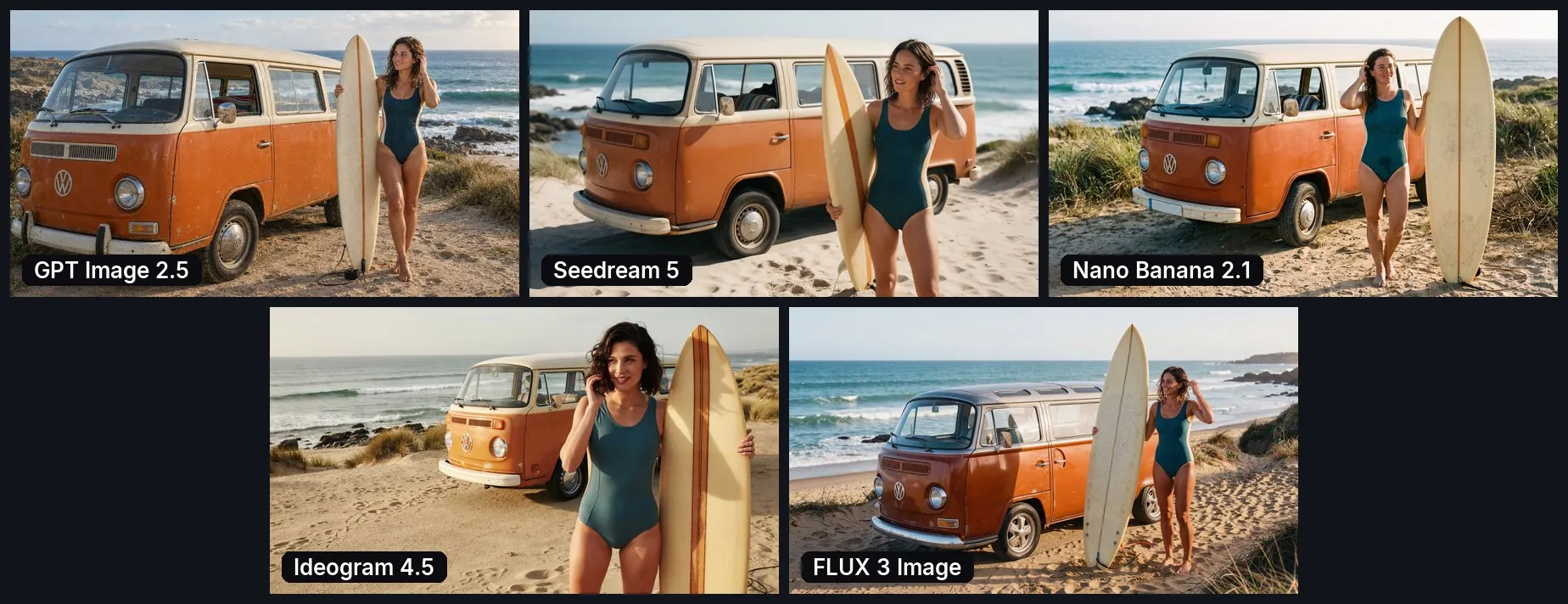
GPT got the composition right, though the woman came out too tall for a vehicle like that. But its details are the best: sand, dirt on the bodywork, old metal, stones, sun-bleached grass. The shot looks like nineties film. Seedream is clean, but the skin is plastic again. Nano Banana made the swimsuit look wet, but its composition didn’t come together. In Ideogram and FLUX the light doesn’t add up: the board’s shadow falls on the van even though the sun is on the other side. And plastic bottles and modern wheels on a vintage bus crept into the frame.
How to check a generated image before publishing
The main trap Artyom kept coming back to all evening: the first look always says “beautiful”. You generate it, you like it, you post it. And then everyone who sees the ad notices the hood glowing from inside, the elephant without trousers or the shadow going the wrong way. That’s why, after the overall impression, comes a mandatory six-point check.
- Materials. Skin, fabric, metal, food. Is there plastic, grain, “speckles”?
- Light. Where it comes from, whether the scene has such a source, whether shadows and reflections match.
- Anatomy. Hands, fingers, pose and how the person holds an object: a pan, a board, a tablet.
- Composition and scale. Is there a main subject, are object sizes sensible, is the hood over the hob?
- Text. Cyrillic, figures, the currency sign, whether the offer is readable on a phone.
- The brief. Was the action carried out, does the number of objects match, has the style been kept?
Look at it on a big screen and zoomed in. GPT’s grain and acid colours are visible on a monitor but disappear in a preview and on a projector.
A reference works better than regenerating
Someone in the room asked: what if you give GPT’s image to another model as a sample? Artyom had this experiment ready in advance. Seedream got GPT’s generation as a reference, and the grain went away. He made a second version from a vintage photo of a surfer found in a search: Seedream picked up the atmosphere and the film colour.
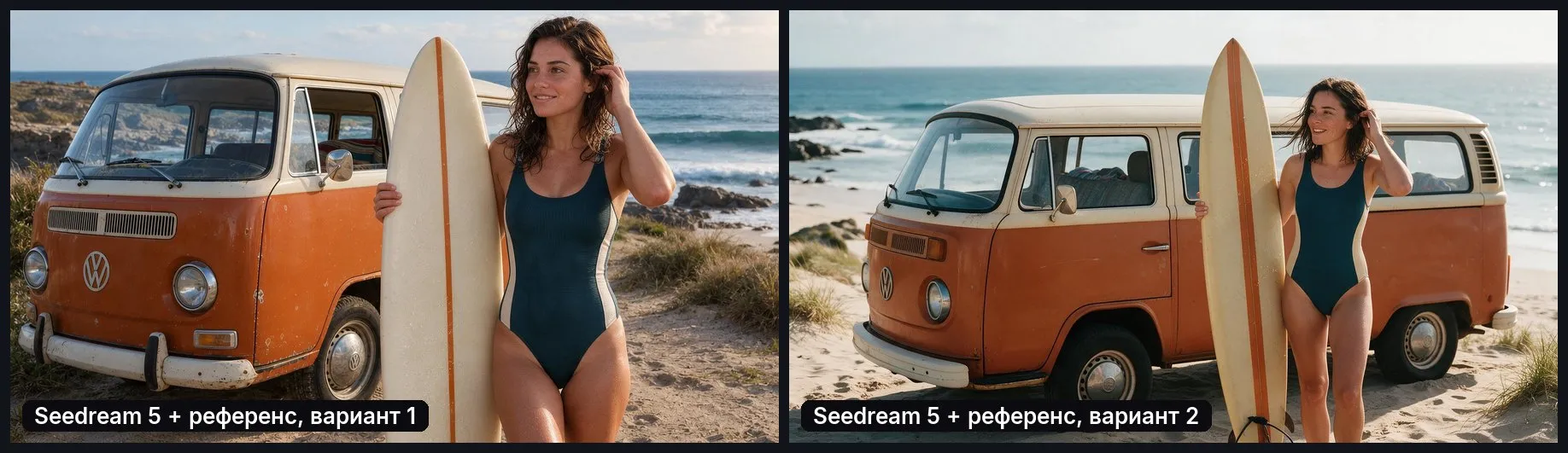
With a text prompt, Seedream produces plastic. With a reference and clear instructions on what to do with it, it’s the most controllable of the five, and for realistic people it’s the one Artyom starts with. He described a working scenario for a clothing shop: you need a model in a swimsuit in a particular pose. You give Seedream a photo of the pose, a sketch of that pose and past shoots of your real model. According to Artyom, it will reproduce the pose down to the position of the little finger, and the skin will look as it does in a real photo shoot.
How to write a prompt for image generation
The model will carry out “Draw a chef with a pan”, but you almost certainly won’t like the result: it will fill in everything you didn’t say on its own. Artyom’s working prompt is built from ten blocks: shot type, scene, action, the subject’s behaviour, light, atmosphere, lens, materials, colour and constraints. In the chef test it looked like this: a cinematic medium shot, a professional kitchen, a flambé, a calm gaze at the food, light from the fire and the ceiling lamps, steam and droplets, an 85 mm lens with shallow depth of field, natural skin and steel, Kodak Portra 400 film, one chef and no retouching.
Hardly anyone writes a prompt like that by hand any more. People ask ChatGPT or Claude for one, or use ready-made skills. And there’s a technique that saves the most time: you find an image online that you like — download it, give it to ChatGPT and ask it to describe the scene, light, camera and lens in detail. That’s a ready-made foundation for a prompt; all that’s left is to slot in your own task.
Longer doesn’t mean better. Artyom has tried prompts of up to 15,000 characters: if they contain contradictions or padding, the model doesn’t ignore part of it but mixes everything into mush. What you need is clear detail, not school-essay word count.
AI for marketplace product cards
The most down-to-earth case of the evening. Artyom’s friends sell hockey kit bags on Wildberries, and all they had were photos of the product on a white background from different angles. The chain goes like this: the photo is given to a language model (in Artyom’s case, Claude), which analyses the product and the audience and writes a detailed prompt, and GPT Image does the drawing. Toy cars went through the same process, with nothing to start from but a factory photo of the packaging from China.
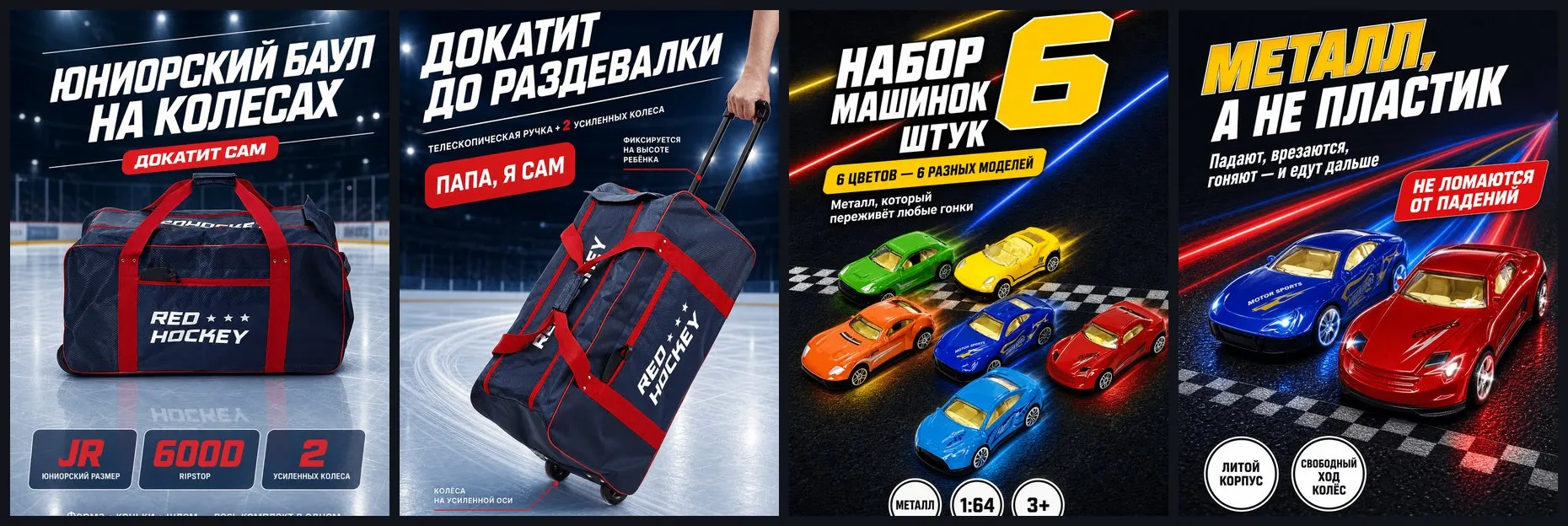
Bright, big, with the benefits right on the card — exactly what you need to stand out in Wildberries or Ozon search results. Here GPT’s vivid colours actually help.
AI aggregators: Higgsfield, Magnific, Artlist, Weavy
If all you need is GPT, work in ChatGPT. If you need to compare, an aggregator is more convenient: one interface and dozens of image, video and audio models. Artyom singles out four. Higgsfield is geared towards film and advertising clips. Magnific is the former Freepik: in April 2026 the company renamed itself after its upscaler. Artlist is known for stock music and now sells generation too. Weavy was bought by Figma in October 2025, and the product is now called Figma Weave.
Artyom loves Weavy for its node graph. You write the prompt in one window and connect it to five model nodes; one click, and they all generate in parallel. With the next node you can send the best frame to a video model such as Seedance or Kling, and connect references to the scene: for example, the jacket and trousers the model should be wearing. The screenshot below shows a comparison of the same five models.
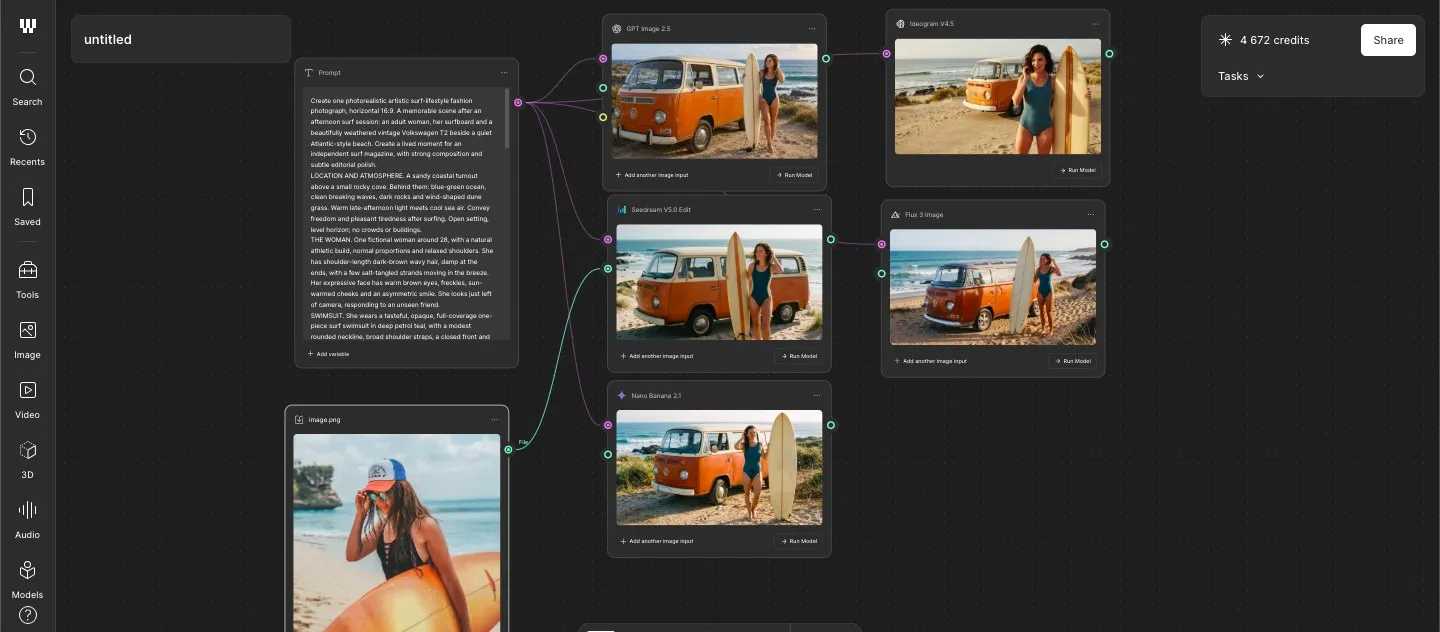
An important nuance that surprises many: the same model with the same prompt gives different results in different aggregators and in its native chat. The services compete and mix in their own prompt “enhancers” and presets. So “GPT in Higgsfield” and “GPT in ChatGPT” are not the same thing, and the best service has to be chosen for the task.
The services are moving further into automation. Krea, for example, has launched Ad Studio: an agent studies an online shop on its own — range, colours, fonts — and prepares ads and social media posts. The bet is clear: most people won’t bother learning about models; they want one button. Higgsfield grew on this same laziness: in September 2026 the company announced an annual revenue run rate of $1 billion. That isn’t a billion actually earned over a year, just recent months’ revenue annualised, but year-on-year growth is still roughly twentyfold.
The plans Artyom compared on 2 November 2026, with monthly billing, excluding taxes:
| Service | Plan | Price | What you get |
|---|---|---|---|
| Higgsfield | Plus | $59/mo | 1,200 credits, photos, video and effects, temporary “unlimited windows” |
| Magnific | Premium+ | $45/mo | 45,000 credits, generation and upscaling, unlimited on certain models |
| Artlist | AI Core | $39.99/mo | 40,000 credits, photos, video, voice and music, commercial licence |
| Weavy (Figma Weave) | Professional | $45/mo | 4,000 credits, workflows and language models, credit rollover for up to 3 months |
Annual billing is cheaper: Artlist AI Core, for example, costs $23.99 a month. Credits differ between services, so you can’t compare them directly.
Treat the word “unlimited” with caution. Over the summer Artlist sold an annual plan for about $500 with unlimited Seedance 2.5, the most expensive video model. Artyom bought it and generated hundreds of clips in a couple of days. About a week later, unlimited use was removed from all plans and replaced with credits. ChatGPT has no official unlimited image allowance either: on Plus at $20, according to user reports, it’s about 40–50 images per three hours, and OpenAI doesn’t publish its own figure. In practice it’s hard to hit, especially if you ask for a batch of variants at once.
What generation costs: images are cheap, video is expensive
In Weavy, running one prompt through five models cost Artyom about 50 credits. One Seedance 2.5 clip in the same place is about 1,350, so a 4,000-credit pack is enough for roughly three videos. Thirty seconds at 720p with sound costs roughly $4 to $9 across different services. Kling 4.0, always considered cheap, costs about $3.4 per 30 seconds at 720p from resellers and $5–7 at 1080p; Kling has no official price yet.
Artyom is sure it will get more expensive, and on the whole that seems plausible: launch promotions and unlimited plans are ending one after another. But we didn’t confirm his figure of “Seedance 2.5 got 10 times more expensive”: according to service price lists for November, a second of 2.5 costs 1.1–2 times as much as in version 2.0.
A good clip rarely comes out first time; it usually takes two to five generations. Hence two rules. First, look at a draft: Seedance 2.5 has a Draft mode, a 480p preview costs roughly four to five times less than the final, and the take you like is then rendered in high resolution. And set your budget in advance. Generation works like a slot machine: you press, you wait, it comes out beautiful — but what if the next one is even better? Artyom calls it gambling addiction and advises stopping when the result does the job.
Two video cases
A developer’s ad on Seedance 2.5. A developer from Dubai, the project still just a hole in the ground, with nothing to start from but drawn 3D renders. They were made photorealistic, and characters were placed in the location. The result is a 30-second clip; the room agreed it’s the kind people watch to the end.
An AI channel with a Korean chef. Artyom and his wife invented a non-existent Korean man who cooks in his kitchen; the clips are made in Seedance. According to Artyom, the channel gained 82 thousand subscribers in three months, and views range from 150 thousand to 5 million. The most interesting part is the audience. It’s mostly women watching, and what hooks them isn’t the cooking but the image of a K-drama hero. Most of the views are from the USA, Italy, France and Spain. Under a post with a thousand comments, Artyom says, two or three people notice it’s AI, and small slip-ups like fish laid in the wrong layer go unnoticed by almost everyone. We can’t verify these figures independently. For now they’re looking to monetise it through native advertising and platforms that connect bloggers with foreign advertisers.
The risks for a channel like this are very real. Since 31 August 2026, Instagram has asked profiles with an AI character to add an “AI-generated profile” label. Those who don’t lose recommendations in Reels and Explore for non-followers — that is, almost all their reach. The rest is the room’s experience, not platform rules. Artyom says he posts from his own phone without any warming up and hasn’t been penalised so far. Others told of blocked channels they had fought support over for up to a year, and advised warming up new accounts and keeping a backup channel from the start.
Tips you can use today
- Run one prompt through two or three models in parallel rather than spinning one model endlessly. Weavy or any aggregator does this in one click.
- Write “make 10 variants, each separately”. ChatGPT will return a gallery in a single request.
- Describe someone else’s image. Give an image you like to ChatGPT and ask it to break down the scene, light and lens — you get the basis of a prompt.
- Someone else’s ready-made prompt is a basis too. Give ChatGPT a prompt from a presentation or a post and ask it to adapt it to your task.
- Describe the font in the prompt, otherwise the banner will come out with a default one. The exact price and button are more reliably overlaid in an editor.
- Clean up noise with a reference. A GPT image given to Seedream as a sample loses its grain.
- For people and clothing — Seedream and three references: a photo of the pose, a sketch of the pose and past shoots of your model.
- For video — a low-resolution draft first, then the final.
- Compare a model across several services. It draws differently in different aggregators.
FAQ
Which AI is best at writing Russian text in an image? In the test, all five wrote Cyrillic. The best advertising banner came from GPT Image 2.5: the text is readable and the colours are the brightest. Ideogram 4.5 made mistakes in a word and in the currency sign. You should still check the lettering letter by letter.
Which AI gives the most realistic photos of people? Seedream 5, but only with references. From text alone its skin comes out “plastic”, but with a photo of the pose and past shoots of a real model it looks like a real photo shoot.
Can you generate images in ChatGPT without limits? There’s no official unlimited allowance. On the Plus plan at $20, according to user reports, it’s about 40–50 images per three hours; OpenAI doesn’t publish an exact figure.
Why does the same model draw differently in different services? Aggregators add their own “enhancers” and presets to the prompt. So GPT Image in Higgsfield and in ChatGPT will produce different images from the same prompt.
How much does it cost to generate a video? 30 seconds in Seedance 2.5 at 720p with sound costs roughly $4–9 depending on the service. A good clip usually takes two to five attempts, so multiply accordingly.
What follows from all this
There is no universal best model, and that’s the main conclusion of the evening. GPT Image follows the prompt best and gives the most eye-catching colours in a feed, but with grain you’ll have to clean up. Seedream is plastic out of the box, but with a reference it becomes the most precise tool for realism. Nano Banana is clean but likes to overload the scene. Ideogram and FLUX lost in this test, although in certain details, such as Ideogram’s natural fabric, they were stronger than the leaders.
The working chain Artyom ended his talk with looks like this. First, understand who will see the image and where. Then describe the scene concretely, in ten points. Then run the prompt through several models and choose the best for the task. And only then refine — with a reference, a clarified prompt or a targeted edit, not endless regeneration. Every image goes through the six-point check before publishing, with text and price checked separately.
The full recording of the talk, with corrections on screen, is in the meetup announcement (in Russian). Artyom runs a Telegram channel (in Russian) and Instagram. Bring questions about images you have generated to the IT Party chat (in Russian) — we’ll go through them on a live example.