Spotify plays on the Yandex Station Lite. The speaker shows up in the Spotify Connect device list on the phone, the music comes out of its speaker, and Alice calmly answers over the song without going silent. “Alice, play Spotify” works too. It runs on Spotify’s official client, Soloist, which was never meant for this speaker in terms of either libraries or sound. To get it going, we had to build it a tiny Debian in a separate folder and get past three obstacles, each of which at first looked like something else.
A word on status first. Autostart is done and tested across two reboots: the speaker reconnects to the home Wi-Fi by itself, and Spotify comes up hands-free. Not instantly, though. It takes a few minutes after power-on, because the first sign-in to the account usually fails and a supervisor script retries it on its own. One commitment remains: swapping the client itself every 90 days.
Why Spotify on a Yandex Station that already has Yandex Music
This is the second episode in the story of a single speaker. The Yandex Station is Yandex’s smart speaker with its voice assistant Alice (Alisa in Russian); it is sold mainly in Russia and the CIS, and the Station Lite is its compact entry-level model. In the first part we got root on a first-generation Station Lite and taught it to answer the phrase “Alice, ask the neural network” using the brain of our AI agent, Mia. It all wrapped up around one in the morning, and it seemed the laptop could finally be closed.
It couldn’t. Now that the speaker was ours, we wanted it to play more than Yandex Music. What we needed was Spotify Connect: you open Spotify on your phone, pick the speaker from the device list, and the music plays from it while the phone works as a remote. The Station doesn’t support Spotify Connect out of the box, and it isn’t supposed to.
Same patient as before: the Yandex Station Lite, model YNDX-00025, with a Cortex-A53 processor, 244 MB of RAM and Linux on kernel 4.9 inside. The kernel is 64-bit, but all the programs are 32-bit, and the system glibc library is version 2.30. These numbers will come up again and again, because everything that followed came down to them.
First attempt: librespot, which skips through tracks
The community has long solved this with librespot, an open-source implementation of Spotify Connect. There is a ready-made installer for the Station Lite and Mini, and that’s where we started.
At first the installer refused to work: our firmware has no /usr/local/bin directory, where it puts its command. We created the directory, and from there everything went smoothly. The speaker appeared in Spotify, the app could select it, and then things got strange: tracks skipped one after another, and not a single one played. For every song, the log repeated the same line: Unable to load key. The decryption key couldn’t be obtained, track skipped.
It never even got as far as the speaker, its loudspeaker or the sound: without a decryption key, a track won’t play. The cause turned out not to be on our side. On 7 November 2026, a librespot developer wrote in issue #1649 that playback is broken for accounts created after a certain date, roughly in 2024–2025. According to him, the problem affects every version of librespot and there is no workaround, because the official clients get their keys through a different, protected scheme.
Our account seems to be one of those. We removed librespot from the speaker entirely, along with the directory we had created for the installer.
Soloist: the official client that won’t run here
Since August 2026, Spotify has had its own answer to this problem. Spotify Soloist is an official “headless” Spotify Connect client for Linux: no screen and no interface, just a device in the app’s list. To run it you need an API key, which is issued on a Premium account. Builds have a limited lifespan: ours reported at start-up that it expires in 88 days. Once a quarter, the program will have to be replaced with a fresh one.
There is also a build for 32-bit ARM, which is to say for our processor. We downloaded it from Spotify’s official server, and it turned out it wouldn’t run on the speaker as is. Two things stood in the way.
The first was the system library. Soloist is built against glibc 2.38, and the speaker has 2.30. It’s like an app that needs a recent version of Android: on an old one, it simply won’t open.
The second was sound. On Linux, Soloist only outputs sound through the PulseAudio or PipeWire sound servers. The speaker has neither, just bare ALSA, the lowest layer of sound in Linux, which is what Alice speaks through.
Updating the speaker’s system is impossible, and unnecessary anyway: Yandex’s firmware holds everything else together, including Alice and Mia’s bridge. So we decided to set up a separate mini-world next to it.
Our own Debian in a separate folder
The idea is simple, though on 244 MB of memory it looks bold. We take a fresh glibc 2.41, PulseAudio 17 and everything they need from Debian 13 (trixie) for 32-bit ARM, and put it all in a separate folder on the speaker. Soloist isn’t launched directly but through the loader from that folder, which we point to our libraries.
We could have taken the shortcut and set the path to the new libraries in the LD_LIBRARY_PATH variable for system services. But then Yandex’s programs, built against the old glibc, would have picked them up too, and the speaker would most likely have stopped working altogether. So we didn’t replace the firmware’s system library: the new libraries live separately and are used only by Soloist and PulseAudio.
We built it on the laptop. We downloaded 129 Debian packages and checked each one against the checksum from the official index. Going by the dependency lists, we picked exactly 38 libraries, without locales, documentation or other dead weight. The kit came to 41 MB, with 57 free on the partition. Tight, but it fit.
Under its own loader, Soloist responded with version 1.3.10, PulseAudio with version 17.0. First step done. Then came obstacles we didn’t expect.
Wall one: sound that won’t open
PulseAudio from Debian was supposed to output sound to the speaker’s ALSA by itself. Instead, it crashed on its very first call to the sound card with the error SNDRV_PCM_IOCTL_SYNC_PTR failed (-25).
The answer lay in the kernel’s age. Recent 32-bit Debian builds have switched to 64-bit time. This is protection against the “year 2038 problem”, when a 32-bit seconds counter overflows. Our sound library from Debian asked the kernel to do the same thing using a new variant of the command, with 64-bit time, and kernel 4.9 doesn’t know that variant and answers “I don’t understand”. The kernel can’t be updated: it’s part of the firmware.
We found a way around it. PulseAudio no longer talks to the sound card itself; instead it writes the finished sound into a named pipe (FIFO), something like a tube between programs. At the other end, the speaker’s own player, aplay, reads the pipe using the old system library, which gets along with the kernel perfectly well. That way both sources of sound, the music and Alice, end up in the same dmix mixer. Later we confirmed that Alice can be heard over the music. But that was still a long way off, and the first version of this setup ended with the sound freezing for everyone.
Wall two: the speaker was shouting into the wrong network
Next we needed a Soloist key. I issued one on Spotify’s developer site and put it in a file, from which the key went to the speaker with root-only permissions. Soloist started and reported that it had announced itself on the network. The phone didn’t see the speaker.
Spotify Connect devices find each other via mDNS: someone asks “who here can play?”, and devices answer. A check from the laptop showed that Soloist responded to one type of address query, but there was no answer to the ordinary multicast question on the home network. It turned out the Station has a service Wi-Fi Direct interface, p2p0, with a link-local address of the form 169.254.x.x. That was the first address Soloist saw in its list, and that seems to be why its answers weren’t reaching the home network.
We removed the address from p2p0, restarted Soloist, and the phone knocked on the speaker’s door straight away. This is a temporary measure: after a reboot, the address comes back. A permanent solution is still to be chosen, because we haven’t yet worked out what Yandex itself needs this interface for.
Wall three: the speaker is visible, but you can’t connect
The speaker appeared in Spotify on the phone. And then nothing: the phone tried to connect and couldn’t. Soloist’s built-in web server, through which the phone hands over the session, was accepting connections into a queue and not processing a single one. Meanwhile the program’s main thread was constantly busy and burning CPU, and only in kernel mode, as if it were endlessly asking the system for something and getting no reply.
The system log gave us the hint: on every iteration, the kernel complained that the SoloistRunner M thread was using a “deprecated CP15 barrier instruction”. We disassembled the machine code at that address and found a loop that tries to atomically change a single byte. On ARM processors this is done with a pair of instructions: the first puts an invisible “I’m reading this” mark on a memory location, and the second writes the new value only if the mark is still there. Between them, Soloist’s code has a memory barrier written the old way, in the style of 32-bit ARMv7 processors.
In the speaker’s original configuration, the kernel didn’t hand such a barrier to the processor but intercepted it and executed it itself. It looks like this interception is what clears the mark: you get a vicious circle where the program sets the mark, the barrier wipes it, the write is refused, and the program starts over. Forever.
We tested this by switching modes: echo 2 > /proc/sys/abi/cp15_barrier. This line tells the kernel to stop intercepting old barriers and let the processor execute them itself, which the Cortex-A53 can do. After restarting Soloist, the main thread finally went to sleep waiting, as it should, and the speaker’s web server began answering requests in 40–130 milliseconds. The setting only lasts until a reboot, so it is one of the first things in the autostart script.
An important caveat: the hang went away and the responses appeared, and that we saw with our own eyes. The mechanism with the cleared mark, however, remains our hypothesis, and that is exactly how we described it when we reported the finding to Spotify.
Finding something like this from the symptom “the speaker is visible but won’t connect” is almost impossible. It’s one of those cases where the obvious suspects (the network, the key, Spotify) have nothing to do with it.
After the third wall, the line we had been after all along appeared in the Soloist log: the phone logged in, the key was received, and “La clé des champs” by NTO was playing. The Spotify side worked. The official client got the decryption key without any fuss, the very key librespot never received on this account.
And yet nothing at all could be heard from the speaker.
How we left the speaker without a voice
Here the story gets to the unpleasant part, but without it the account wouldn’t be honest.
The first sound setup was the simplest one: aplay reads the pipe from PulseAudio all the time, whether there’s music or not. First it was killed by closing the debug session: when launched from the command line, the process died along with it. Then it turned out that sound wasn’t working for anyone anymore. The sound card’s shared output had frozen in the “prepared but not started” state, and Alice went silent along with the music. We couldn’t get the sound back without a reboot.
The reboot brought the sound back and immediately took away the home Wi-Fi. At boot, Yandex rewrites the network configuration from its own database, and the home network we had added by hand wasn’t in that database. The home network vanished from the list completely, but the hotspot from the laptop, through which the speaker had once got root, was still there. Without internet, Alice kept saying “no internet connection”. We found the speaker by turning on that very hotspot, and pinned the home network with a separate little script: once a minute it checks the list of networks and, if the home one isn’t there, puts it back. After a reboot this takes about a minute and a half, and all that time Alice honestly says there’s no internet.
To be honest, we still don’t fully know why the sound froze. The first explanation, “our aplay became the master of the mixer and died, leaving it without an owner”, didn’t hold up: according to the sound library’s source code, there is no such mode on this kernel. The working hypothesis, which we arrived at together with a second opinion from Codex, is this: the process died in the middle of recovering from a failure, right between “prepare” and “start”, and the shared output stayed prepared. That’s a hypothesis, not proof.
Since the cause hasn’t been established, from then on we erred on the side of caution: an outside process must not hold the shared sound output longer than necessary, and must not die mid-sentence.
A gatekeeper that lets sound through only while music plays
The new setup rests on a small gatekeeper script. It reads the Soloist log. As soon as “playing” appears there, the gatekeeper starts aplay. When “pause” comes through, or the phone switches to another device, the gatekeeper waits five seconds and politely stops the player with a signal after which it closes the sound card itself. No force-killing the process.
We tested it by the book, with stop criteria written down in advance: if Alice goes silent or the sound output stops moving, first we capture diagnostics, then we rescue the speaker. I listened. First, a second of silence through the system aplay: the output started and closed cleanly. Then quiet music with Alice over it: both could be heard. Pause: the player stopped, the output closed, Alice spoke on her own. Play again: the music came back. Over the whole test, the sound didn’t freeze once.
Along the way another trap popped up. Soloist caches music, and in five minutes of listening the cache grew to 15 MB. The partition it lived on had 13.8 MB left, and that’s also where Yandex’s data, the Wi-Fi settings and Mia’s bridge live. A little more, and the speaker would have hit a full disk in the most awkward possible place. We moved the cache into RAM with a hard limit of 12 MB and separately checked what happens when those run out too. The test took about ten minutes: the cache filled almost to the brim, after that two tracks changed, and not a single error appeared in the log.
How much memory Spotify takes on the Yandex Station Lite
Measurements during playback: Soloist takes about 50 MB of memory, PulseAudio 3.5 MB, aplay 1.7 MB. The system still has 68–70 MB of the 244 available, and about 60 MB once the RAM cache filled up. The threshold below which we agreed to shut everything down was 40. Soloist puts about 4% load on the processor. Mia’s bridge responded normally the whole time.
For a speaker that was designed to run Alice alone, the headroom in a short test stayed above our threshold. How it will behave over several hours of music, we don’t know yet: there has been no long test.
Autostart: the speaker brings up Spotify by itself
The last step was making sure everything comes back without the laptop after the speaker is unplugged. A supervisor script, in order, waits for the network, removes the address from p2p0, switches the barrier mode, sets up the cache in RAM, then the sound, Soloist and the gatekeeper. If the client crashes, the supervisor brings it back up; if the build has expired, it leaves it alone, since restarting it endlessly would be pointless.
We tested it with two reboots. The speaker reconnected to the home Wi-Fi by itself, Spotify appeared in the device list, and Mia’s bridge and the update block were unaffected.
One honest detail: the first sign-in to the Spotify account after boot usually doesn’t go through. The first time, the reason was clear: the speaker’s clock was still set to 1970, and with a time like that, certificates can’t be verified. The second time, the network, the clock and DNS were all fine, yet the sign-in still failed, and we don’t know why. The supervisor catches this itself and retries, so on the second reboot Spotify was ready about three or four minutes after power-on. We later sped up the retry; what came of that is below, in the section about the installer.
By voice: “Alice, play Spotify”
A phone as a remote is nice, but a speaker with Alice that you can’t ask by voice feels unfinished. Now you can. Three phrases (spoken in Russian, since that’s Alice’s language on this speaker): “Alice, play Spotify” resumes whatever was playing last, “Alice, pause Spotify” pauses, and “Alice, next track on Spotify” skips the song. Without the word “Spotify”, everything still goes to Yandex as before: “Alice, pause” will stop Yandex Music, not Spotify.
This is built on the bridge from the first part. A rule in Quasar Bridge looks for “spotif” in the recognised phrase (the Russian spelling, written in Cyrillic, as the recogniser outputs it) and hands it not to Yandex but to the voice version of Mia, who briefly confirms out loud. At the same time, a small watcher on the speaker sees in the bridge’s log that the request went to Mia, and gives Soloist the command: play, pause or next. The phrase log lives only in the speaker’s RAM, and the watcher itself doesn’t write the text of the phrases anywhere.
Why such a roundabout way rather than going directly through the agent’s tools: our agent on the server runs tools on its own side and doesn’t pass the call back to the speaker. It can’t reach Soloist, but a watcher on the speaker itself can.
Tested by voice. There is one limitation, but a noticeable one: you can’t ask for a specific artist or song. Soloist has no search; for that you need Spotify’s separate Web API. Whether voice control survives a reboot wasn’t tested separately; the watcher starts together with Soloist, so it should.
Volume: the music follows Alice
Soloist has its own volume, 40 out of 100 by default, so music starts at half volume. And the buttons on the speaker and “Alice, louder” don’t reach it. Alice keeps her level on a scale from 0 to 20 in a separate file and applies it only to her own player, without touching the overall volume control. Soloist simply never finds out that the volume changed: Alice’s voice gets quieter or louder, and the music plays as it was.
That’s why the kit includes a small sync script. Once a second, it reads Alice’s level and passes it to Soloist, converting the scale: 15 out of 20 for Alice becomes 75 out of 100 for Spotify. Alice’s mute silences the music too. Soloist starts straight away at Alice’s volume, not at its own 40. The volume slider in the Spotify app works as well, but only until the next change of Alice’s volume, by button or by voice. Anyone who doesn’t need the sync can turn it off with one line in the settings file.
Verified with three tests, each of which fails without this script, and on the speaker itself: Soloist started at 75 with Alice at 15, after a reboot the service came up on its own, and the speaker’s log shows Alice at 17 turning into 85 on Spotify. I checked the buttons and voice myself: the music changes along with Alice.
The installer: so this can be repeated
Everything described above was done by hand, command by command. It worked, but it couldn’t be repeated from a description: a second opinion from Codex flatly called such a recipe non-reproducible, and found defects in the scripts while it was at it. So we turned the manual work into an installer.
It has two parts. The first is a builder that runs on a computer: a single Python command with no third-party dependencies, which works on Windows, Linux and macOS, with no Docker needed. It downloads the Debian 13 index, works out the dependencies itself, downloads about 130 packages and checks each against its checksum, picks out the 36 libraries it needs and fetches Soloist from Spotify’s server. The 39.6 MB kit builds in about a minute. If a library is missing, the builder stops with an error rather than quietly building a broken kit. Soloist itself isn’t included in the installer: Spotify explicitly forbids distributing its archives and binaries, so the builder downloads it for each user separately.
The second part installs the kit on the speaker over ADB, also with a single command. Space on the speaker is razor-thin, about 28 MB free for a 40 MB kit, so unchanged files aren’t copied again but linked with hard links. If something goes wrong after the old version has been stopped, the installer puts everything back as it was. And if it can’t put it back, it says so instead of reporting success. On our speaker, 39 of 51 files matched byte for byte, and only 12 had to be copied, just 208 KB. After a reboot, Spotify signed in to the account on the first try, about two minutes after power-on. So far that’s one reboot.
Along the way we fixed bugs in the speaker scripts that simply hadn’t surfaced during the manual work. If the RAM cache fails to mount, Soloist now won’t start: otherwise at least 100 MB of cache would go into the speaker’s shared RAM, of which there’s only 244 MB in total. It also won’t start without PulseAudio. Only the 169.254.x.x link-local address is removed from p2p0, not just any address. The CP15 barrier mode works on a “closed by default” basis: if it can’t be switched on, we don’t start, so as not to get stuck in an endless loop, and on stop the original value is restored. A phrase with the word “Spotify” but no clear command no longer starts the music. Lines of Soloist output that contain the key don’t make it into the log. The speaker name, interfaces and cache size have been moved into the settings file.
We tested it in a way that makes the tests worth trusting. The speaker scripts went through 29 tests under busybox, the same stripped-down shell the speaker runs, and the builder through another 17. Then we rolled back each of the 20 fixes in turn and watched whether its test went red. It went red every time, which means the tests catch exactly these bugs rather than just turning green. One of Codex’s findings, about “zombie” aplay processes, couldn’t be reproduced, so it wasn’t counted among the fixes. The tests also caught five bugs made by Claude itself, which wrote the scripts: for example, the voice watcher didn’t stop together with the service.
But three things were found only by the live speaker; they were invisible in tests with stubs. Under Windows, adb returns line endings as \r\r\n, and parsing the response broke. adb on the speaker silently drops any command longer than about 4 KB. And a background process started via adb was dying: the session closed before the process had time to detach. A two-second pause fixed it.
The installer itself is in the open repository yandex-station-lite-spotify under the MIT licence. It contains the kit builder, installation over ADB with rollback, the speaker scripts along with volume sync and voice commands, tests, and a README in Russian with a short paragraph in English. Neither Soloist nor the key is in there: the builder downloads the client from Spotify’s server for each user.
From the same repository, a diagram of what ends up running on the speaker:
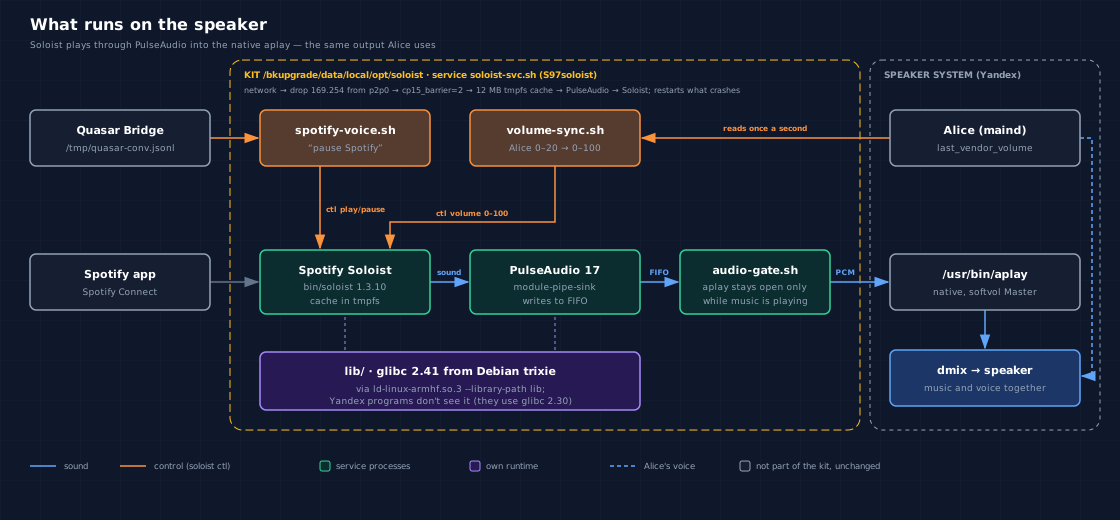
We also offered the installer-based recipe to the community wiki hackalice.me: a PR in the yandex-station-extended repository (in Russian) is awaiting the maintainers’ decision. After the fresh install we checked both the sound by ear and the voice commands, and everything works. On a clean speaker, however, the installation has only been verified by tests: ours wouldn’t have had room for a second full copy.
While we were at it: Yandex telemetry
A friend asked a simple question: does the speaker send anything to Yandex? We checked without changing anything, taking 40 snapshots of network connections over 80 seconds. The speaker talks to clck.yandex.net, where logs and product events go, and to report.appmetrica.yandex.net, which is the AppMetrica analytics service. Plus Alice’s own permanent channel, uniproxy.alice.yandex.net, which in our setup is held by the bridge. Spotify talks only to Google Cloud. This is the firmware’s standard telemetry; root has no effect on it.
What exactly gets sent isn’t visible on our speaker: it’s all encrypted. But the community wiki has a detailed analysis of the telemetry (in Russian), captured on a Station Midi. According to it, every AppMetrica report contains the device’s serial number, model, firmware version and the full kernel version string.
We shut it off using a method from the same wiki. The exact names of the metrics servers are pointed at the speaker itself via the /etc/hosts file. The speaker checks that file before its own DNS, so Yandex’s programs end up talking to themselves at these addresses. Seven names are blocked: clck.yandex.net, report.appmetrica.yandex.net, startup.mobile.yandex.net, startup.appmetrica.yandex.net and their variants on yango.com. Unlike the script from the wiki, the entries are written for IPv6 too, and on our speaker the telemetry was going over exactly that. The system partition is opened for writing only for the duration of the edit, a copy of the original file is kept, and rolling back takes one command. Alice’s channel, sync, settings updates, Spotify and the bridge were left untouched.
Before the block, nine connections to telemetry servers piled up in 80 seconds; after it, not a single one in three minutes. The telemetry processes themselves didn’t crash and keep running, they just can’t send anything. The queue of unsent data is capped: about a megabyte on disk, with the rest held in memory. Ten minutes after the block, 168 KB had accumulated in memory, and the telemetry processes never restarted once. Alice and Spotify keep their connections, and this was checked by voice too: Alice answers, “ask the neural network” goes to Mia through the bridge, and Spotify plays.
One caveat. Voice recordings are a separate channel, controlled by the “Help Alice get better” setting in Yandex ID, and blocking via /etc/hosts doesn’t affect them.
What isn’t ready yet
Voice search. “Play Zemfira on Spotify” (Zemfira being a well-known Russian rock singer) won’t work: the speaker can only resume, pause and skip a track.
The Soloist build expires around 4 February 2027. After that, every 90 days, a new version from Spotify’s official server. That’s the only thing left to do by hand.
Long-running operation is also an open question: the longest test lasted about ten minutes of music. What happens after three hours, we haven’t checked.
Being honest about the limits
- This is one experiment on one speaker. Everything described was tested on our Station Lite 1 with the
ntp8910aamplifier. Community recipes for the same model mention a different amplifier,tas5825m, which means hardware revisions differ. We haven’t checked how well our solution carries over. - You need root. The whole story rests on the administrator rights from the first part, and that means tampering with the firmware: the speaker may stop working, and what that means for the warranty and recovery is something to check separately.
- The ready-made Soloist file can’t be shared. This is Spotify’s ban, so there won’t be a “download and install” archive. The client comes only from Spotify’s official developer page, and the key is your own, on your own Premium account.
- The API key is needed on every launch, and Spotify explicitly asks you to treat it like a password. Naturally, it isn’t in this article. But on the speaker it’s visible in the process list: Soloist 1.3.10 has no other way to pass it. There are no other users on the speaker, so we accepted this.
- Maintenance once a quarter. This isn’t set-and-forget, but a subscription to a small job every three months.
Pitfalls: the short version for fellow tinkerers
The installer takes care of most of the manual work, but on a clean speaker it has only been verified by tests, so this is still not a “do this and it will work” guide. Here’s what ate up the most time in our experiment; start with these spots.
- If you see
Unable to load keyand tracks skipping in librespot, that’s a known problem with the project, not your installation. On our account it blocked playback completely, and the developer offers no workaround. Test librespot before installing anything seriously. - Soloist requires glibc 2.38 and PulseAudio or PipeWire. The Station Lite has only glibc 2.30 and ALSA, so you need your own set of libraries in a separate folder and to launch through your own loader with
--library-path. Don’t set the path to them for system services: Yandex’s programs are built against the old library. - The sound library from a recent Debian couldn’t open the sound card on kernel 4.9:
SYNC_PTRreturns ENOTTY. What worked for us was output from PulseAudio into a FIFO, which the speaker’s nativeaplayplays. - If the speaker is visible but the phone won’t connect, and the main thread is hogging the CPU, look in
dmesgfor “CP15 Barrier”. For us,echo 2 > /proc/sys/abi/cp15_barriercured the hang; the setting lasts until a reboot. - If the phone can’t see the speaker, check whether there’s an IPv4 address on
p2p0. Once we removed it, discovery started working. - Don’t keep
aplayopen all the time, and don’t kill it withkill -9. We start it for the duration of playback and stop it with SIGINT. - Launch everything via
setsid nohup, otherwise processes will die along with the closed debug session. - Soloist’s cache grows fast: 15 MB in five minutes of music. Don’t keep it on the same partition as Yandex’s data; a 12 MB tmpfs was enough for us.
- Don’t reboot the speaker if the home network was added by hand and not pinned: at boot, Yandex will rewrite the list of networks from its own database.
- If voice commands go through an agent on Hermes, remember: it glues requests with the same first phrase into a single session with history. Our first test reply, “I can’t turn on Spotify”, got stuck to the phrase “play Spotify” and kept repeating until we deleted that session.
- The speaker’s buttons and “Alice, louder” change only Alice’s voice, not Spotify. Alice’s level (0–20) is stored in the file
/data/quasar/data/last_vendor_volume; pass it to Soloist with thesoloist ctl volumecommand, converted to the 0–100 scale. - If you shut off telemetry via
/etc/hosts, add the names for IPv6 (::1) as well, not just for127.0.0.1. On our speaker, telemetry went over IPv6. - If you install from Windows via
adb, keep three things in mind: line endings in the response come back as\r\r\n, a command longer than about 4 KB is silently lost, and a background process can die along with the closed session, so give it a couple of seconds to detach.
What’s next
We have reported both findings that sit in Soloist itself in Spotify’s official repository: the endless loop when the kernel intercepts old barriers, and answers going to the wrong network while p2p0 is up. They are issue #32 and issue #33. There, too, the mechanism of the first is described as suspected, not proven. No reply from Spotify yet.
Meanwhile, the speaker has stopped being a one-night experiment. You can unplug it, plug it back in, and a few minutes later say “Alice, play Spotify”: an ordinary home speaker that can do more than it’s supposed to. It listens to Alice, answers with Mia’s brain and plays Spotify.
If this kind of DIY tinkering with speakers and agents is your thing, come by our chat (it runs in Russian): we’ll tell you where the pitfalls are and show you how it sounds live.