
For a lot of people, the first encounter with AI agents follows the same script.
First comes delight: the agent reads files on its own, uses the browser, calls tools, writes code, remembers context, replies in Telegram or Discord and generally starts to look like a little Jarvis.
Then reality arrives: the limit runs out in half a day, the API bill has grown uncomfortably, Claude Code has suddenly become an “expensive employee”, and OpenClaw or Hermes seems to have replied with just a couple of lines, yet somewhere inside it burned through a mountain of tokens.
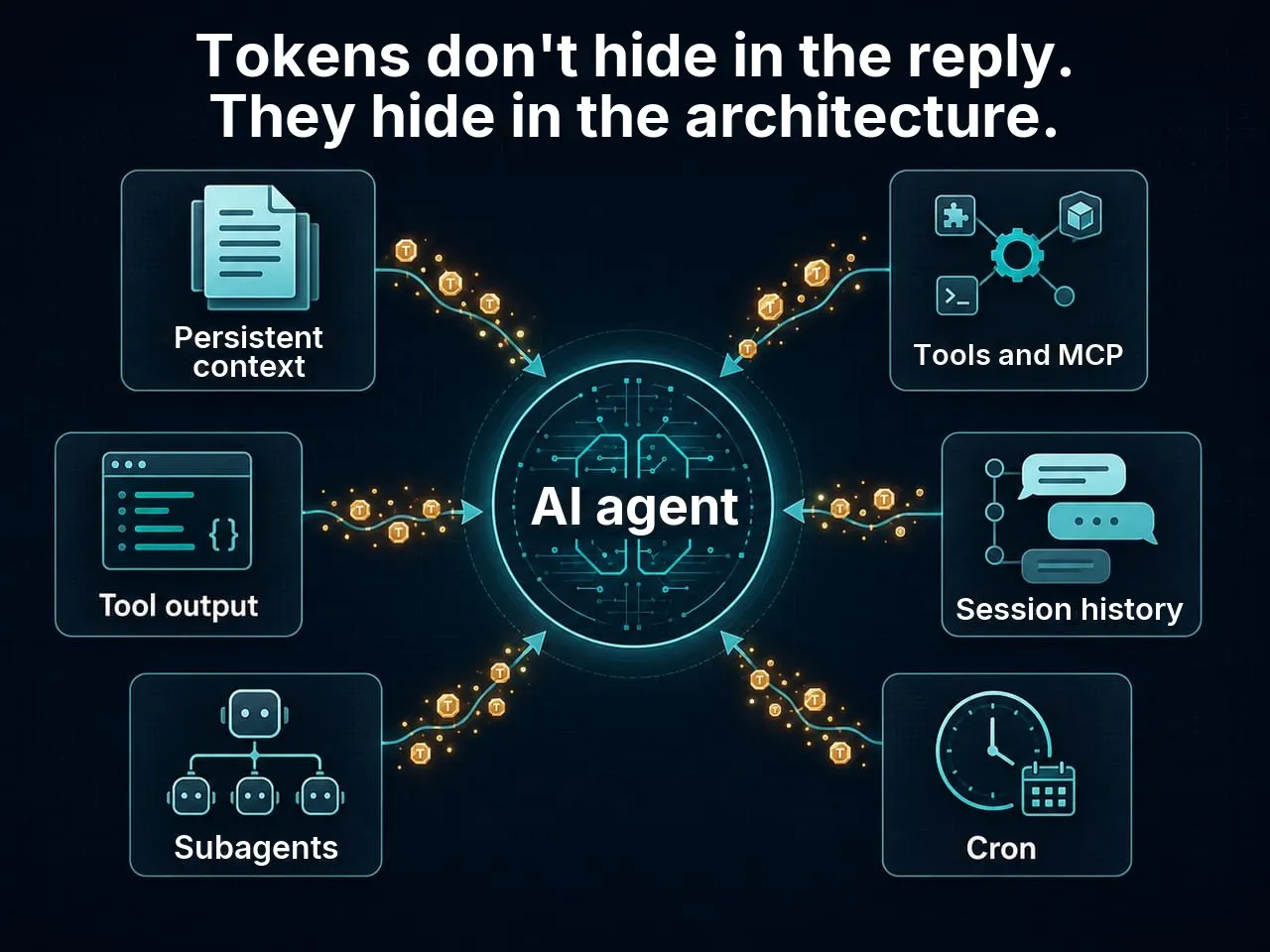
The spend usually builds up unnoticed:
- a long
AGENTS.md,CLAUDE.mdorSOUL.mdis loaded on every run; - the session history grows and is sent to the model again;
- dozens of tools and MCP servers bring their descriptions and JSON schemas with them;
- tool results come back into the context in full;
- cron wakes an expensive model for the sake of one line;
- reasoning, once switched on, generates thousands of invisible tokens;
- subagents get their own context windows;
- the browser, shell and search are launched “just in case”.
From the outside it looks like an ordinary short reply. Inside, it’s a small factory where the model thinks several times, calls tools, reads the results, thinks again and drags more and more context along with it.
This article isn’t about “ask it to answer more briefly”. That’s a weak optimisation.
It’s about something else: how to set up an agent so that it does the same work without hauling half your digital life along on every step.
TL;DR
In short:
- You pay not for a message but for the whole agent loop.
- The most expensive token is the one repeated on every step.
- Reasoning may be invisible, but it still takes up space and is usually billed as output.
- Tools don’t cost money only when they’re called: their descriptions, schemas and results also end up in the context.
- A big
SOUL.mdorCLAUDE.mdis a permanent tax. - Cron jobs shouldn’t wake a flagship model if the result is deterministic.
- The biggest savings start not with choosing a cheap model but with the question: “What does the model not need to see at all?”
First, the main thing: you’re not paying for a message
An ordinary chat works roughly like this:
user -> model -> replyAn agent works differently:
user
  -> model thinks
  -> calls a tool
  -> gets the result
  -> thinks again
  -> calls the next tool
  -> gets another result
  -> writes the reply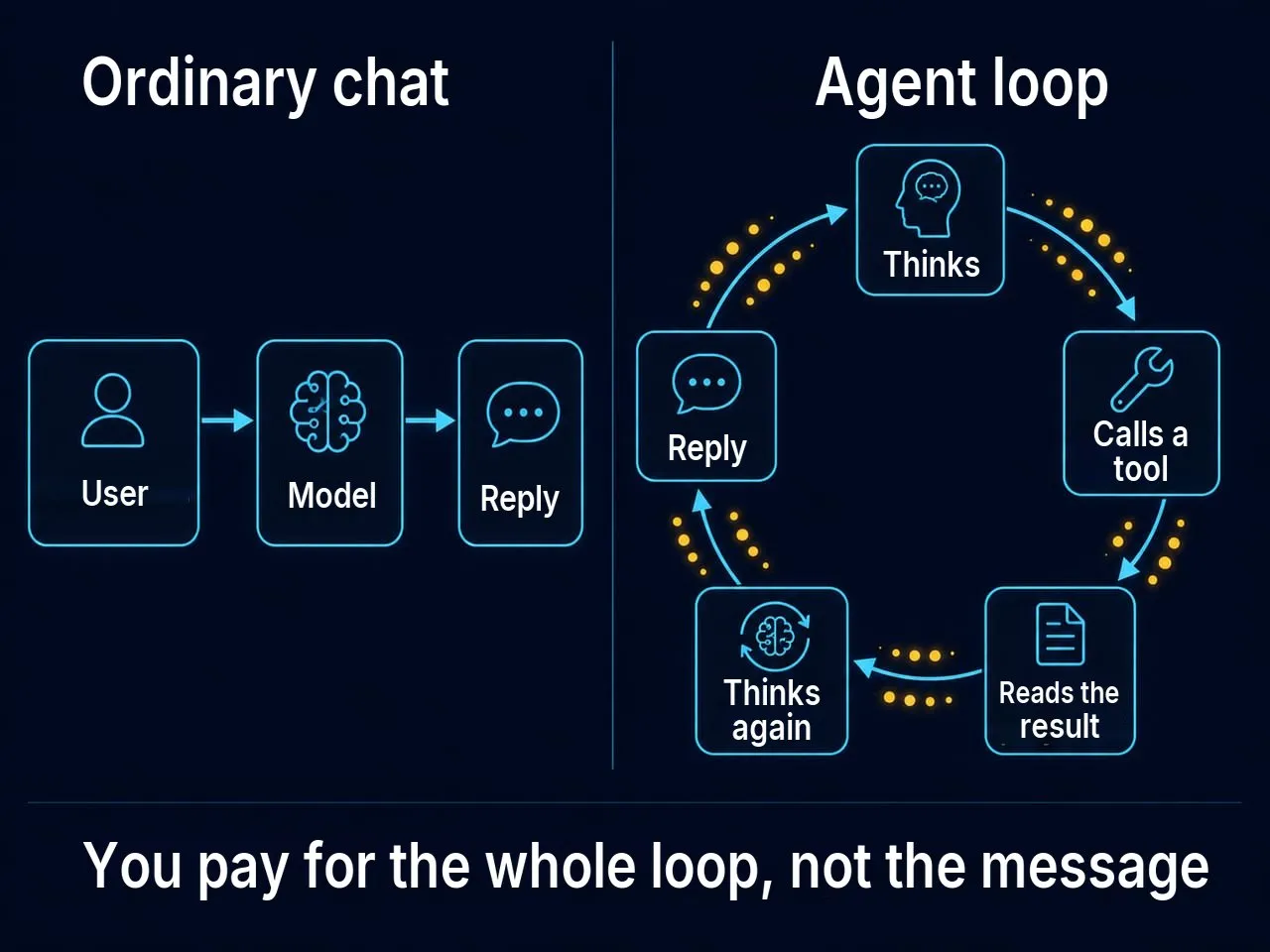
And that’s only the simple case.
In a real agent system, more gets piled on top: memory, system instructions, bootstrap files, the list of tools, the schema of every tool, the dialogue history, the results of earlier calls, attachments, logs and sometimes subagents.
The rough cost of one agent run can be pictured like this:
spend ~ persistent context
      + session history
      + input data
      + tool descriptions and schemas
      + tool results
      + visible reply
      + hidden reasoning
      × number of agent steps
The last multiplier is the nastiest one.
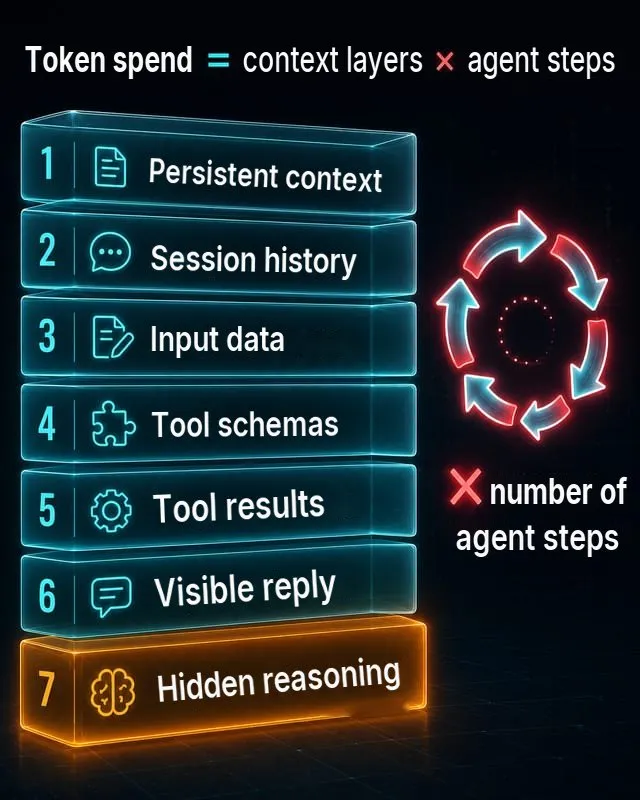
If you’ve added 10,000 tokens to the persistent instructions, that isn’t necessarily 10,000 tokens per task. If the agent took 8–10 steps, those 10,000 tokens may be processed over and over again. In practice, one “harmless” big file in the base context turns into a standing subscription fee for every action the agent takes.
OpenAI’s official documentation explicitly separates input, output, cached input and the cost of tools; built-in tools can also add charges for calls and for content that is fed to the model along with the request.
Invisible tokens: why a short reply can be expensive
The most deceptive part of agent economics is reasoning.
The user sees:
Done, I've updated the config.But inside, the model may have spent thousands of tokens on planning, weighing options, analysing errors and choosing the next action.
OpenAI’s documentation describes reasoning tokens as separate tokens the model uses for “thinking”; they aren’t visible through the API, but they take up space in the context window and are billed as output tokens. OpenAI also gives an example where 1,024 of 1,186 output tokens are reasoning tokens.
Anthropic has similar logic for extended thinking: thinking tokens are billed as output, and the visible token count in a response may not match the billed output; the documentation says plainly that you pay for the full thinking process, not just the visible summary.
The practical takeaway:
“The reply is short” doesn’t mean “the run is cheap”.
For simple tasks, reasoning should be low or off, if the platform allows it. For complex architecture, code, migration planning or risky actions it’s the other way round: reasoning can pay for itself. But turning thinking up to the maximum for greetings, reminders and forwarding notifications is like calling in a senior architect to sign a greetings card.
Where the tokens actually hide
1. Persistent context
This means AGENTS.md, CLAUDE.md, SOUL.md, USER.md, TOOLS.md, memory files, project instructions, policies, communication rules and everything the agent reads at start-up.
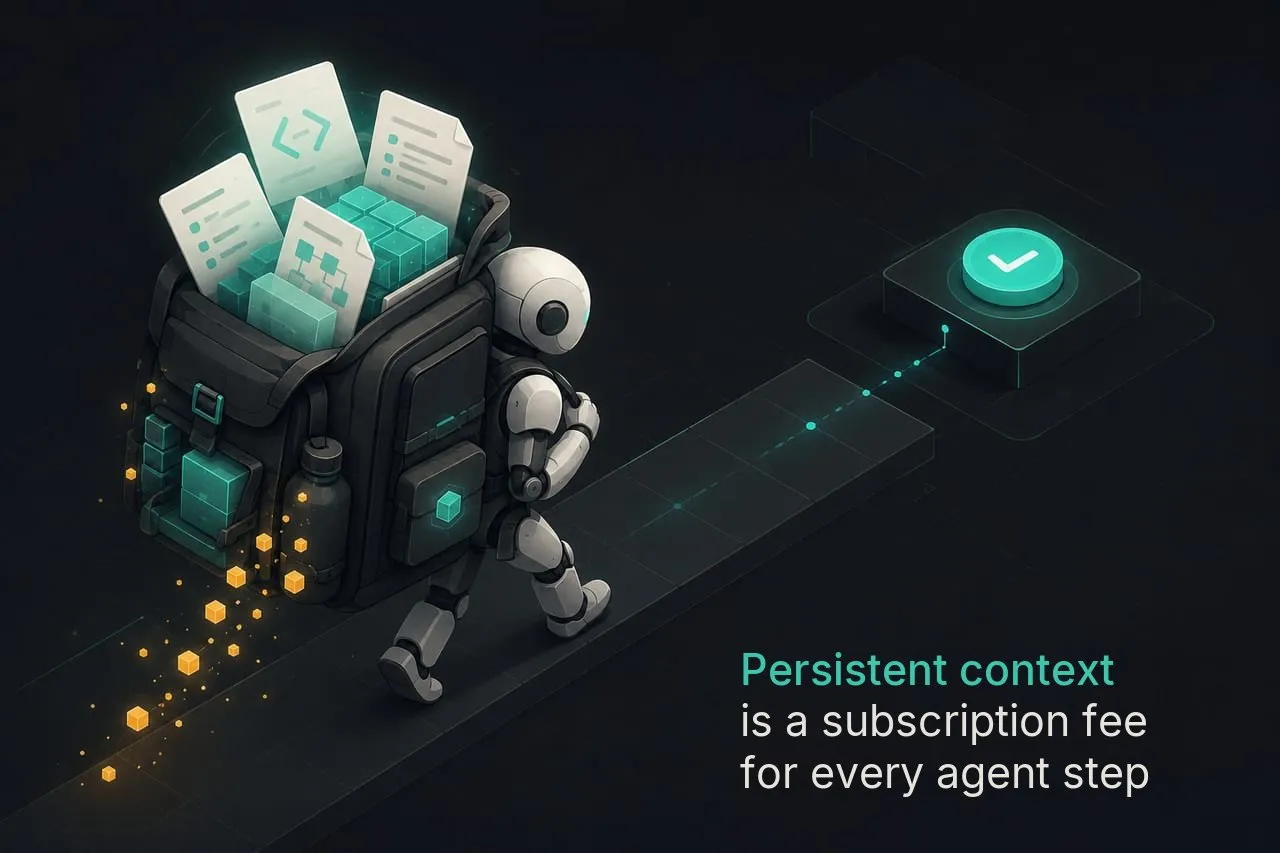
The problem isn’t that these files exist. The problem is that, over time, people start piling everything into them:
- the user’s biography;
- the project’s history;
- old decisions;
- communication style;
- every edge case;
- instructions for rare scenarios;
- examples;
- notes;
- prohibitions;
- exceptions to the prohibitions;
- exceptions to the exceptions.
A month later, the agent gets an encyclopaedia every time instead of a short instruction.
A good rule:
Persistent context should hold only
what's needed on almost every run.
Everything else should load on demand.
2. Tools and MCP servers
MCP is a standard for connecting AI applications to external systems: files, databases, calendars, search, specialised prompts and workflows. The official description calls MCP “a USB-C port for AI applications”.
Sounds wonderful. But every tool has a price.
For the model to be able to use a tool, it has to know:
- what the tool is;
- when to call it;
- what parameters it takes;
- what format of result it returns;
- what limits apply to the call.
In function calling this is often expressed through a JSON schema. OpenAI states plainly that function tools are defined by a schema, and that with a large number of functions or large schemas it makes sense to use tool search, so that rarely used tools load only when needed.
So the problem isn’t only the tool call itself. The problem is that you show the model an oversized menu in advance.
If a task only needs to read memory, there’s no need to hand it Gmail, Calendar, a browser, a shell, Notion, GitHub, Jira, Linear, Figma and three search engines all at once.
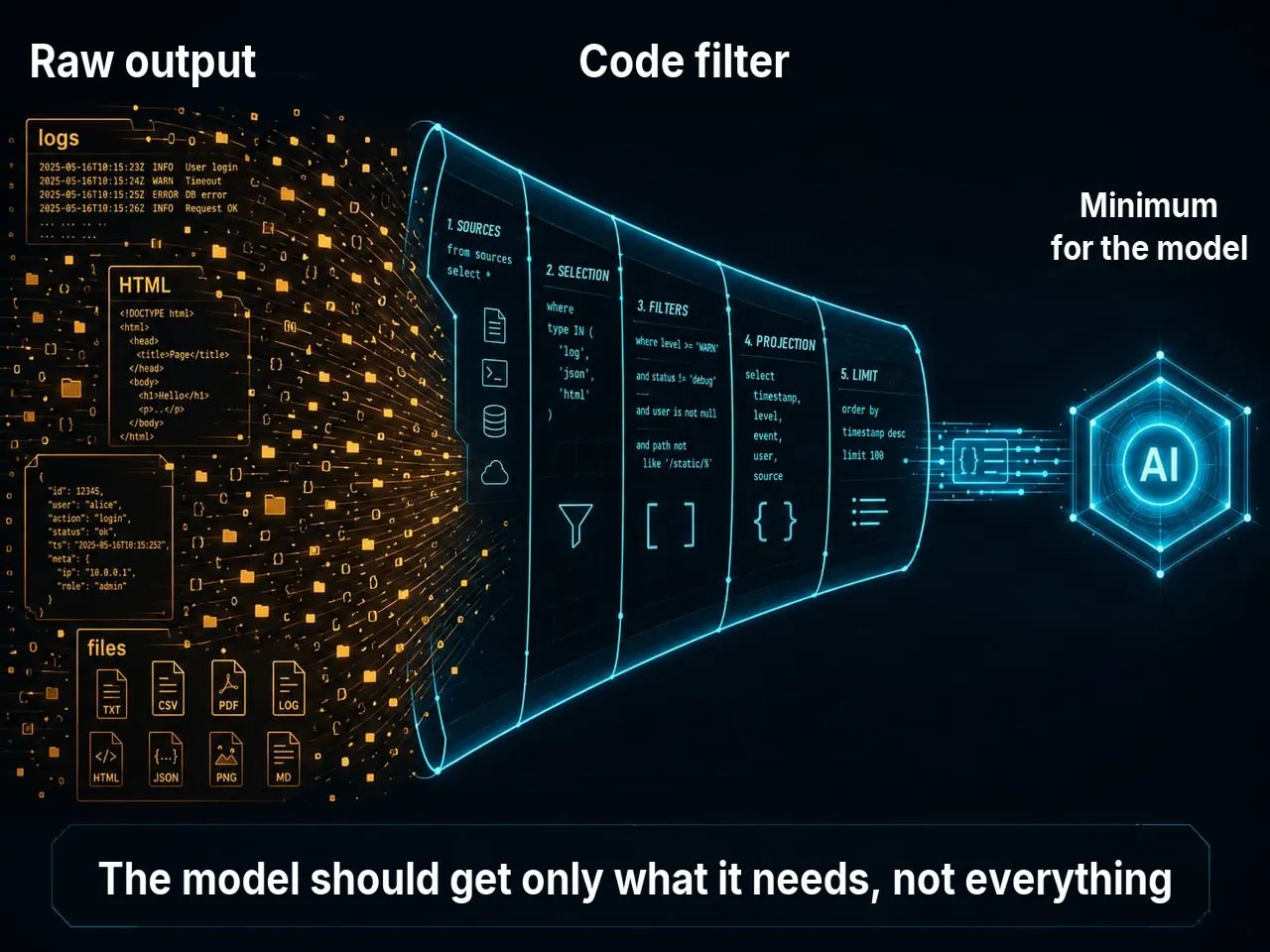
3. Tool results
It’s even worse when a tool returns too much.
Bad option:
Read the whole 80,000-line log and find the error.Good option:
A script filtered ERROR/WARN in advance,
kept 100 lines around the first error,
and passed only that to the model.
Claude Code’s own advice on reducing costs explicitly suggests moving preprocessing into hooks and skills: for example, rather than letting Claude read a 10,000-line log, run grep for errors first and return hundreds of tokens instead of tens of thousands.
This is one of the most practical principles:
The model should get a prepared minimum that’s enough to solve the task, not raw data.
4. Session history
A long session is psychologically comfortable: “the agent remembers everything”.
But technically a long session carries an ever-growing history that costs money at every new step. At some point you’re paying not for the current task but for a month of conversation history that stopped being useful long ago.
Claude Code explicitly advises clearing the context when you switch tasks: stale context wastes tokens on every message that follows.
Knowledge should live in a knowledge base, documents, memory and retrieval. A session should live exactly as long as the current task needs.
5. Subagents and multi-agent setups
Multi-agent setups sound cool: one agent writes code, another reviews it, a third looks up facts, a fourth writes a post.
But every agent is a separate context.
In the Claude Code documentation, Anthropic warns plainly: agent teams run several Claude Code instances, each with its own context window, and token usage scales with the number of active “teammates”.
In other words:
3 agents ≠ one agent, only smarter.
3 agents = 3 context windows + coordination + handing over results.
Multi-agent setups pay off when the tasks are genuinely independent or need different specialisms. If you hand three items from one list to three agents just because you can, you’re often buying chaos with tokens.
6. Cron and background jobs
Cron is the silent budget killer.
The user is asleep, and every 15 minutes the agent wakes up, loads its memory, reads its tools, calls a flagship model, checks something, sees that nothing has changed and goes back to sleep.
A week later it turns out that your agent’s most expensive user isn’t you but the schedule.
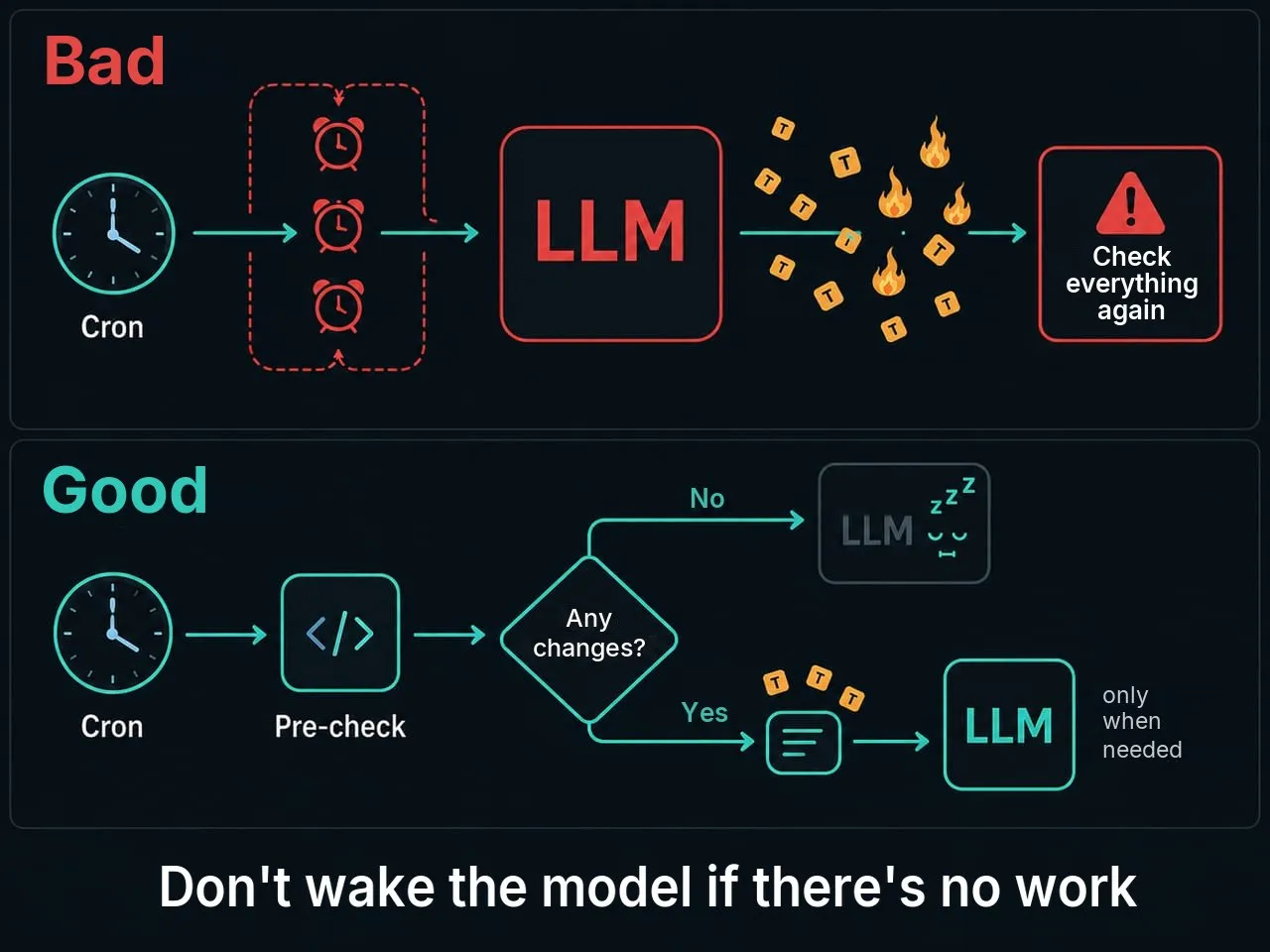
The right architecture for a background job looks like this:
cron -> cheap pre-check -> any changes? -> yes/noIf there are no changes, you don’t need an LLM at all.
The most cost-effective line in an automation system:
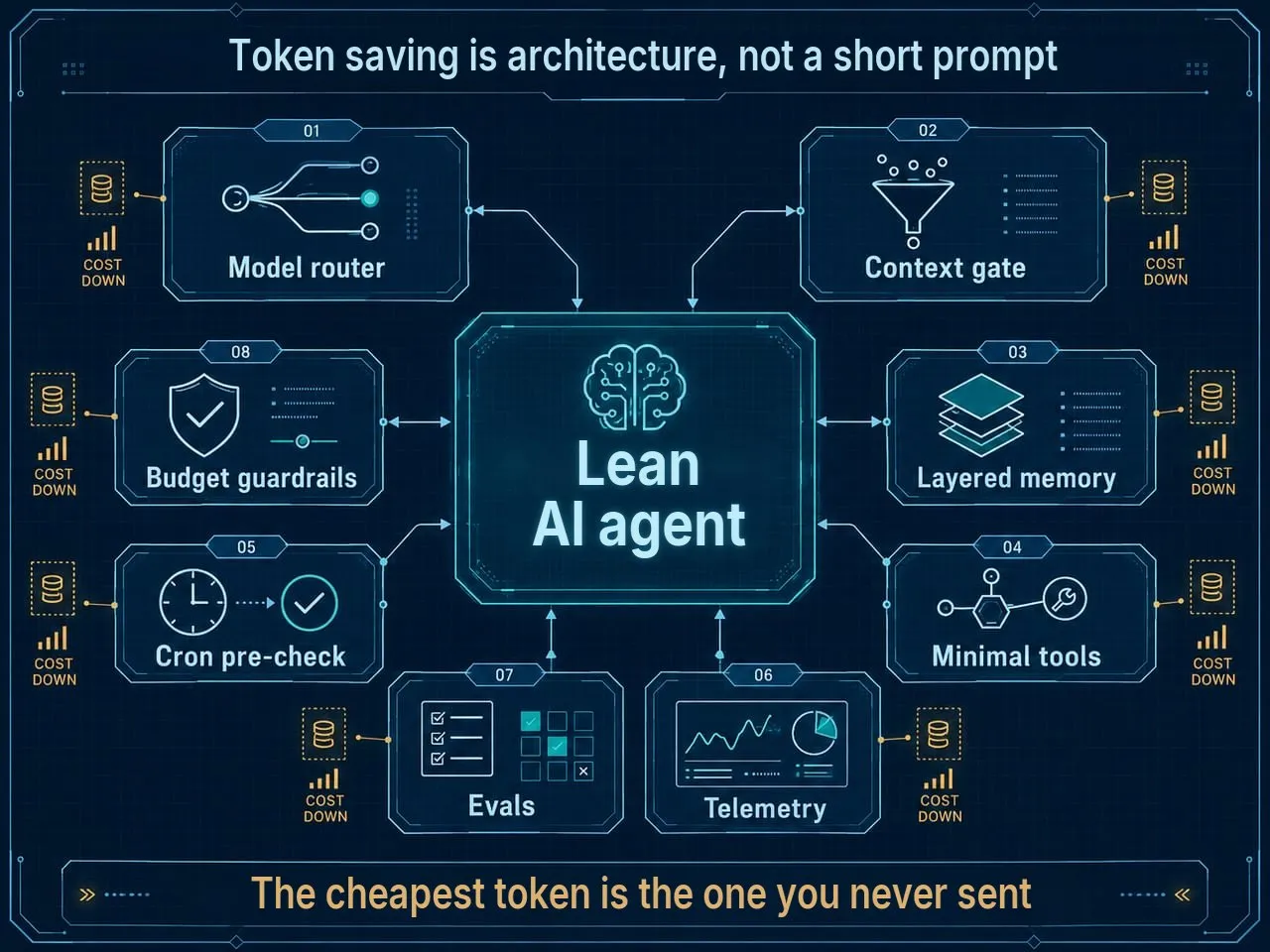
{ "wakeAgent": false }The main principle: the cheapest token is the one you never sent
You can switch to a cheaper model.
You can lower reasoning.
You can turn on caching.
You can shorten replies.
But the strongest optimisation almost always sounds simpler:
Don’t send the model what it doesn’t need for the current step.
This applies to everything:
- instructions;
- memory;
- tools;
- schemas;
- logs;
- HTML;
- dialogue history;
- attachments;
- search results;
- intermediate artefacts.
If data can be filtered by code, filter it by code.
If a task can be solved with a template, solve it with a template.
If a big document is rarely needed, don’t keep it in the base context.
If a skill is needed once a month, let it sit in references, not in AGENTS.md.
The token-saving checklist: 14 fixes in order of payoff
1. Measure first, then cut
Don’t start with “let’s shorten the prompt”. First find out what’s actually expensive.
The minimum baseline is 7 days.
Look separately at:
- interactive sessions;
- cron and background jobs;
- tool calls;
- input tokens;
- output tokens;
- reasoning/thinking tokens;
- cache hit rate;
- the number of steps per task;
- the cost of a completed task, not of a single request.
A useful table:
MetricWhat it showsInput tokens / runBloated context, history, tool outputOutput + reasoning / runToo much thinking or wordy repliesTool calls / taskUnnecessary search, poor routing, badly designed toolsRequests / taskLooping, a poor plan, retriesTokens / cron jobAutomation that’s due to be replaced by a scriptCache hit rateHow stable the repeated prefix isWithout a baseline, it’s easy to spend a week heroically trimming SOUL.md, only to find that 70% of the spend came from night-time monitoring.
2. Don’t use the flagship as a general-purpose processor
A flagship model is needed for:
- complex architecture;
- ambiguous decisions;
- difficult coding;
- synthesis from different sources;
- risky actions;
- tasks where a mistake is costly.
But it doesn’t have to:
- sort emails into three categories;
- pull a date out of a text;
- format JSON;
- write repetitive reminders;
- check whether a new file has appeared;
- forward a notification.
A cheap model isn’t always better either. If it makes a mistake and launches five extra tool calls, one good reply from the flagship might have been cheaper.
Optimise the cost of a completed task, not the price of a token.
3. Lower reasoning by default
The basic rule:
low/medium: by default
high: only for a clear reason
For everyday tasks, short notifications, classification, simple summaries and template replies, high thinking usually isn’t needed.
For a complex task, run an eval:
- the same set of tasks;
- different reasoning levels;
- compare quality;
- compare errors;
- compare tokens;
- compare time.
If high gives +2% quality and +300% cost, that’s a bad deal.
4. Take the LLM out of deterministic tasks
If the output is known in advance, you don’t need a model.
Bad option:
cron -> load the agent -> load memory -> load tools
     -> ask it to write "Time to drink some water"
Good option:
cron -> script-only -> send a ready-made lineAn LLM is needed where there’s uncertainty:
- understanding meaning;
- choosing an action;
- synthesising information;
- explaining;
- making a decision;
- adapting to context.
If the task is just a date, a timer, a format, a health check or a fixed line, that’s a job for ordinary code.
5. Cut down the persistent context
Check every file that loads on every run:
AGENTS.md;CLAUDE.md;SOUL.md;USER.md;TOOLS.md;MEMORY.md;- bootstrap instructions;
- global project rules.
Ask one question of each block:
Is this needed on almost every run?If not, move it into a separate reference.
A good structure:
AGENTS.md
  short global rules
  a map of the documents
  when to read what

references/
  security.md
  sales-process.md
  content-style.md
  deployment-guide.md
  rare-edge-cases.md
AGENTS.md should be a navigator, not an encyclopaedia.
6. Move skills to progressive disclosure
Progressive disclosure means the agent first sees a short description of a skill and reads the details only when it needs them.
A bad skill:
A 30-page SKILL.md
with every scenario, example, exception and template in it at once.
A good skill:
skill/
├── SKILL.md              # short router
├── references/
│   ├── interview.md      # interviews only
│   ├── landing.md        # landing pages only
│   ├── bugfix.md         # bug fixes only
│   └── full-protocol.md  # rare full mode
└── scripts/
    └── preprocess.py
Claude Code’s official documentation explicitly recommends moving specialised instructions out of CLAUDE.md into skills: CLAUDE.md loads at start-up, while skills load on demand.
7. Connect only the tools you need
There’s no need to give the agent the whole toolbox for every task.
For a task like “find in memory what we decided about pricing”, you don’t need:
- Gmail;
- a browser;
- a shell;
- Calendar;
- GitHub;
- Notion;
- Figma;
- Sentry;
- Stripe.
You need memory/retrieval and perhaps one file tool.
For each category of task, set up a minimal toolset:
memory-only
research
coding
calendar
email-draft
browser-heavy
admin
The fewer tools at runtime, the less schema noise and the lower the chance that the agent picks the wrong hammer.
8. Trim tool results before they reach the model
Don’t give the model everything.
Give it what’s already been filtered.
Examples:
Instead of: the page's entire HTML
Better: title, h1, main text, links, meta, relevant snippets

Instead of: the whole log
Better: the first errors + 50 lines around them + the last 100 lines

Instead of: the whole repository
Better: tree + 3 relevant files

Instead of: every email
Better: 20 new emails with sender, subject, date, snippet

Instead of: the full API JSON
Better: selected fields
This saves twice:
- less input on the current step;
- less junk in the rest of the session history.
9. Limit the length of the agent loop
Set limits:
max_turns;max_tool_calls;- a retry limit;
- stop on a repeated error;
- stop on a repeated tool call;
- a mandatory new plan after 2–3 failures.
An agent without limits is like an intern who’s been handed the company card and told: “Sort it out.”
They’ll sort it out. But the bill may surprise you.
10. Manage the session lifecycle
Start a new session when you switch:
- project;
- repository;
- topic;
- client;
- type of task.
Use compaction, but not as a rubbish compactor that turns everything into mush.
In its compaction documentation, OpenAI describes an approach where a long window is replaced with a compact state that carries the key prior state and reasoning in fewer tokens.
But compaction needs quality control. After compression, check that these have survived:
- prohibitions;
- decisions;
- unfinished actions;
- important constraints;
- the current plan;
- sources of truth.
Bad compaction saves tokens and creates expensive mistakes.
11. Split memory by purpose
Not all memory is the same.
There are four layers:
- Core memory: what the agent must always know.
- Retrieval memory: what needs to be found for the current topic.
- Session memory: what matters within the current task.
- Log memory: an event log that’s rarely needed.
Bad memory architecture:
Everything sits in one MEMORY.md
that loads every time.
Good architecture:
core.md          # short, permanent things only
projects/*.md    # per project
people/*.md      # per person
logs/YYYY-MM.md  # log
vectors/         # retrieval
Big reference files shouldn’t load on every run. They should be searched.
12. Make cron event-driven
Cron should answer the question:
Is there any new work?And only then wake the agent.
A bad setup:
every 15 minutes -> LLM -> check everything againA good setup:
every 15 minutes -> script pre-check
if nothing has changed -> sleep
if something has changed -> short data packet -> LLM
For monitoring, news, email, tasks, logs and prices, this is critical.
13. Ask for short, verifiable output
Automations don’t need a beautiful novel.
They need a compact result:
{
  "status": "needs_attention",
  "reason": "3 new invoices over budget",
  "next_action": "ask_user"
}
Set the format of replies:
- a maximum length;
- JSON for automation;
- a bullet summary for humans;
- a separate artefact only on request;
- no introductions;
- no restating the input;
- no “here’s what I did” unless it’s needed.
Output is often more expensive than input, so brevity isn’t a matter of style but a budget policy.
14. Lock in the savings with evals and budgets
Optimisation without evals easily turns into self-deception.
After making changes, check:
- whether the token count has gone down;
- whether the number of errors has gone up;
- whether there are more reruns;
- whether the user has started correcting the agent more often;
- whether the quality of the result has dropped.
The main metric:
the cost of a reliably completed taskNot the cost of a single request.
How it looks on different platforms
OpenClaw
OpenClaw is especially sensitive to context architecture because it lives as a permanent agent: channels, skills, memory, hooks, cron, browser, workspace.
Check first:
- which bootstrap files always load;
- how bloated
AGENTS.md,SOUL.md,USER.mdandTOOLS.mdare; - how many skills the agent can see;
- which MCP servers/tools are connected by default;
- what the tools return;
- how the cron jobs are set up;
- whether there’s a sandbox and an allowlist/denylist for dangerous tools.
Articles on OpenClaw single out the role of memory, compaction, hooks and the sandbox: in a long conversation the agent compresses the context and writes what matters to memory, and the sandbox is there so that group sessions don’t get dangerous access to the system.
For OpenClaw, a good strategy is this:
1 agent ≠ the whole world
1 agent = a specific role + minimal tools + short memory + clear workflows
Claude Code
Claude Code already has built-in ways to save: prompt caching, auto-compaction, /usage, /clear, model settings, MCP management.
Anthropic says it plainly: token costs scale with context size, so the bigger the context, the more tokens; Claude Code optimises costs through prompt caching and auto-compaction, but the developer still needs to keep the context small.
A practical set:
/usage        # see your spend
/clear        # clear the context when you switch tasks
/compact      # compress, with instructions on what to keep
/model        # change the model to match the complexity
/mcp          # switch off servers you don't need
And most importantly: don’t turn CLAUDE.md into a corporate tome.
Codex
For Codex the logic is similar:
- the root
AGENTS.md: global rules only; - local instructions: next to the module;
- repeatable processes: in skills;
- long procedures: in references;
- a new task: a new, focused session;
- tools and connectors: only if needed.
Codex, like Claude Code, gains especially from a short context and a clear repository structure. The less the agent has to “explore the world”, the fewer tokens it will burn on reconnaissance.
Hermes
In Hermes, family assistants and Telegram/Discord agents, the main source of spend is often not coding but everyday automation.
A typical set of optimisations:
- lower default reasoning to medium/low;
- move simple reminders to script-only;
- give cron a pre-check;
- separate the conversational context from background automation;
- limit tool output;
- keep
SOUL.mdshort; - move rare instructions into references;
- set limits on turns/tool calls;
- add a budget and telemetry.
A family assistant can be “warm” in conversation, but that doesn’t mean every school reminder should load the entire family history and a flagship model.
A quick 30-minute audit
If you already have an agent and need to find out quickly where it’s devouring tokens, go in this order.
Step 1. Find the two most expensive scenarios
Usually these are:
- one interactive scenario;
- one cron/automation scenario.
Don’t try to cover everything at once.
Step 2. Check reasoning
Ask:
Does this task really need deep reasoning?If not, lower it.
Step 3. Check the persistent context
Open:
AGENTS.md;CLAUDE.md;SOUL.md;- memory;
- skills.
Remove duplicates. Move rare things into references. Shorten the examples.
Step 4. Check the tools
For the chosen scenario, write down:
Which tools are actually needed?
Which are only connected for historical reasons?
Switch off everything you don’t need.
Step 5. Check tool output
If a tool returns a wall of text, set limits on:
- lines;
- characters;
- fields;
- number of results;
- time;
- file size;
- search depth.
Step 6. Check cron
Every cron job should have a pre-check:
has anything changed since the last run?If not, don’t wake the model.
Step 7. Check quality after the savings
After a week, compare:
- tokens;
- errors;
- reruns;
- manual corrections;
- execution time;
- the cost of a completed task.
The final formula for a lean agent
A lean agent isn’t necessarily small and isn’t necessarily dumb.
It’s an agent where:
- the strong model is called only where it pays off;
- reasoning matches the complexity of the task;
- the persistent context is short;
- skills load on demand;
- tools are kept to a minimum;
- tool results are filtered before they reach the model;
- deterministic work is done by code;
- cron wakes the LLM only when something has changed;
- loops are limited;
- memory is split into layers;
- compaction is checked;
- quality and cost are measured together.

In agent systems, tokens aren’t spent only on text.
The architecture spends them.
So the main question isn’t this one:
How do I get the agent to answer more briefly?It’s this one:
Of everything sent to the model, what is really needed at this particular step?If you ask this question of every file, tool, skill, cron job, MCP server and agent loop, costs start to come down without turning a useful assistant into a cheap but helpless chatbot.
The cheapest token isn’t the one a small model processed.
The cheapest token is the one you never sent at all.
Where extra spend shows up most often
Tokens are usually lost not in one long request but in resending the history, overly detailed logs and raw tool results. First cut the context and remove duplicates, then choose the model, and only after that compare pricing.