
My skill hermes-cron has made it into the official Hermes Agent plugin catalogue. It teaches the agent to handle scheduled jobs carefully: set reminders without duplicates, avoid spending tokens on empty runs, check every change and find where a job that didn’t fire went wrong. The pull request was merged on 3 October by Teknium from the Nous Research team, and the skill got its own page in the Hermes documentation: category Automation, tier Community, version 1.2.0, MIT licence. Now you can find it where Hermes users look for every other extension, not just through a link in our chat.
Why an agent’s cron jobs break without anyone noticing
Cron jobs are whatever the agent does on a schedule: a morning summary, a reminder in half an hour, a nightly server check. They are what turns an agent from someone to talk to into an assistant, and they are also the easiest place to get things wrong. A cron failure looks like success: the tool replied success: true, the job is listed as paused, the last status is ok, and yet messages either keep arriving or don’t arrive at all.
The causes are usually mundane. The agent read “in 30 minutes” as 30m, and that’s not a one-off reminder but a repeat every half hour. The prompt says “send the summary”, the agent sends it, and the scheduler delivers it a second time. origin delivery goes to the chat where the job was created, not to the person who needs it. A job marked as paused but with enabled: true will never fire, even though it looks scheduled in the list. I ran into almost all of these while running a few dozen jobs in Hermes, and I turned each mistake into a rule the agent now follows on its own.
What hermes-cron can do
Pick the right action. Pausing, disabling and deleting are different operations, and the skill explains to the agent when each one is needed. A request like “pause the morning digest until Monday” ends with a pause, no duplicate job, and an honest answer about who will resume it on Monday: Hermes has no delayed resume for recurring jobs.
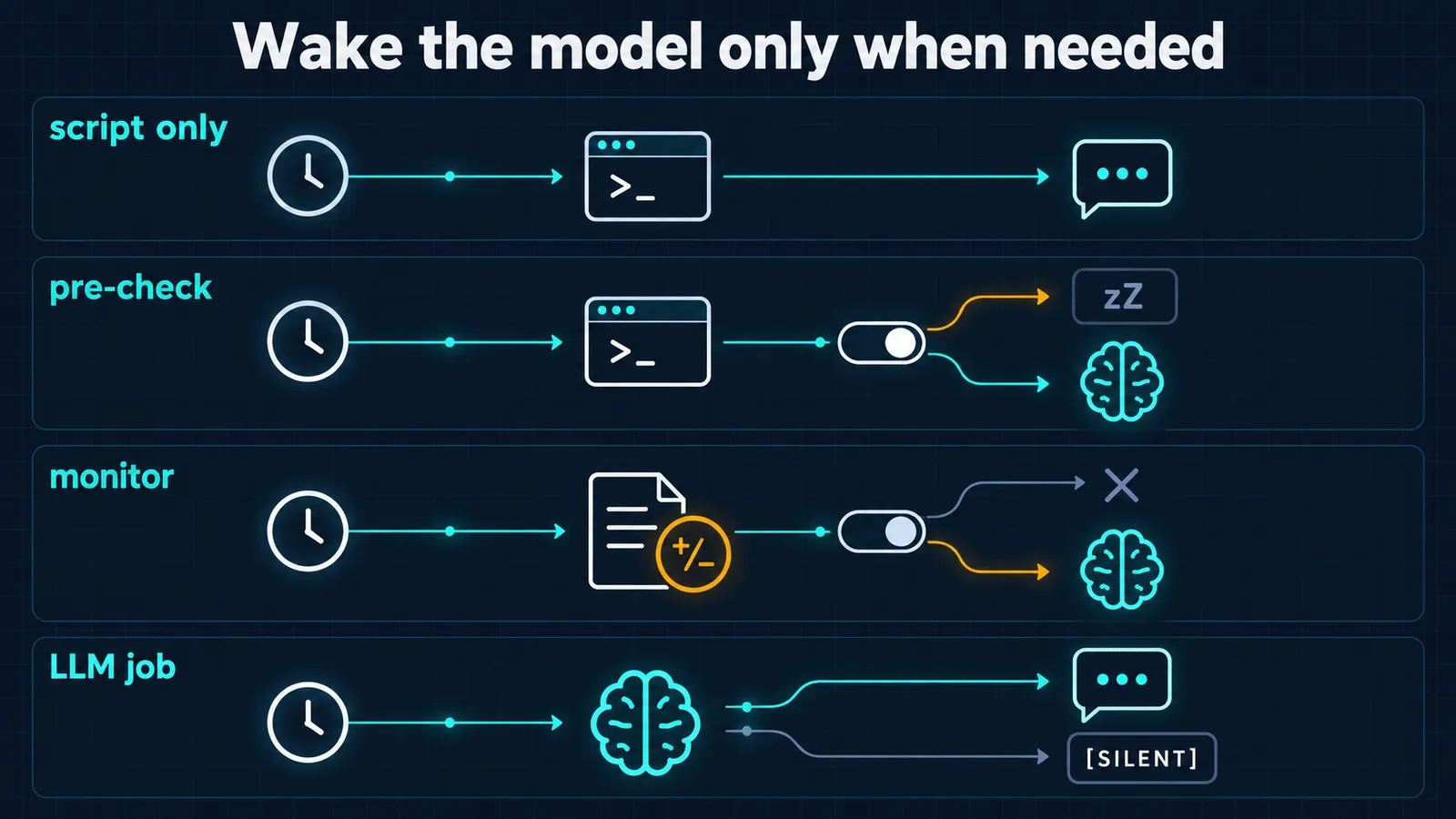
Don’t wake the model for nothing. Every call to a language model costs tokens, and many scheduled jobs only need it now and then, or not at all. Three modes avoid an unnecessary call: a script job without the agent (no_agent), a pre-check that decides whether a run is needed, and watching for changes (“tell me when this changes”). The fourth mode, the [SILENT] reply, saves not tokens but your attention: the model has done its work, there’s nothing to report, and no message goes out. A watchdog like “message me only if the disk is more than 90% full” gets by without a single model call as long as everything is fine. We have a separate checklist on saving tokens in agent systems.
Check every change. After creating or editing a job, the agent rereads it and makes sure what was saved is exactly what was asked for: whether it’s one-off or recurring, and when it will fire. Under the skill’s instructions it can only say “done” after this check.
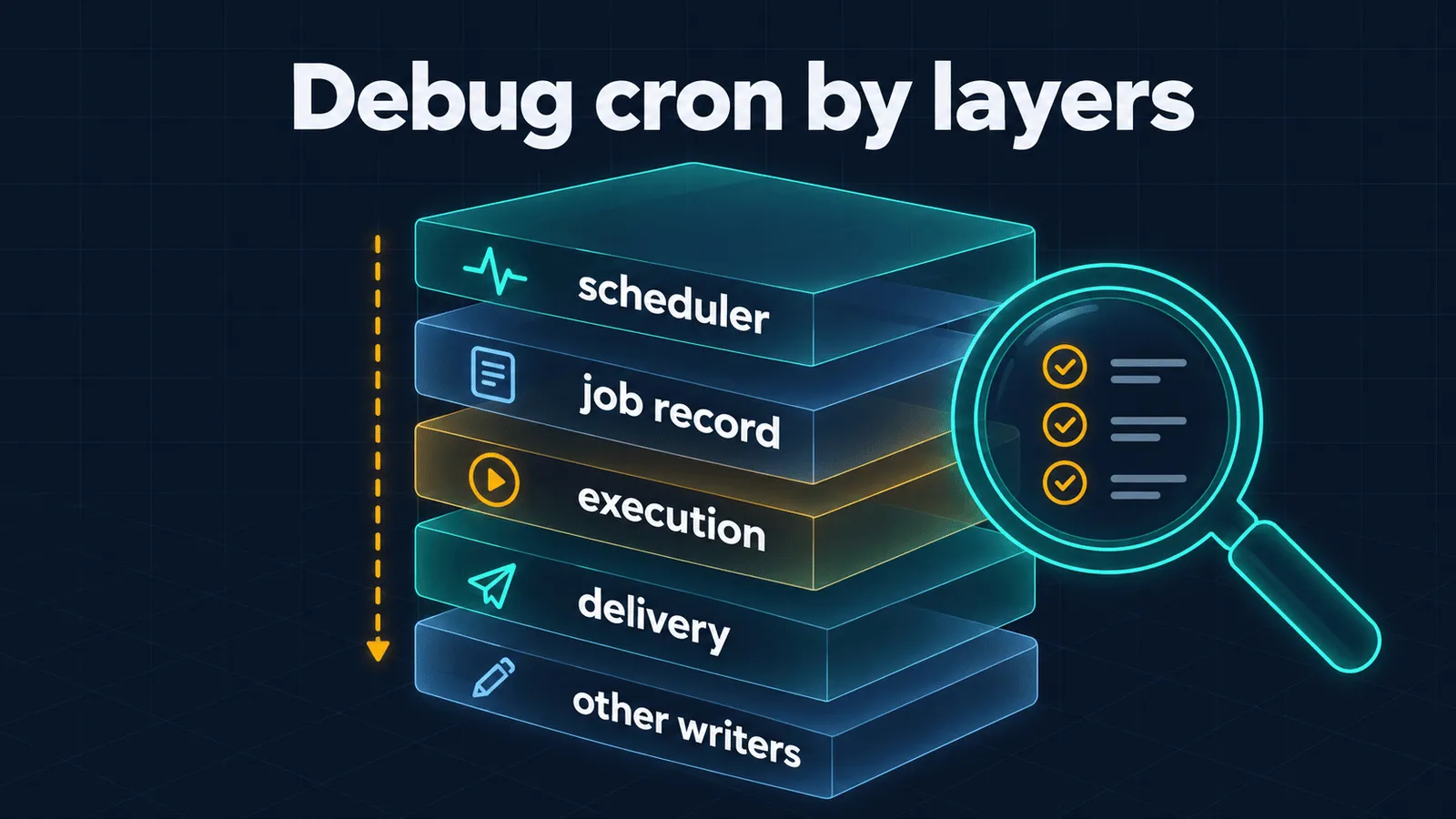
Look for the fault layer by layer. Asked “why didn’t the report arrive at nine?”, the agent doesn’t rewrite the schedule at random but works from the top down: is the scheduler ticking, is the job record intact, was there a run, did the result get delivered, and did a sync overwrite the edit.
The doctor. The skill comes with a script, cron-doctor.py. On its own it doesn’t write, run or delete jobs, makes no network calls and doesn’t touch keys. It calls the built-in hermes cron doctor check and adds what that check can’t see: disabled and “half-paused” jobs, streaks of failures, the delivery outcome of the last run, open incidents, and jobs with a pinned model. Those don’t follow the general model setting and don’t switch to the fallback when the provider is down. One caveat: the built-in check loads jobs with Hermes’s standard loader, and that loader can repair damaged records in jobs.json, exactly as it does on every normal scheduler tick. If you need a purely read-only run, there’s the --no-builtin flag.
A failure that turned up in production
The doctor’s most recent check was added after a real incident. On Hermes 0.21.3, not a single scheduled job of mine ran for several days in a row: they all failed with the same error at launch. No incident was opened, and the failure records for individual jobs were reset after the next successful run, so job by job everything looked almost normal. The cause wasn’t in the jobs but in the server configuration.
Now the doctor catches exactly this: the same error in three or more jobs within 24 hours is shown once, as a scheduler or host failure, rather than as a dozen unrelated problems. Before being submitted to the catalogue, the skill went through an independent review and a run on a live agent, and the doctor has 43 automated tests with no network and no external dependencies.
How to install hermes-cron
You need Hermes Agent 0.21 or newer; the catalogue lists Linux, macOS and Windows. The usual route is to install it as a skill, and the agent will pick it up by its description:
hermes skills install itpartypattaya/hermes-cron/skills/hermes-cronOr as a portable plugin:
hermes plugins install itpartypattaya/hermes-cron --no-enable
hermes plugins enable hermes-cron
After that, just talk to the agent in plain words: “remind me in 30 minutes to call the bank”, “why didn’t the morning report arrive?”. If you installed hermes-cron as a regular skill, you can also run the doctor by hand:
python3 ~/.hermes/skills/hermes-cron/scripts/cron-doctor.pyIf you don’t have Hermes yet, start with installing it and connecting it to Telegram, then the settings after installation. The code, documentation and a place for questions are in the GitHub repository. Issues and pull requests are welcome.
My second skill in the same catalogue is hermes-dreaming: it tidies up the agent’s memory at night. I’ve put together a separate overview of where to find other skills and plugins for Hermes and how to vet them before installing.