
Skills for Hermes Agent are folders with a SKILL.md instruction file that teach the agent repeatable work: going through documents, putting together reports, writing in the right tone, working with services. Plugins are extension packages: they can contain code, new tools, those same skills and connections to services. The places to look for them are Skills Hub inside Hermes itself, its official plugin catalogue, collections on GitHub, the Anthropic and OpenAI marketplaces and the Russian NeuralDeep catalogue.
Skill, plugin and MCP: what’s the difference
A skill is knowledge on demand. The folder holds a SKILL.md file: a name and description at the top, then the instructions, and next to it there may be scripts, templates and reference files. The agent doesn’t keep every skill in its head at once. At the start of a session it sees only a compact list of names with descriptions (in Hermes that’s about 3,000 tokens) and opens the full text when a task calls for it. Every skill also becomes a command in the chat: /skill-name.
Hermes supports the open Agent Skills standard. The same format is understood by Claude Code, Codex, Cursor, Gemini CLI, OpenClaw and several dozen other agents, so a skill written for Claude Code can be tried in Hermes too. Whether it works depends on which tools, MCP servers, programs and operating system it expects.
A plugin is an extension package. A classic Hermes plugin is written in Python: it adds tools, commands, hooks, memory or voice backends. There’s also a portable format without Python: a manifest, skills and MCP settings; all three of my packages use it. A third-party plugin stays off after installation until you explicitly switch it on. And an important caveat from the documentation: a Python plugin runs inside the Hermes process as ordinary code; it isn’t a sandbox.
MCP is a way to connect the agent to an external tool or service over a common protocol: a browser, Jira, a database. An MCP server can come as part of a plugin or be connected separately.
You don’t have to look elsewhere for skills. Hermes writes them itself: after a complex task it can save the sequence of steps as a new skill, and the /learn command turns a folder, a link, a book or a conversation into a skill. Why a short skill works better than a long one is covered in our article on skills and prompts for strong agents.
Hermes Agent Skills Hub: finding and installing skills
Start with what’s already there. Hermes comes with 58 built-in skills in 12 categories. They’re copied to ~/.hermes/skills and updated along with hermes update, and skills you’ve edited yourself are left alone by the update. Another 152 optional skills from Nous Research in 23 categories aren’t active by default and install with a single command.
Everything else is in Skills Hub, the Hermes skills showcase. On the website it’s a separate page with tabs for built-in, optional and community skills and an install button for Hermes Desktop. The same showcase is available in the terminal through the hermes skills commands, and in the chat through /skills. On 5 October the index had 101,748 entries. Almost 80,000 came from ClawHub, the open registry of the OpenClaw project, and another 20,000 from skills.sh by Vercel. The rest come from GitHub, LobeHub, browse.sh, NVIDIA and the official sets. These are index entries, not a hundred thousand vetted and compatible skills.
Run the commands where Hermes is installed; if it lives on a server, connect to it over SSH first. Below are two independent examples: the official skill for the 1Password password manager and Anthropic’s skill for Word documents. Take whichever you need:
# Example 1: an optional skill from Nous Research
hermes skills browse --source official                # what's in the official set
hermes skills install official/security/1password     # install one of them

# Example 2: a skill from a third-party repository
hermes skills search docx                              # search across all sources
hermes skills inspect anthropics/skills/skills/docx    # the skill's card before installing
hermes skills install anthropics/skills/skills/docx    # install with a check

hermes skills list                                     # what's installed now
After installing, start a new session and give the agent one real task. From the description it’ll work out by itself when to call the skill, or you can call it explicitly: /docx. After that, these come in handy: hermes skills check (checks for updates), hermes skills update, hermes skills audit (re-run the security check on everything installed from the Hub) and hermes skills uninstall <name>.
Hermes splits sources into trust levels. Built-in and official skills come from Nous Research itself. Hermes policy treats four repositories as trusted: openai/skills, anthropics/skills, huggingface/skills and NVIDIA/skills. That’s a decision by the Hermes developers, not an audit of every skill in them. Everything else counts as community skills.
Every install from the Hub goes through a scanner. It looks for data leaks, prompt injections, destructive commands and signs of an attack through dependencies. There are three verdicts. “Safe” means the scanner found nothing, not that the skill is definitely safe. “Caution” is let through for trusted sources, and for community ones only with the --force flag. A skill from a trusted or third-party source with a “dangerous” verdict won’t install, and --force won’t help here. Before it reaches the skills folder, the download sits in quarantine, and its hash is recorded in lock.json.
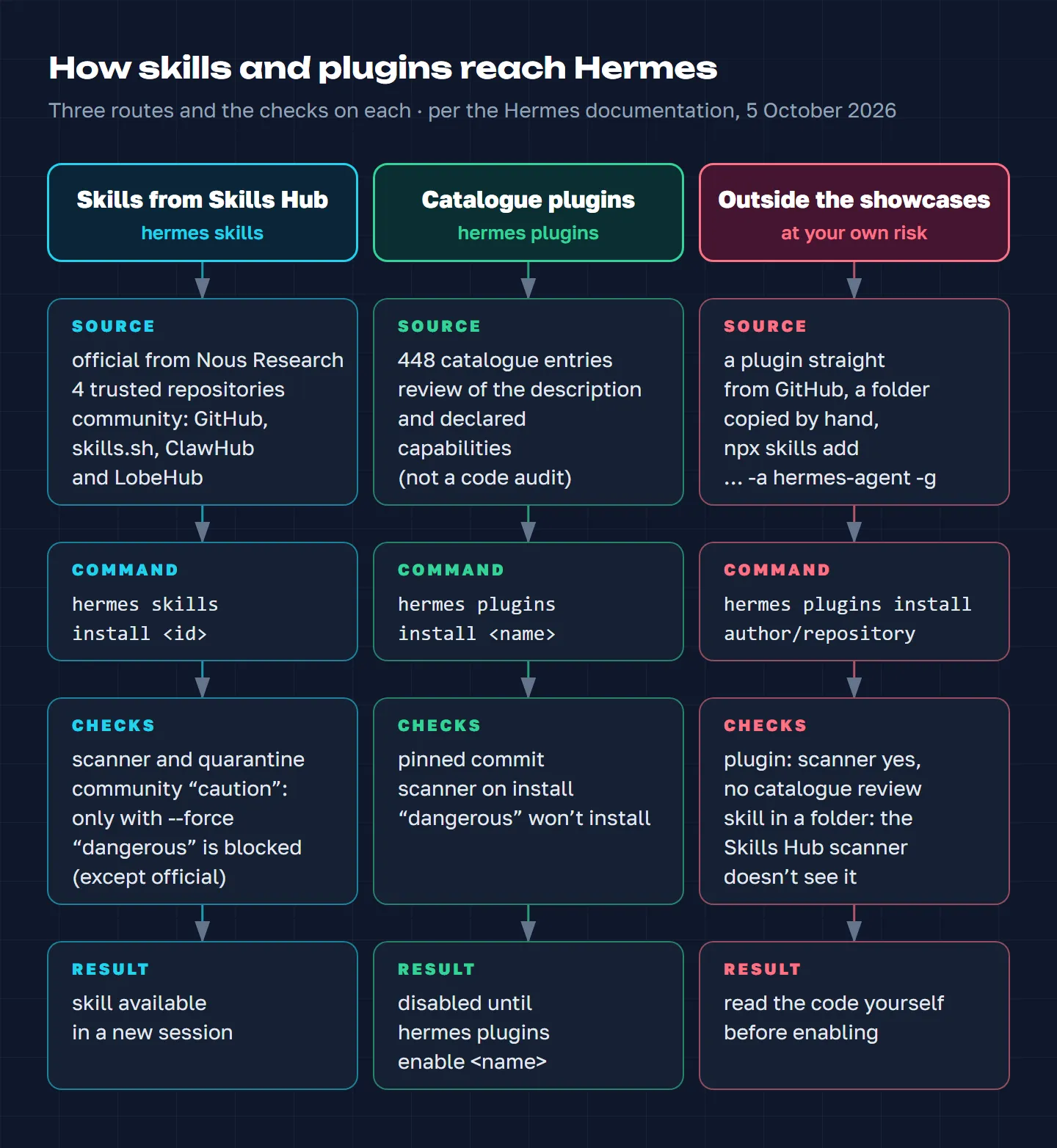
In short: Skills Hub checks a skill with the scanner, the catalogue pins the version of a plugin that was reviewed on acceptance, and installing outside the showcases leaves the checking to you.
The workarounds do exist. The npx skills add <author/repository> -a hermes-agent -g utility from skills.sh puts a skill straight into ~/.hermes/skills, and you can copy a folder there by hand too. The Skills Hub install scanner won’t check a skill like that, so read it yourself. Skills from a project folder (.hermes/skills in a repository) are only picked up by Hermes after the hermes skills trust command, and are also checked by the scanner before loading.
The official Hermes Agent plugin catalogue
The plugin catalogue is the second showcase, and it’s run more strictly. On 5 October it had 448 entries: 9 official ones from Nous Research and 439 from the community. The biggest groups are tools (122), extensions for Hermes Desktop (112) and memory plugins (48).
To get into the catalogue, an author sends a pull request with a single yaml file: name, description, repository, exact commit, declared capabilities. The entry is checked by automation, then a maintainer merges it by hand. The documentation is honest about it: the review covers the description and the declared capabilities; it isn’t a code audit. What you do get is a pinned version. hermes plugins install <name> installs exactly the commit that was reviewed on acceptance, not whatever the author pushed to the repository yesterday:
hermes plugins install hermes-dreaming    # catalogue version, pinned commit
hermes plugins enable hermes-dreaming     # enabling is a separate step
Installing straight from GitHub (hermes plugins install author/repository) goes around the catalogue: the latest version of the branch is installed, and Hermes marks such a source as unverified. The security scanner still works in this case: it runs on every plugin install and update, and a “dangerous” verdict blocks the install even with --force.
What’s in the catalogue: for memory, hindsight and honcho (how to choose a memory provider is covered in our article on Hermes memory); among the official ones, hermes-telegram-business (a secretary for Telegram Business: the agent drafts a reply and the owner approves each one), homeassistant for the smart home, snyk for checking code and dependencies, and blender. My three packages are there too: hermes-cron for scheduled jobs, hermes-dreaming for memory and hermes-field-notes for pitfalls and core patches.
What to choose for the task: our list
This isn’t a ranking but what we’d install ourselves or recommend to friends. For each item we checked the repository: it’s public, recently updated, and the author’s description matches what’s inside. I use my own packages and anydoc in my agent built on Hermes. Still, test any new skill on one task first. And don’t install everything at once: two or three skills for a real task are more useful than twenty that the agent has to choose between by their descriptions.
Documents and visuals
anthropics/skills is Anthropic’s official set, with 180,000 stars on GitHub. The most useful for work are docx, pptx, xlsx and pdf: the agent reads and builds Word documents, presentations, spreadsheets and PDFs. There’s also skill-creator, which helps you write a skill of your own. In Hermes this is a trusted source and installs through the Hub. Licences differ between skills, so check the licence file of the one you take.
firecrawl/anydoc converts Word, PowerPoint, Excel, PDF, EPUB, CSV and other formats into clean Markdown, locally and in milliseconds. In my agent it’s the first step in going through any document. anydoc doesn’t recognise scans by itself: you can send them to Firecrawl’s cloud OCR, but then the document goes to someone else’s server, so my agent passes scans to local OCR. Installing in Hermes: hermes skills install firecrawl/anydoc/skills/convert-documents-to-markdown.
plannotator/effective-html is a set of skills that let the agent build visual HTML: diagrams, plans, prototypes, one-pagers. You don’t even have to install it; you can use it as a reference guide to techniques.
Russian-language copy and marketing
humanizer-ru removes 37 signs of AI-generated writing from Russian text: bureaucratic language, ChatGPT clichés, copy-paste traces. It can also estimate whether a text was written by a model. Hermes is named explicitly in the description.
yandex-wordstat and yandex-direct cover search demand in Wordstat and ad work in Yandex Direct through the official APIs, and come from NeuralDeep’s “editor’s choice”. You’ll need to set up access: for Wordstat, a service account in Yandex Cloud; for Direct, a connection to the ad account.
Scheduling, memory and Hermes maintenance
hermes-cron teaches the agent to set up scheduled jobs without duplicates and to work out why a job didn’t run; it comes with a diagnostic script that changes nothing. hermes-dreaming checks the agent’s memory against conversations once a night, suggests saving what matters and asks about what’s gone stale; since version 3.3 its confirmations can be double-checked by a cloud judge. hermes-field-notes records the pitfalls it finds along with their cause, and after every hermes update checks whether your patches to the core survived it. All three are mine, and all three are in the official catalogue. The holographic memory provider, which I maintain, is there too: it stores facts locally and injects the relevant ones before a reply by itself. How to install it is in the first article, and what’s new in it is in the article on version 0.17.
Browser
Tencent/BrowserSkill lets the agent work in your real browser, where you’re already logged in, without getting in your way. You need the bsk utility and an extension for Chrome or Edge; Hermes is on the list of supported agents. This is powerful and risky at the same time: the agent gets access to your accounts. And the utility installs with a script through curl … | sh, so read it before you run it.
Development and product
obra/superpowers has 295,000 stars on GitHub, more than any other collection in the table below. It teaches the agent discipline: first ask questions and clarify the task, then write a plan, then do the work and check it. The author describes installing it in Hermes as a plugin. It isn’t in the official catalogue, so install it without automatic enabling and switch it on once you’ve looked it over:
hermes plugins install obra/superpowers --no-enable
hermes plugins enable superpowers
garrytan/gstack is 23 tools for product and development, each in its own role: CEO, designer, head of engineering, QA and others. Among them is office-hours, which the agent uses to work through a product problem before starting on the work. The repository is one of Skills Hub’s default sources, so you can search for its skills straight from Hermes.
Video
remotion-dev/skills is a set of skills for Remotion, an engine that builds video from code: clips, animation, subtitles. Remotion is free for individuals, for-profit companies of up to three employees, non-profit organisations and during evaluation; everyone else needs a paid company licence. The licence of the skills repository itself isn’t stated.
Where else to look: GitHub and open registries
On GitHub, skills come in two forms: collections of ready-made folders and awesome lists with links. The most prominent as of 5 October:
| Repository | Stars | What’s inside |
|---|---|---|
| obra/superpowers | 295k | 15 methodology skills for development |
| mattpocock/skills | 277k | 38 skills, among the most installed on skills.sh |
| anthropics/skills | 180k | Anthropic’s official skills |
| garrytan/gstack | 135k | 23 role tools for product and development |
| addyosmani/agent-skills | 101k | 25 skills on the development cycle |
| ComposioHQ/awesome-claude-skills | 77k | a list of links and hundreds of integration skills |
| VoltAgent/awesome-agent-skills | 35k | almost 1,500 links, “curated but not verified” |
| google/skills | 21k | 155 skills for Google products |
| awesome-hermes-skills | 590 | a list for Hermes with ready-made install commands |
Stars show attention, not quality and not safety.
ComposioHQ/awesome-claude-skills deserves a closer look: by its name it’s a list, but in fact it’s a mixed collection of links and ready-made skills. The README promises more than a thousand skills. The repository really does have 864 SKILL.md files, but 832 of them are automatically generated composio-skills/*-automation integration skills that only work through Composio’s own MCP server. The rest are about thirty of its own skills and 164 links to other people’s. Of its own skills, a marketer will find use for content-research-writer (copy with research, sources and editing along the way), lead-research-assistant (finding potential clients), competitive-ads-extractor (analysing competitors’ ads from ad libraries) and meeting-insights-analyzer (analysing meetings from a transcript). The last commit to the main branch was on 24 July 2026.
Besides GitHub, there are open registries:
- skills.sh is Vercel’s catalogue, running since January 2026. Skills get there on their own, through anonymous install statistics from
npx skills add, and a separate page publishes the results of checks by Gen, Socket and Snyk. In Hermes this is theskills-shsource. - ClawHub is the open registry of the OpenClaw foundation, and most of the Skills Hub index rests on it. Since 7 February 2026 every skill there has been checked by VirusTotal.
- LobeHub claims 334,000 skills; in Hermes search this is the
lobehubsource. - SkillsMP is a search engine over 3.3 million
SKILL.mdfiles from GitHub. It only indexes them: it doesn’t install or certify them.
The Anthropic and OpenAI marketplaces: what to take from them into Hermes
Both Claude and ChatGPT have plugin catalogues of their own. On 5 October Claude Marketplace showed 341 plugins for Claude and Claude Code, some of them marked “Anthropic verified”. A Claude plugin can contain skills, MCP connectors, commands and subagents; how to get your own plugin in there is covered in a separate article. Anthropic’s official selection is also on GitHub: anthropics/claude-plugins-official, with 37,000 stars.
OpenAI has a single plugin catalogue for ChatGPT and Codex: in ChatGPT it’s the Plugins tab, in Codex CLI the /plugins command. A plugin can include skills, MCP servers, browser extensions and hooks, and third-party plugins get into the shared catalogue after review by OpenAI. Examples from OpenAI itself are collected in the openai/plugins repository: Figma, Notion, Netlify, Remotion, Google Slides and others. The former openai/skills repository has been declared deprecated and points to the same place.
Hermes won’t install such plugins whole: they’re built for the Claude and Codex manifests, and the Hermes plugin loader skips them as foreign. Some authors put a separate manifest for each agent into the repository; that’s how superpowers is built, which is why it installs in Hermes as a plugin. In other cases you can take a plugin apart:
- The skills inside are ordinary folders with
SKILL.md. They’re installed through Skills Hub by their path on GitHub, for examplehermes skills install anthropics/claude-plugins-official/plugins/frontend-design/skills/frontend-design. This repository isn’t on the Hermes trusted list, so the skill will be checked as a community skill. - MCP servers are connected to Hermes separately, in the
mcp_serverssection of the~/.hermes/config.yamlfile. - If you already work in Claude Code or Codex, there’s a shortcut:
hermes import-agent claude-code(orhermes import-agent codex) moves skills from~/.claude/skillsor~/.codex/skills, MCP servers and instructions into Hermes. With the--dry-runflag you can first see what will move over. The command doesn’t read files with passwords and keys, and it strips MCP server variables that look like secrets.
NeuralDeep, a Russian skills catalogue
neuraldeep.ru/skills calls itself an aggregator for Russian AI developers. It’s run by Valery Kovalsky, author of the NeuralDeep Telegram channel; the catalogue launched on 23 March 2026 under the name skillsBD. It now has 137 items: 65 skills, 38 MCP servers and 34 command-line utilities, 61 of them marked “Russian”. Some items are whole packages: the 1C set, for example, contains 65 skills.
The catalogue’s main value is integrations with Russian services in one place: Wordstat and Direct, Bitrix24, 1C, GigaChat, Wildberries and Ozon, YooKassa. Installation is free: npx skillsbd search яндекс, then npx skillsbd add author/repository/skill, or you can download a ZIP.
There’s a catch for Hermes. The skillsbd installer puts skills in the shared .agents/skills folder of the current project, or with the -g flag in ~/.agents/skills, and distributes them to Claude Code, Codex, Cursor and other agents, but Hermes isn’t among them. There are two ways round it. The first is to install the skill globally (npx skillsbd add author/repository/skill -g) and add ~/.agents/skills to skills.external_dirs in the ~/.hermes/config.yaml file. The second is to install the same skill through Skills Hub by its path on GitHub. I’d choose the second: that way the skill goes through the Hermes scanner. MCP servers and utilities from the catalogue are separate programs, so check their compatibility with Hermes separately.
Vetting here isn’t clear-cut. The catalogue describes its “editor’s choice” as checked and recommended by the team. But some items get into the catalogue from what people install through npx skillsbd add, and the site itself marks them as not yet checked. The check inside the installer only warns; it doesn’t block.
How not to pull in a harmful skill
A skill is an instruction the agent carries out with your permissions: it reads files, runs commands, goes online. That’s why skills have become a convenient target. In early February 2026, researchers at Koi Security found 341 malicious skills on ClawHub out of 2,857 they checked. Under the guise of “prerequisites” they talked people into installing the AMOS stealer on macOS, and slipped Windows users a password-protected archive. A few days later Snyk analysed 3,984 skills from ClawHub and skills.sh: 13.4% had at least one critical issue, and the specialists confirmed 76 malicious payloads by hand. In June, Trail of Bits showed that scanners aren’t a cure-all either: they managed to get around the ClawHub checks, the Cisco scanner and all three skills.sh scanners. Their conclusion was that neither scanning nor model-based analysis reliably finds a malicious skill.
That’s no reason to be afraid of skills. It’s a reason not to install them blind. The Hermes scanner is a good first line of defence, but not a guarantee.
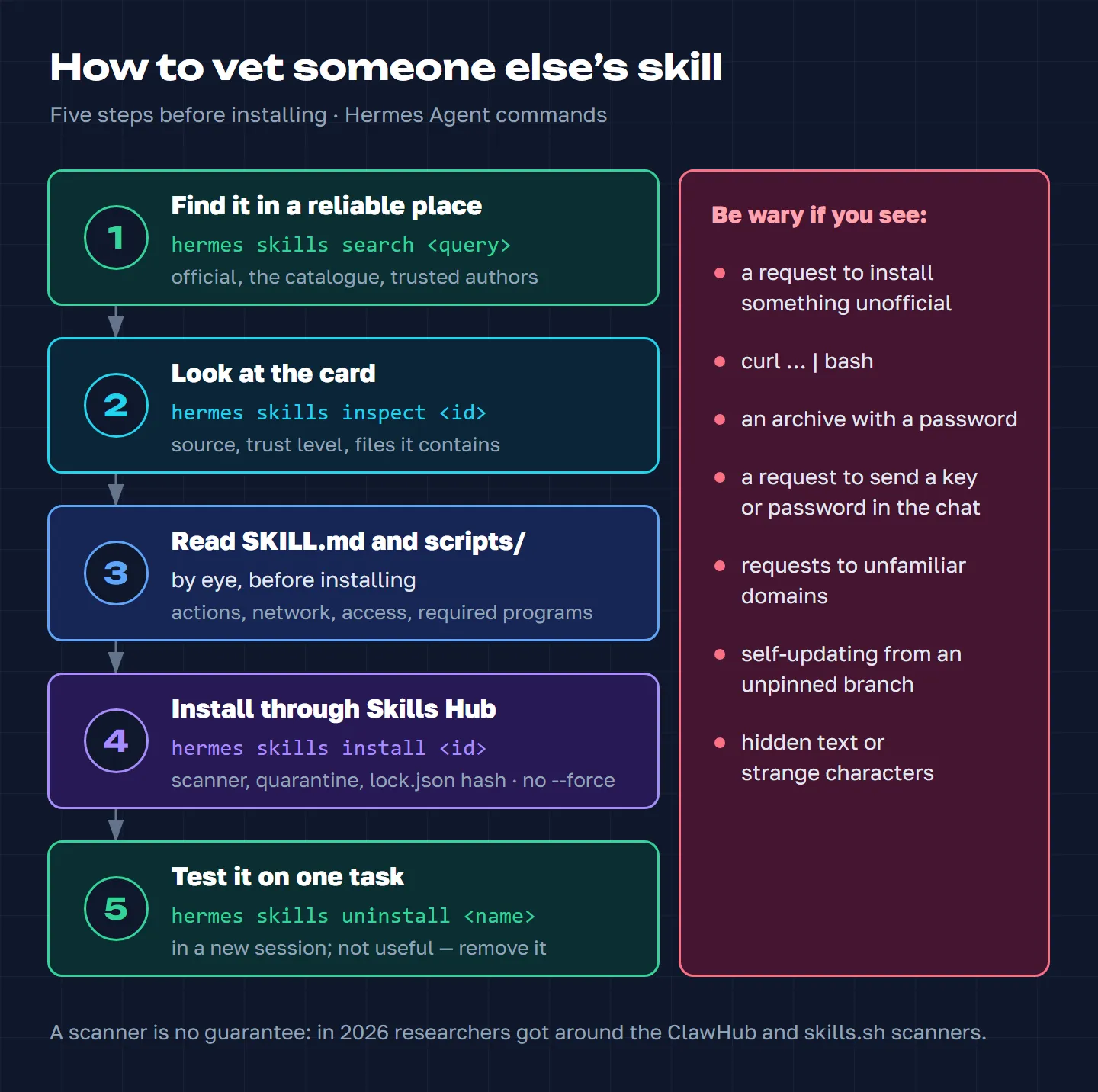
The order I recommend:
- Find the skill in a reliable place: built-in and official skills, the plugin catalogue, trusted sources and well-known authors. The command is
hermes skills search. - Look at the card before installing:
hermes skills inspect <id>shows the source, the trust level and the files it contains. - Read
SKILL.mdand thescripts/folder: what the agent will do, which commands it will run, where it will go online, what access it will ask for, and which programs, MCP servers and operating system it needs. - Install through Skills Hub and without
--force: that way the skill goes through the scanner and quarantine. - Test it on one task in a new session. If it’s not useful or behaves oddly:
hermes skills uninstall <name>.
Pause the install and look into it if you see any of these in a skill:
- a request to “install first” a program from an unofficial source or to download an archive, especially a password-protected one. Dependencies as such are normal, many skills need them; it’s suspicious when it’s unclear where they come from and why;
curl … | bashand self-updating from a branch that isn’t pinned to a version;- requests to unfamiliar domains;
- a request to send a key or password in the chat. An API key in the settings is normal too, many skills need access to a service. It’s bad when a secret ends up in the conversation or goes who knows where;
- hidden text and invisible characters in the instructions.
What this looks like in real life. One pack of product skills, on its first run in a conversation, checks whether a new version is out: it contacts the author’s website and, according to its description, sends only the skill name and version, and this can be switched off with one line in the settings. The update command downloads an install script from the repository’s main branch and runs it straight away. A network request on its own doesn’t make a skill malicious, and the author described everything openly. But if the website or the repository is ever hacked, that route will deliver someone else’s code straight into your agent. Those are exactly the spots you need to find by eye before installing.
With plugins the logic is the same, and the commands are different. Look at the card with hermes plugins info <name>, the declared and granted capabilities with hermes plugins capabilities <name>, and remove a plugin with hermes plugins remove <name>. Before enabling one, read the source code and remember that a Python plugin is ordinary code inside Hermes. If the agent works with important data, run it in isolation, for example in Docker.
Hermes can also give you a second opinion. When installing from the Hub, it can run an NVIDIA SkillEvaluator check with the SkillSpector scanner: it looks in the files for personal data and keys, hidden characters, licensing problems and dangerous code. This check only advises and blocks nothing. It’s switched on by installing two utilities; the commands are in the Hermes documentation.
FAQ
Do Claude Code skills work in Hermes Agent?
The format is shared, the open Agent Skills standard, so you can install skills made for Claude Code in Hermes. Whether a particular one works depends on which tools, MCP servers, programs and operating system it expects. Composio’s integration skills, for example, are useless without their MCP server. Check the description and run the skill on one task. And Hermes will move your own skills, MCP servers and instructions over from Claude Code with a single command: hermes import-agent claude-code.
How much do skills and plugins cost?
Installing from Skills Hub, the plugin catalogue and NeuralDeep is free. Check the licence of each package: it can be open, it can be the author’s own, and it can be missing altogether. What you pay for is whatever stands behind the skill: a service, an API, a model. Remotion is paid for companies of more than three people, and some of NeuralDeep’s own skills run through their paid platform.
How is a skill different from a plugin?
A skill is an instruction, sometimes with scripts: the agent reads it when a task calls for it. A plugin is an extension package: it can add new tools, commands and connections to Hermes, or it can simply bring a set of skills. An installed skill is available to the agent in a new session, while a third-party plugin also has to be switched on: hermes plugins enable <name>.
Where can I find skills in Russian and for Russian services?
In the NeuralDeep catalogue: Wordstat, Direct, Bitrix24, 1C, GigaChat, marketplaces. For Russian-language copy there’s humanizer-ru. And don’t forget the agent can write a skill itself: describe a process you repeat every week and ask it to save that as a skill.
How do I make my own skill and get it into the catalogue?
Hermes will build your own skill with the /learn command or when you ask in the chat. To share it, put the folder on GitHub: it can then be installed with hermes skills install by its path in the repository. How packages get into the official catalogue I described in the articles on hermes-cron and hermes-dreaming.
If you don’t have Hermes yet, start with installing it and connecting it to Telegram, then the settings after installation. And add skills one at a time, for a task you already have.