
hermes-field-notes is a free skill for Hermes Agent: a database of known Hermes errors with their fixes, and a check on whether your edits to the core survived an update. The agent first searches the database for the error text, then fixes it, and records what it found so the same thing never has to be debugged twice. After hermes update the patch check runs with a single command or a request to the agent, and if watch mode is switched on, it runs by itself once an hour.
On 7 October the skill appeared in the official Hermes Agent plugin catalogue. It’s my third skill there, after hermes-cron and hermes-dreaming. The pull request was merged by Teknium from the Nous Research team, and the skill got a page in the catalogue: category Tools, tier Community, version 1.2.1, MIT licence.
Why edits vanish and errors come back after hermes update
If you’ve been running Hermes not for a week but for months, two things pile up that aren’t properly written down anywhere: the errors you’ve found and your edits to the core.
The first is pitfalls. Scheduled jobs went silent because linger wasn’t enabled for the user the service runs under. A colon without quotes in a skill’s description, and the plugin loader quietly drops the skill without a word. The first time, something like this takes an hour. A month later the symptom comes back in a different guise, and another hour goes, unless someone wrote down how it ended last time.
The second is local patches. Sooner or later you edit something right in the hermes-agent core: you fix a bug that hasn’t been fixed upstream yet, or you adjust the behaviour to suit yourself. hermes update silently wipes these edits. You find out when the bug comes back, sometimes several days later, when you no longer remember it ever existed.
hermes-field-notes keeps both in one place, and it checks that patches are intact against set markers rather than from memory.
Known Hermes Agent errors: search first, then debug
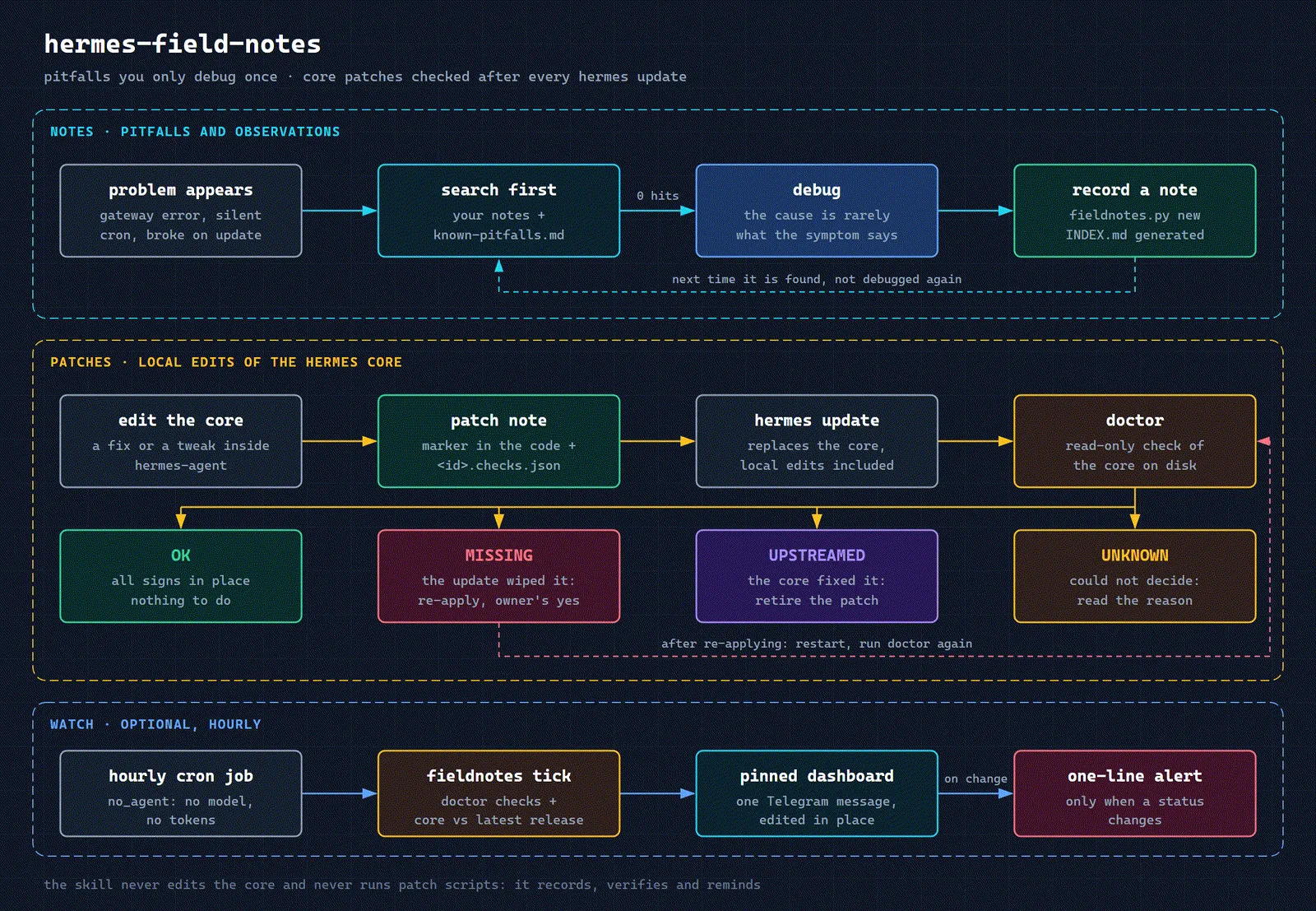
When something breaks (a gateway error, a silent cron job, a breakage after an update), the agent first searches for the error text with the search command. The search covers your own notes and the built-in list of Hermes pitfalls. That list has 41 entries, and the mechanism of each one has been checked against the Hermes 0.21.5 source code: which installations it affects, the exact symptom, where the mechanism sits in the core code, how to work around it, and whether there’s an issue in the Hermes tracker. Ten entries are about problems that have already been fixed in Hermes: each one says where the fix landed, and they’re kept for people still on an older version.
A few examples from the list:
- The agent doesn’t pick a skill even though it’s installed and enabled. Only the first 57 characters of the description make it into the list of skills the model sees. The words by which the agent should recognise the task need to go at the very start.
- Voice messages in Russian are transcribed as gibberish. The default speech recognition language is English for every provider until
stt.languageis set in the settings. - After an update a plugin silently fails to load, or a script crashes with
ModuleNotFoundError.hermes updatebrings the virtual environment back in line with Hermes’s dependency list and removes everything you added there by hand. - After an update a Git install shows version
0.0.0or a version string with a long hash suffix. By default the update moves it to the very latest code on themainbranch, not to the latest release. - A new skill isn’t visible in an old chat. An ongoing conversation keeps working with the old system prompt, and restarting the gateway doesn’t change that: you need to send
/newin that chat. - A Telegram topic ID in the settings turns into a strange number. A value like
-1001234567890:2without quotes is read by YAML as a sexagesimal number.
If nothing turns up, the agent debugs and then records the finding. A note is an ordinary Markdown file with a small header; the INDEX.md table of contents builds itself and isn’t edited by hand. The lint check catches broken fields, stale notes and anything that looks like keys or passwords: a log is no place for secrets. Once the cause has been found and recorded, the issue-draft command turns the note into a draft issue for the Hermes developers, with personal data masked. Whether to submit it is up to a human.
Among the built-in pitfalls is the story from the article on hermes-cron, when not a single scheduled job ran on the server for several days in a row. If Hermes is installed as a system service and the service user only logs in to the server over SSH, then after the last session ends, the systemd user manager that Hermes uses to launch jobs goes away. Before version 0.21.4 this broke every run; newer versions have a fallback mode. The fix is to enable linger for the service user and restart the gateway: one command with root privileges, if you know where to look. Now this cause can be found in the database by the error text.
Checking core patches after a Hermes update
Every core edit is written up as a patch note, and next to it sits a checks file: which lines should be in which core file, for which Hermes versions, and which markers show that the developers have fixed it on their side. After an update, the doctor command looks at the core on disk (it only reads and changes nothing) and sorts the patches by status.
OK: all the markers are in place, nothing to do. MISSING: the patch markers aren’t in the file; most often an update wiped it, and you need to decide whether to bring the edit back. UPSTREAMED: the core has been fixed upstream, and the patch can be retired. N/A: the patch has no checks for this core version. UNKNOWN: the doctor couldn’t decide, and it says why. Separately, it shows core files that someone changed outside the registry, and notes that were checked on a different Hermes version.
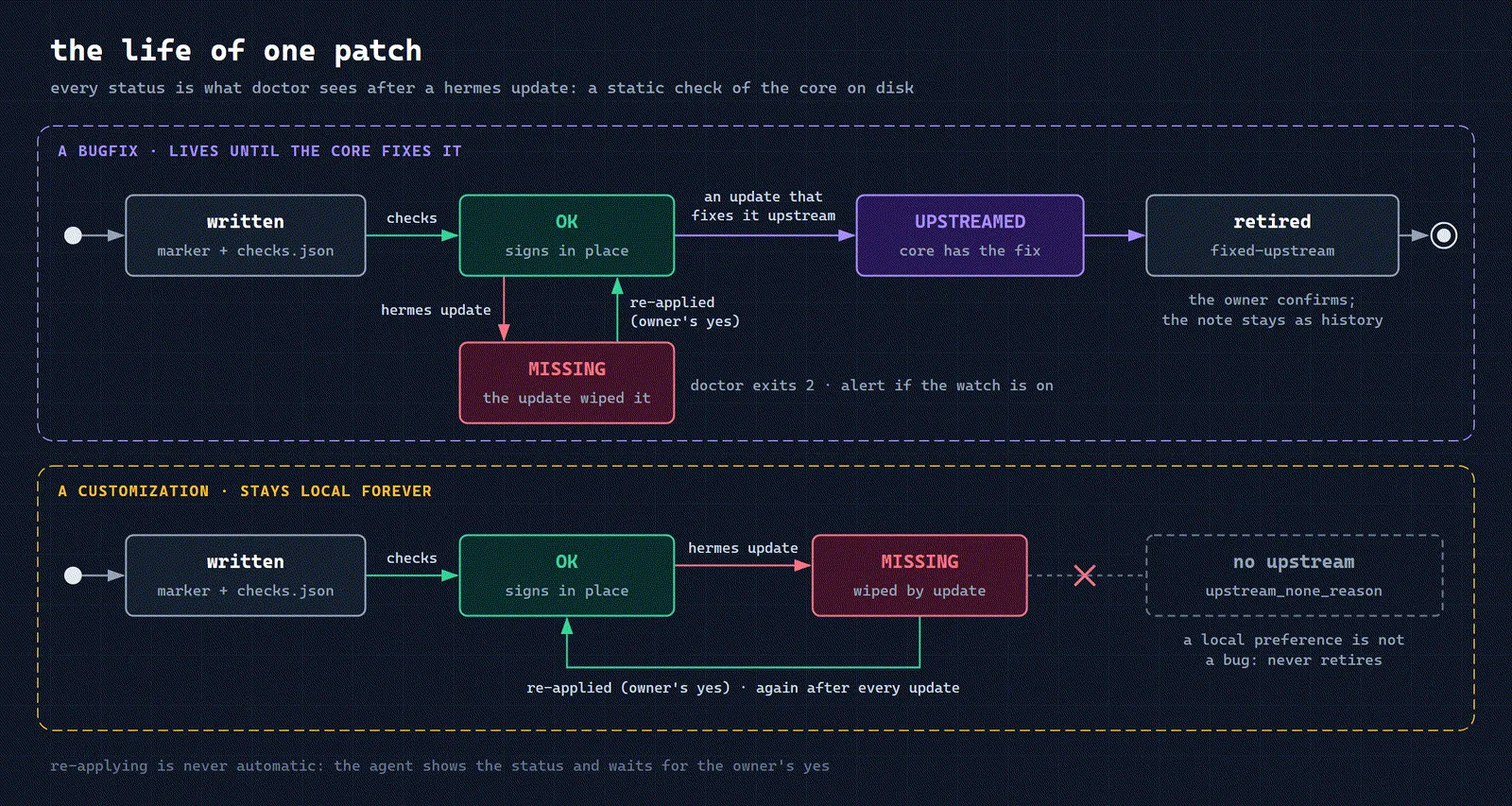
The check is static: it looks for lines in files. OK means the required lines are in the files, not that the code definitely works. If a patch’s marker survived but the code beneath it changed, the doctor shows UNKNOWN rather than a false green status.
And one deliberate limit: the skill’s scripts only read the core and don’t apply patches. They record, check and remind. The agent will offer to bring back a wiped edit, but will only do it after the owner says “yes”.
To give you somewhere to start, the skill ships with ten patch recipes from one production installation: five bug fixes and five personal customisations. One example is misreading provider errors: Hermes used to report an exhausted quota in the chat as an authorisation error (this was fixed in 0.21.4), and it can still mistake a block under the provider’s policy for a temporary rate limit. Another is empty Telegram messages made up of nothing but invisible characters. Each recipe gives the place in the core, the edit itself, what to put in the checks file and its status with the developers. It’s a starting point, not a script that will patch everything for you.
A Telegram dashboard that uses no tokens
The last part is optional. Once an hour a scheduled job runs in no_agent mode, with no model call and not a single token. It runs the doctor, compares your core version with the latest Hermes release and updates one pinned message in Telegram. The message is edited in place, so the feed doesn’t get cluttered, and a short alert arrives only when a status changes: for example, when an update has wiped one of the patches.
Security: what the skill touches and where it connects
The notes are stored only on your machine, in ~/.hermes/field-notes/, and aren’t uploaded anywhere. The skill makes network requests in two cases: to the Telegram Bot API if the dashboard is on, and only to the chat you’ve specified; and to the public GitHub API without authorisation, a couple of requests every 12 hours, to compare your core with the latest release. The second can be switched off in the settings. The --read-only flag guarantees that a command writes nothing and makes no network requests. There are no third-party dependencies, only the Python standard library.
How to install hermes-field-notes
You need Hermes Agent 0.21 or newer and Python 3.11+. For the patch check the core has to sit on disk as a folder, and to see edits made outside the registry it has to be a git checkout. The usual route is to install it as a skill, and the agent will pick it up by its description:
hermes skills install itpartypattaya/hermes-field-notes/skills/hermes-field-notesOr as a plugin from the catalogue, which installs exactly the version that was reviewed on acceptance:
hermes plugins install hermes-field-notes
hermes plugins enable hermes-field-notes
Then create the store and settings once and check that everything is in place. The commands below are for a skill install; if you installed it as a plugin, the scripts are in ~/.hermes/plugins/hermes-field-notes/skills/hermes-field-notes/scripts/:
python3 ~/.hermes/skills/hermes-field-notes/scripts/install.py
python3 ~/.hermes/skills/hermes-field-notes/scripts/install.py --check
The dashboard is switched on in ~/.hermes/field-notes.json, where you set the chat, thread, language and time zone, and the scheduled job is set up by install_cron.py from the same folder. It’s worth running it with --dry-run first to see what it’s going to do.
After that, talk to the agent in plain words: “what do we know about this error?”, “write this down”, “did the patches survive the update?”, “show the dashboard”.
FAQ
How much does hermes-field-notes cost? Nothing: the skill is open source under the MIT licence. The hourly check and the dashboard run as a script without a model call and spend no tokens. When the agent works with the notes and investigates an error, at your request or on its own, tokens are spent as in a normal conversation.
Will the skill fix the core by itself after an update? No. It shows which edits are missing and suggests how to bring them back, but the core code will be edited by you or the agent, and only with your consent.
Do I need patches of my own for the skill to be useful? No. The database of known errors and the notes on your own findings work on a clean install too. The patch check kicks in once the first core edit appears.
Do I have to connect Telegram? No. The dashboard and alerts are optional; without them, the doctor runs by hand or when you ask the agent.
If you don’t have Hermes yet, start with installing it and connecting it to Telegram, then the settings after installation. The code and documentation are in the GitHub repository. If you’ve found Hermes pitfalls that affect more than just your installation, send a pull request to the pitfalls list in the same format. I’ve put together a separate overview of where to find other skills and plugins for Hermes and how to vet them before installing.
If you work not with Hermes but with Claude Code or Codex, we have our own version of this skill: field-notes. It’s the same log of pitfalls: the agent searches it before fixing a familiar symptom, records the finding after debugging and drafts an issue for the developers with keys and paths masked. This version has no core patch registry and no Telegram dashboard. On the other hand, there’s one notes store per machine, shared by both agents: what Claude Code wrote down, Codex will find, and vice versa. You need Python 3.9+, and the installer from the repository connects the skill to both agents on Windows, Linux and macOS. If the agents’ global instructions already point to different folders for notes, it’s worth aligning the paths, otherwise a second store will appear. The notes themselves stay with you and don’t end up in git.