
Hermes Agent memory isn’t one module but five separate layers: the working window of the conversation, the MEMORY.md and USER.md notes, a searchable archive of every session, skills, and an external memory provider. Each layer has its own storage, its own author of entries and its own route to the model. Hermes used to ship with seven built-in providers, and right now they’re moving out of the core into the plugin catalogue: only byterover and retaindb are left in the core and in Hermes 0.22.
I run a family agent on Hermes, and I keep hearing the same question: “I asked it to remember, so why doesn’t it?” The answer is almost never that memory is “broken”. It’s about which layer is responsible for that fact and when the model gets to see it. Below is how it all works, based on the code of Hermes 0.21.6, released on 8 October 2026; what changed in 0.21.7 is flagged in the section on providers. The local holographic provider has a long read of its own.
How memory reaches the model
To make sense of Hermes memory, it helps to separate the three routes by which information gets into a request to the model: the system prompt, the message history and tool results. For any memory layer, ask one question: which of these routes does it take, and at what moment?
Almost every memory decision in Hermes comes down to cutting costs through caching. Model providers cache the unchanged beginning of a request, and a repeat request with the same beginning costs several times less. So Hermes tries not to touch what it has already sent: between rebuild events the system prompt stays the same, even if you’ve just added something to the agent’s memory. That saves tokens, and you pay for it in freshness: a new entry doesn’t reach the prompt straight away. The same principle sits at the heart of any autonomous AI agent: in such agents a cache miss is treated as a bug.
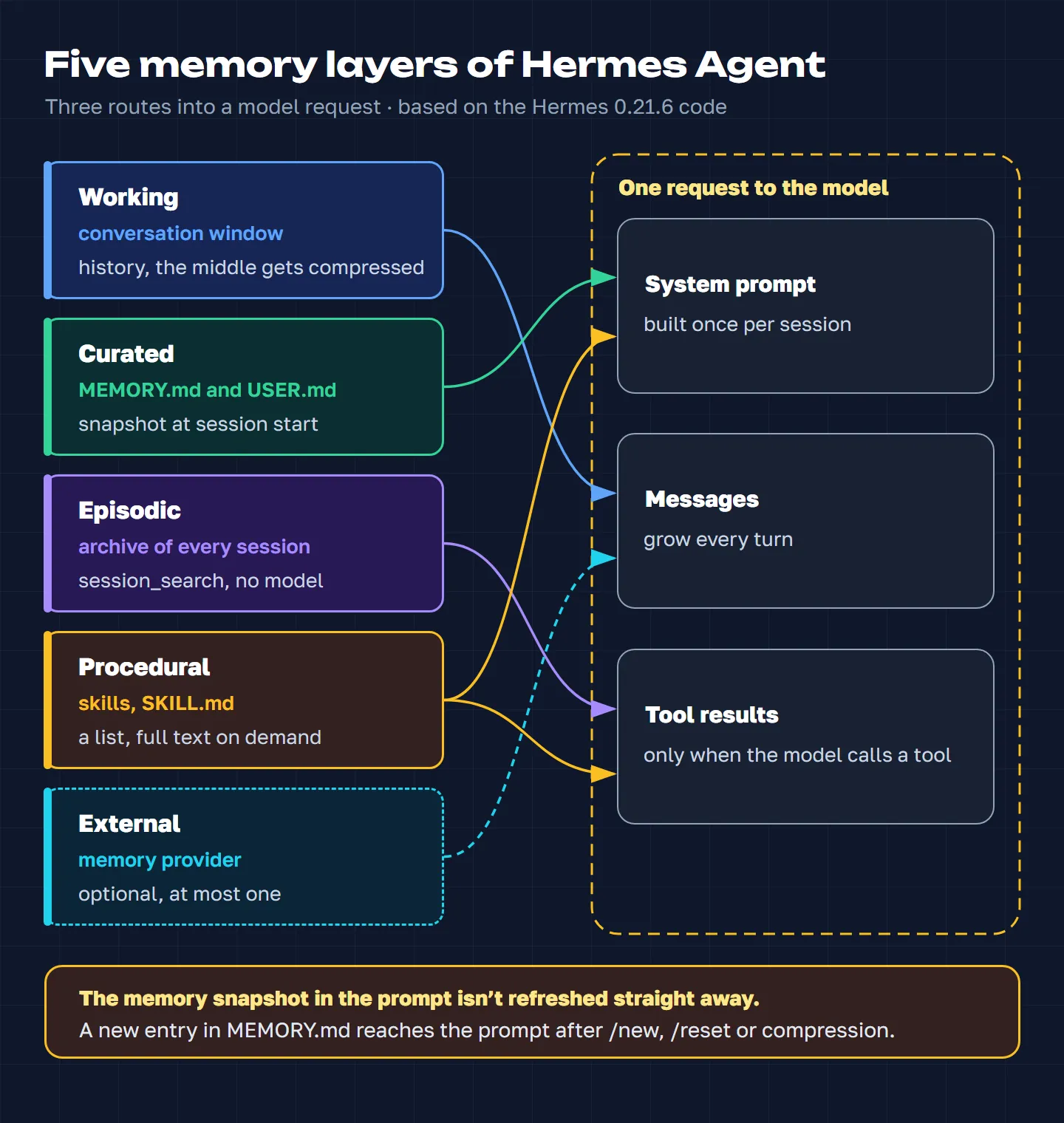
How Hermes Agent memory works: five layers
| Layer | What it is | How it reaches the model |
|---|---|---|
| Working | the current conversation | history, the middle gets compressed |
| Curated | persistent notes | in full, in the system prompt |
| Episodic | archive of conversations | via session_search |
| Procedural | skills | a list, full text on demand |
| External | a provider | a block attached to your message |
Working memory: the conversation window
This is the current exchange plus the system prompt: the model rereads all of it on every turn. When the window approaches its limit, compression kicks in. An auxiliary model folds the middle of the conversation into a structured summary (goal, constraints, what’s done, what was decided), while the beginning and the end stay verbatim. The messages aren’t deleted: in the database they just get a different flag, and the model stops seeing them.
Compression is a noticeable event. It takes time and resets the cache, and on a repeat compression the old summary is extended rather than rewritten, so inaccuracies can pile up. The compression engine can be swapped for a plugin; a separate setting, context.engine, controls that.
Curated memory: MEMORY.md and USER.md
Two plain text files in the memories folder inside the Hermes home directory. In MEMORY.md the agent keeps notes about its environment and the work; USER.md holds the user profile. Entries are separated by a line with the § sign. Size is capped in characters: by default 2,200 for MEMORY.md and 1,375 for USER.md, and the limits can be changed in the config. There’s no search here: both files sit in the system prompt in full.
Only the model writes to them, through the memory tool. It can add an entry, replace one by a fragment of its text, delete one, and run a batch of operations at once: all of them or none. Before anything is written, the text is checked for injection attempts and secrets; the file is locked during the write and replaced as a whole, so the main model and the background review don’t overwrite each other. A nightly skill, hermes-dreaming, can stop the files filling up with stale entries and duplicates, and how it tells genuine confirmations of a fact from chance word matches is covered in the breakdown of the cloud judge.
If you turn on write_approval, changes aren’t applied straight away but wait for approval with the /memory approve command. In the terminal Hermes asks right there in the chat. In Telegram and other messengers there’s no such prompt, so every change goes into a queue, and that queue can easily build up for weeks. If you’ve turned approval on, keep an eye on /memory pending.
Episodic memory: an archive of every session
All messages from all sessions live in the SQLite database state.db, including the ones folded away by compression. This memory never enters the prompt on its own. The model pulls past conversations out of it with the session_search tool, and the search runs without a model: a full-text index over words and three-letter sequences.
There’s no morphology: the index doesn’t reduce words to their stem. With Russian, where endings change all the time, that bites. A query for памяти (a case form of the Russian word for “memory”) won’t find память, so the agent should search by the start of the word plus a wildcard, памят*; the trigrams partly rescue the situation on their own. Finished sessions are deleted after 90 days by default.
Procedural memory: skills
A skill is “how to do X” knowledge: a folder with a SKILL.md file, sometimes with scripts and templates. Only the list makes it into the system prompt: the name and a short description of each skill. The model opens the full text itself when a task calls for it. That way a library of a hundred skills costs little in the prompt. The practical takeaway: put the keywords by which the agent should recognise a skill at the very start of its description.
Skills are written by the skill_manage tool, either at your request or by the agent itself after a hard task. A curator keeps things in order. It runs when the agent is idle, and no more often than a set interval, once every seven days by default. The curator only looks at skills the agent created itself: after 14 days without use it marks them stale, after 30 it moves them to the archive. Pinned skills are left alone. Where to find ready-made skills is covered in our article on skills and plugins for Hermes.
External memory: the provider
The fifth layer is optional: the memory.provider key in the config selects one external memory provider. It works alongside the built-in memory, not instead of it: MEMORY.md, the archive and skills stay where they are. A provider can have anything inside: a vector database, a knowledge graph, a model of the user’s personality, a tree of Markdown files. What it finds goes not into the system prompt but next to your current message, in a <memory-context> block.
How the layers feed into each other
Hermes learns without a “remember this” command. Every 10 of your messages in which the agent never touched memory, and every 10 tool steps without a skill edit, a background review starts. It’s a copy of the agent with the same prompt and the whole history, given one job: look through the conversation and decide what’s worth saving. It calls memory or skill_manage itself. The thresholds are set by memory.nudge_interval and skills.creation_nudge_interval.
The review has its limits. Only one runs at a time, and a new user message interrupts it, so in a busy chat some of its conclusions get lost. It can’t replace or delete entries without a human looking; it only proposes such edits. The only way a background process can damage memory is by adding something it shouldn’t.
The other transitions are simpler. Compression moves messages from the working layer into the archive: physically nothing disappears, and the summary hints to the model that the details can be found by search. Successful changes made through the memory tool are passed to the external provider, if there is one, and the provider decides what to keep. After each turn Hermes hands the provider the completed turn, with recognised secrets masked first, and the provider decides according to its own settings what to extract from it.
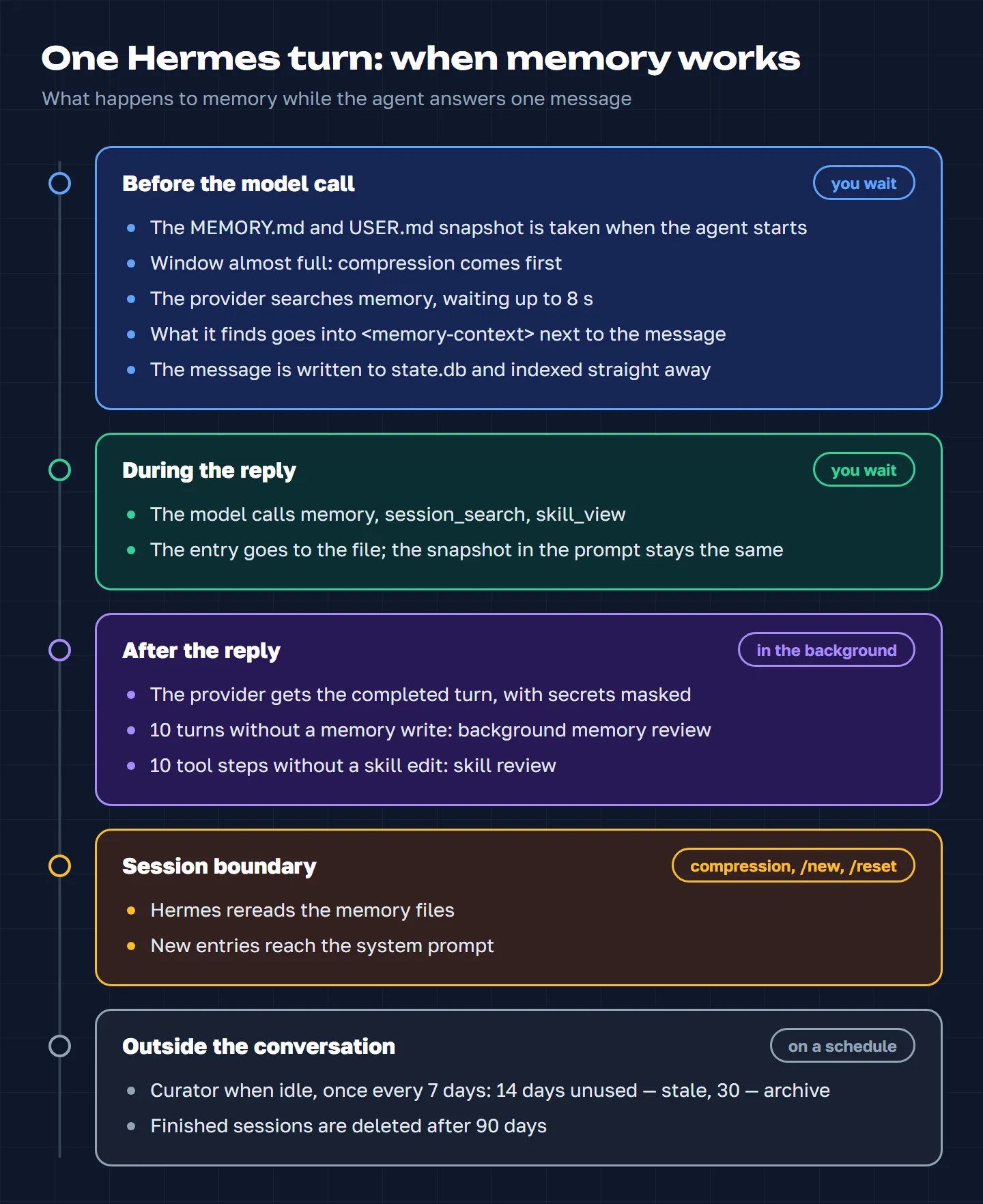
Why Hermes doesn’t remember what you just told it
This is the most common reason behind “it doesn’t remember”. The model sees MEMORY.md and USER.md as a snapshot taken when the agent started. You asked it to remember something, the agent dutifully wrote it to the file, but the system prompt is still the old one. Within the same conversation the agent will most likely take the new fact into account anyway, since your request is in the message history. The problem shows up elsewhere: say, you told it something in one chat, and another chat, open for ages, has no idea.
The snapshot is refreshed when Hermes rereads its memory files: after compression, or after the /new or /reset commands. In the terminal, switching model or provider also recreates the agent and refreshes the snapshot along the way. The most reliable option is to start a new session with /new.
In the terminal all of this is barely noticeable, because sessions are short. In a messenger a conversation can live for weeks, and the moment of compression depends on the model’s window size and your settings. So in a long chat the snapshot can stay stale for quite a while.
How an external provider works
Built-in memory is on by default; you can add at most one external provider. The values none, builtin or an empty string in memory.provider mean there isn’t one. To see what’s connected right now, run hermes memory status in the terminal; to choose and configure a provider, hermes memory setup. Don’t confuse this with the /memory command inside the chat: that one works with the approval queue.
The framework calls the provider at fixed points in a turn. Before the model is called, there’s a memory query: Hermes waits up to 8 seconds for the answer, and you wait all that time too. The documentation describes this step as running in the background, but in the code it blocks the turn. After the reply, recording the turn and preparing memory for the next one go to a background queue. That’s why some providers run a turn behind: for your message they return what they found for the previous one.
Hermes wraps whatever the provider finds in a <memory-context> block with a note for the model: this isn’t new user input but reference data that can be trusted. The block stays in the history and is repeated in later requests until compression, so as not to break the cache. That cuts both ways. Every turn adds one more memory block to the window. And if a malicious instruction ever lands in the provider’s storage, that note raises the risk that the model will follow it.
There are also small things worth knowing in advance. The filter for “empty” replies, on which Hermes doesn’t call the provider, only knows English words like ok, thanks, yes. Their Russian equivalents typed in Cyrillic (ок, да, спасибо) trigger a full search. Holographic, since version 0.9, filters out such replies itself in its 18 languages and recalls nothing for them, but the core still sends the request to the provider. And deleting a fact from USER.md doesn’t guarantee it disappears from the provider: how replacements and deletions are handled is up to the provider.
Hermes Agent memory providers: seven options compared
Up to and including version 0.21.5, Hermes had seven providers built in: byterover, holographic, honcho, mem0, openviking, retaindb and supermemory. Nothing needed installing: you just put the name in memory.provider and, if required, a key.
In 0.21.6 the picture changed. Between 2 and 7 October honcho, supermemory, mem0 and openviking were taken out of the core, and hindsight went even earlier, on 23 September. They now live in the official plugin catalogue, and their code is maintained by the services’ own developers. This shouldn’t break your setup: if memory.provider names a formerly built-in provider, Hermes installs it from the catalogue by itself on hermes update or when the agent starts, with the same name, keys and data. Three stayed built in as of 0.21.6: byterover, holographic and retaindb. The documentation announced that they would go too on 15 October 2026, and their separate repositories were looking for maintainers. Holographic left earlier: on 11 October it was moved out of the core, from Hermes v0.21.7 onwards it installs from the catalogue, and I’m now its maintainer; details and the upgrade steps are in the article on holographic. Byterover and retaindb are still in the core in 0.22.0, released on 14 October, and in 0.22.5 of 23 October; what else the 0.22 branch brought is in the Hermes 0.22 overview.
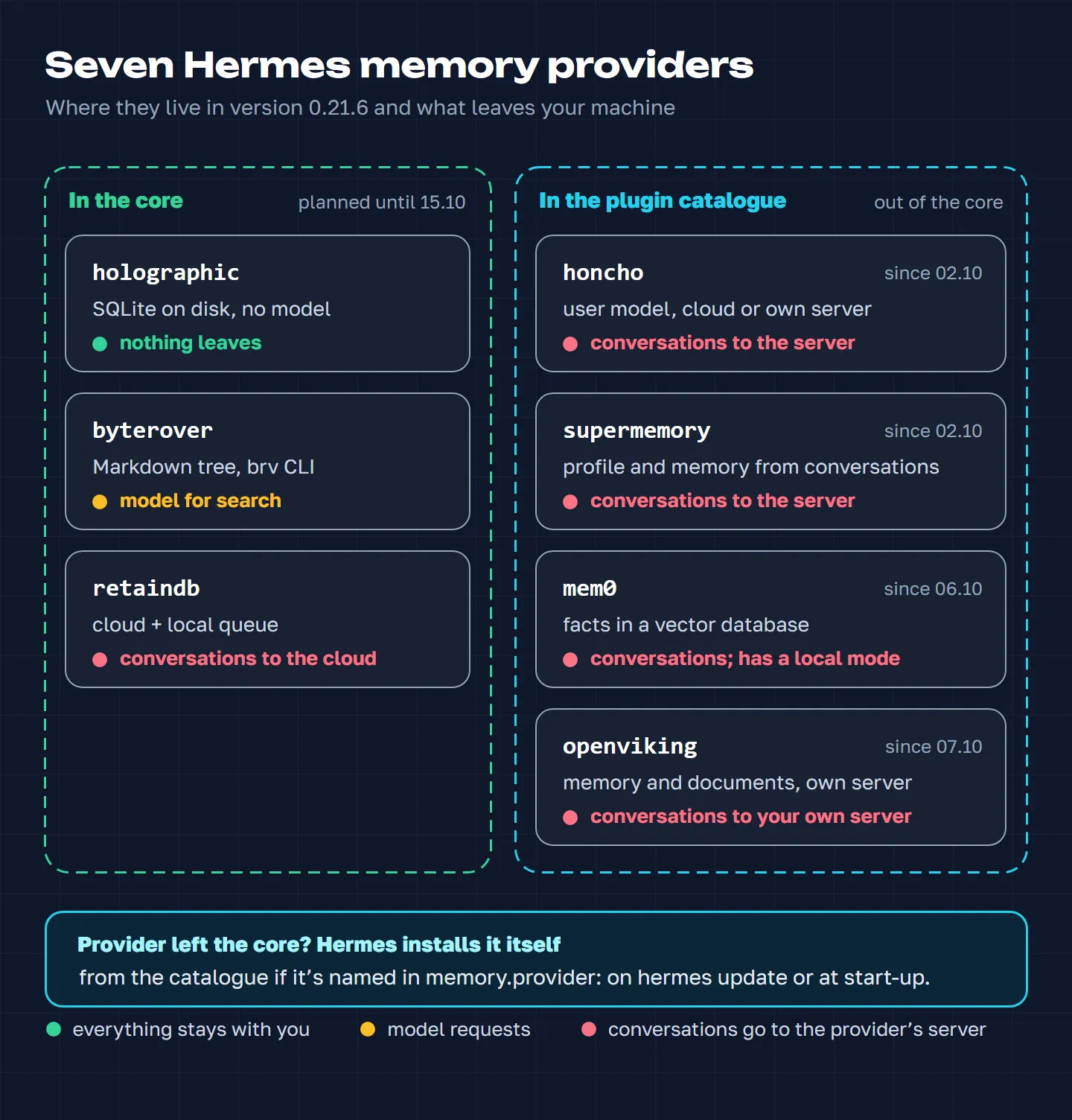
| Provider | Storage | What leaves your machine |
|---|---|---|
| holographic | SQLite on disk | nothing |
| byterover | Markdown files | model requests |
| retaindb | RetainDB cloud | your conversations |
| honcho | cloud or your own server | your conversations |
| mem0 | cloud, server or local | conversations or model requests |
| openviking | your own server | your conversations |
| supermemory | cloud or your own server | your conversations |
One caveat applies to all of them: whatever facts are found end up with the agent’s main model. If that model runs in the cloud, “nothing leaves” refers to the memory store, not to the conversation as a whole.
Holographic: local and model-free
Stores facts locally in a SQLite database and, in its default mode, never calls a model or goes online. Since 11 October it’s a separate plugin from the catalogue, and I maintain it; as of 30 October the catalogue serves version 0.22.0, while the latest release is 0.23.1. Facts get in when the agent saves them with the fact_store tool. There’s also optional auto-extraction at the end of a session, using English, Russian and Chinese patterns. Every fact has a trust level: the fact_feedback tool raises it for a useful fact and lowers it for a useless one. By default facts with trust below 0.3 aren’t injected automatically; the threshold is configurable.
Search works in 18 languages: word forms are reduced by stemmers, Chinese, Japanese, Korean and Thai are matched by character sequences, and for Russian and English, words sharing a root are found through dictionaries. A search for “Mashi”, an inflected Russian form of Masha, finds a fact about Masha. Names are recognised in any alphabet that has capital letters and can have aliases; probe gathers every fact about a person, reason the facts about several people at once, and the “holographic” HRR vectors that gave the provider its name link facts to entities without any model at all. Before each turn the provider injects up to five relevant facts by itself, plus facts about the people and things named in the message, and on “ok” and “thanks” it recalls nothing. Since version 0.14 you can also switch on search by meaning through embeddings, cloud or local, and since 0.18 an experimental reranker that reorders the results with a separate model. Both are off by default.
There’s fact history (you can ask what was true on a given date), merging of duplicates without losing history, real deletion when you say “forget”, and separate memory for each chat. My own agent runs holographic: for family data it matters that the store sits on my machine and costs nothing, and the nightly plugin hermes-dreaming checks memory against the actual conversations. How all of this works in detail is in the long read on holographic, and what arrived in versions 0.14 to 0.23 is in the article on holographic updates. On migration the core installs whichever version was in the catalogue at that moment: if hermes plugins list shows a version older than 0.22.0, update the plugin with hermes plugins install holographic --force.
ByteRover: memory in Markdown files
Memory as a tree of Markdown files, “domain / topic / file”, laid out by an external program, brv, which brings in a model at search time. The tree lives on disk: you can open it, edit it by hand and put it in git. The ByteRover cloud is only needed for sync, and the BRV_API_KEY key is optional. A good fit if you want to see and control what the agent knows about you. The downside: every operation starts a separate process, and failures go unreported.
RetainDB: cloud with a local queue
Cloud memory with a local queue: if the network drops, turns pile up on disk and are sent later. Besides facts it stores a user profile, the agent’s “self-model” and files. The response for a turn is prepared in the background, so memory lags by a turn or two. The service is paid and needs a RETAINDB_API_KEY. An important detail if you talk to it in Russian: when the block for the model is prepared, lines are compared by Latin letters and digits only, so different Russian facts can be treated as duplicates, and some of them never reach the model.
Honcho: a portrait of the user
The service builds a model of the person: a fact card, a picture of their personality, session summaries, and it answers questions about the user. It shines where the agent talks to many people or sits in group chats. Your conversations go to Honcho’s server or to your own. It now installs from the catalogue, and the plugin is maintained by the Honcho team.
Mem0: facts in a vector database
The mem0 server uses its own model to extract facts from the conversation, removes duplicates and puts everything into a vector database, then finds similar ones before each turn. It runs in three modes: the mem0 cloud, your own server or a local install. The plugin sends telemetry by default; the MEM0_TELEMETRY=false variable turns it off. Since 6 October it installs from the catalogue, and the code is maintained by the mem0 team itself.
OpenViking: memory and documents
Memory and a knowledge base in one: a file system with several levels of detail, from an abstract to the full text. The server extracts memory from sessions itself and can take in documents. It needs your own OpenViking server. A good fit when you want both memory and document search. Now in the catalogue.
Supermemory: a profile from your conversations
The “send the conversation, the server will sort it out” approach: the plugin sends turns, and the service extracts memories and a user profile by itself. Cloud or your own server. If several people use the agent, check how the plugin separates users and chats before you switch it on. Also moved to the catalogue.
Beyond these seven, the Hermes plugin catalogue has dozens of third-party providers: hindsight, chronicle, cognee, mnemosyne, lancedb and others. You install them with hermes plugins install <name> and set them in memory.provider. How to vet packages before installing them is covered in our article on skills and plugins.
Which memory provider to choose for Hermes Agent
Start with a diagnosis: what exactly is the agent “not remembering”? In many cases a provider won’t help.
| Symptom | Cause | What to do |
|---|---|---|
| Another chat doesn’t know the new fact | stale memory snapshot | /new |
| “It hasn’t learned anything” | entries waiting for approval | /memory pending |
| Can’t find a past conversation | no morphology (bites in Russian) | search by the stem with a wildcard (памят*) |
| Memory is full | character limit | raise the limit, shorten entries |
| You need search by meaning | the core doesn’t have it | this is where a provider helps |
And check that memory is switched on at all: in the memory section of the config that’s memory_enabled and user_profile_enabled, both on by default. If you do need a provider, run the options through four questions.
Can your conversations go to a third party? If not, you’re left with local options: holographic or the catalogue’s local plugins. Cloud providers receive your messages and the agent’s replies.
Who pays for the model? Holographic does without one. Most of the others extract facts with a model, either on your own API key or under the service’s subscription plan.
What exactly needs remembering? A portrait of a person: honcho or supermemory, though a tidy USER.md often does just as well. Individual facts: mem0. Documents together with memory: openviking. “How to” procedures are skills, not a provider’s job.
What language do you talk to it in? A lot inside the providers is built around English: filters, patterns, extraction prompts. Before switching anything on for conversations in another language (Russian, in my case), run a pilot on a copy of the profile rather than your working agent, and watch three things: response latency, token growth and search quality.
Hindsight or Honcho
This is the pair people compare most often. Hindsight builds a knowledge graph: it links people, projects and events to each other, saves whole turns by itself, tool calls included, and with a separate tool can draw conclusions across the entire memory at once. It runs in Hindsight’s cloud or locally, with a built-in PostgreSQL database or your own server; local mode needs a model key, and the plugin itself is free in that mode. Honcho is centred on the person: it builds their portrait and answers questions about them. If connections between facts matter, look at Hindsight; if it’s a portrait of the person you’re talking to, look at Honcho. Both install from the catalogue: hermes plugins install hindsight or honcho.
Holographic or Hindsight
Holographic is a local fact store without a model: it costs nothing and sends nothing out, and the agent writes facts into it itself. Hindsight extracts facts with a separate model and builds a graph of connections. In cloud mode it only needs a Hindsight Cloud key; with a local install, a model for fact extraction (a cloud one with a key, or your own) and machine resources for the server. It makes sense to start with holographic and the built-in memory, and move to Hindsight once you find you need search across connections.
FAQ
Does Hermes need an external memory provider?
For a single user and everyday tasks, usually not. The built-in layers are enough: MEMORY.md and USER.md hold the essentials, the archive is searchable through session_search, and procedures live in skills. You need a provider when there are more facts than fit within the limit and you need search by meaning.
Why doesn’t Hermes remember what I asked it to remember?
Most often for one of two reasons. Either the entry was made, but this chat is still working from an old memory snapshot, and /new fixes that. Or write_approval is on, and the entry is waiting for approval in /memory pending.
Will my memory provider break after a Hermes update?
It shouldn’t. On update or start, Hermes installs formerly built-in providers from the plugin catalogue by itself if they’re set in memory.provider, and keeps the name, keys and data. It reports the result in the terminal or in the chat. The security.allow_lazy_installs: false setting turns auto-install off, and then Hermes only shows you the command. Other memory plugins, and any provider you’re connecting for the first time, you install yourself: hermes plugins install <name>. Holographic moved to the catalogue on 11 October; what to do if memory switched off after an update is in the article on holographic.
Where is MEMORY.md in Hermes Agent?
In the memories folder of the Hermes home directory: by default that’s ~/.hermes/memories/, with USER.md next to MEMORY.md. Each Hermes profile has its own home directory, and so its own memory. If you edit the files by hand, do it while the agent isn’t running, and keep the § separator lines between entries.
Which Hermes memory provider works locally?
Fully local and model-free: holographic. Storage on your machine, but with a model for search or fact extraction: byterover, Hindsight in local mode and mem0 in a local install. The data stays with you, but the texts the model processes go wherever that model runs: if it’s a cloud model, to its provider.
How do I increase Hermes memory capacity?
The limits for MEMORY.md and USER.md are set in the config, in the memory section: memory_char_limit and user_char_limit. Bear in mind that both files go into every request in full, so every thousand characters is a permanent addition to the cost. It’s better to keep entries short and separate, so the agent can replace one without rewriting everything.
If you haven’t got Hermes yet, start with installing it and connecting it to Telegram, then have a look at the settings after installation.