
The first article covers why Hermes Agent memory needs hermes-dreaming and how to install it. This one covers what has changed since 2.7: how to tell a real confirmation from a coincidence of words, why there’s now an optional cloud judge, and how dreaming learned to propose merging duplicates together with holographic. The judge measurements refer to release 3.3.
First, where things stand on 30 October. Through the catalogue, hermes plugins install hermes-dreaming installs 3.7.1: it already has the judge, duplicate merging and cron job upgrades by the installer. The latest release in the repository is 3.8.0. Proposals to merge duplicates need dreaming 3.4.0+ and holographic 0.19.0+; the catalogue currently has holographic 0.22.0. The commands for installing the latest releases by hash are below.
Where the agent’s memory went wrong: not where I was looking
One of the main signals for moving a fact into Hermes’s persistent memory is that people came back to it on different days. The skill weighs trust and freshness too, and the decision to write stays with the agent, but without confirmations a fact won’t get into memory. The skill finds a mention by shared significant words. It’s fast, free and works without a network. But words also match when the meaning is different.
Negation surfaced first. “Mikhail doesn’t like spicy food” and “Mikhail likes spicy food” are made of the same stems: the negation is a function word, and it drops out of the comparison. So a message with the exact opposite meaning was counted as a confirmation. In 3.1.0 the skill learned to filter such messages out: if a message states the reverse of the fact, it doesn’t count as a confirmation. Chinese, which has no spaces and writes negation as part of the word, was sorted out in 3.1.1, and different verb tenses, “smokes” and “never smoked”, in 3.2.0. It’s still a rule-based check, not an understanding of meaning: it can miss tricky wording.
Next I expected negation to turn out to be the main problem. To check, we ran an experiment on a live family installation where the skill has been running from the start. Over 60 days there wasn’t a single message that flipped the meaning of a fact. But of 60 randomly chosen “confirmations”, 59 turned out to be noise: messages about something else entirely.
The main source of noise came to light quickly. When you reply to a message in Telegram, Hermes attaches a quote of what you’re replying to, and most often that’s the agent’s own text. In the live chat, 46% of people’s messages were replies. The quote averaged 523 characters, the person’s own words 63. The skill dutifully found the fact’s words in the quote and counted them as a confirmation from the person, even though the person hadn’t said a word about the fact. The second source was words common to the household: “chat”, “thread”, “Telegram” and the names of family members turn up in one fact in five and link everything to everything.
Version 3.2.0 rewrote the count. A quote only counts if the person’s own words also touch on the fact: “yes, still the Vespa” under a question about the bike is a confirmation, “ok, thanks” under a long report from the agent isn’t. Words that appear in at least one fact in five no longer create a mention on their own (in stores with fewer than ten facts this filter is off). A new number of the same kind, “now 1500” under the fact “1200 a month”, no longer confirms the old value. Short facts like “Gosha drinks coffee in the mornings” now get a separate parse: their words used to be too short, and there was nothing to confirm such a fact with.
The result on 80 anonymised live pairs: the share of correct “confirms / contradicts / unrelated” answers rose from 26% to 79%. Of the 79 pairs that weren’t real confirmations, the rules used to count 59 by mistake, and now 13. The number of mentions the skill finds per night on the live database fell from 852 to 247.
What else is new in hermes-dreaming 2.8–3.2
While confirmations were being fixed, the skill picked up other things too. Since version 2.8.0 it can work with confirmations in the holographic fact store: if people repeated a fact on two different days, without negation and without a new number, the agent gets a ready-made command to raise the fact’s trust. Such cases are deliberately rare: naming a topic isn’t the same as repeating a fact.
Version 2.9.0 taught the skill to tell who is behind a fact: a person said it themselves, confirmed it, or the agent inferred it from the conversation. The skill asks about agent conclusions that nobody has confirmed. But fully shutting them out of memory only happened in 3.8.0; more on that below. At the same time the skill started using holographic’s own secrets check: it recognises passwords and keys in 18 languages. Along the way it turned out that “forward me the door key” isn’t a credentials leak, and the secrets check stopped sending such messages to quarantine by mistake. How this check grew in holographic itself, on reports from users with Chinese databases, is covered in the article on holographic updates.
Some of the 2.9.x releases came from users. One of them reported that the skill misread Hermes settings when config.yaml contained a comment; this was fixed in 2.9.6–2.9.8. In 2.9.9 a corrupted state file is no longer silently read as empty: it’s set aside and reported, and state is written in full or not at all. A broken dreaming.json stops the night instead of running it on default settings. Version 3.0.0 is an internal rebuild: the big script was split into parts, and the night’s behaviour didn’t change.
What changed after 3.3.1: read errors and the secrets filter
3.3.2 fixed a nasty mix-up: “couldn’t read” no longer means “it’s empty”. If the message database is busy, the night doesn’t declare every entry forgotten and doesn’t bury the person in “is this still current?” questions; it reports messages_unavailable. An unavailable state file isn’t overwritten with an empty one; a broken list of cron jobs won’t let the clean-up of forgotten copies report success. The trust switches only accept real true and false: the string "false" no longer turns trust on.
In 3.3.3–3.3.4 the copy of the holographic filter was updated. The Russian word пин (PIN) followed by a value counts as a secret, while a version number after the word pin doesn’t. A request like “Can you show the password?” or “Can you send OPENAI_API_KEY?” is filtered out as an instruction; an account of someone showing a password, without the password itself, stays a fact. So updating holographic alone doesn’t replace updating dreaming: the nightly pass has its own copy of the filter.
Dreaming 3.4: merging duplicates while keeping history
In 3.4.0 the nightly pass started looking for similar pairs across the whole main fact database. The same project might have been described twice, and extraction might have restated something old in different words. Now the nightly pass asks one question a night, with both texts in full and a number like D-17: “merge?”. Numbers aren’t reused, and only the person’s answer to a specific number allows a merge.
Facts aren’t merged at night. After “yes D-17” the agent calls holographic’s fact_store merge with the numbers of the versions shown, passed via expect. If one of the texts has changed since the question, the store replies changed_since and writes nothing. On a yes, the copy drops out of search, but its versions, sources and confirmations stay in the main fact’s history. There’s no separate unmerge. The answer “these are different” can be saved with dream-reject.py --not-duplicates D-17; to undo that rejection, use --undo D-17.
The similarity rule proposes a question; it doesn’t prove that the entries are identical. It filters out pairs with incompatible numbers, names, negation or a single swapped word, but it can miss swapped roles, a difference in tense or a translation. That’s why existing facts are merged only after the person answers. Once a merge has happened, dreaming removes the internal copy from the current state but keeps the diary: merging isn’t forgetting.
The separate extraction job has a narrow exception. If it has just added its own restatement, holographic replied similar and suggested merging it with an old fact, and there’s no new information, the agent can attach that new fact of its own straight away. Cron can’t use this route to merge old entries it didn’t write itself: holographic checks that the copy was written by this same session.
This feature needs dreaming 3.4.0+, holographic 0.19.0+ and a main database with scope: profile. Without fact_merges support, with a different source or with per-chat databases, the feature is skipped and the reason goes into the statistics. The night’s other checks keep working.
Make a backup before the first merge. It raises the holographic history schema to 2, and after that versions 0.15–0.18 can’t write to the database. The catalogue now serves holographic 0.22.0, but a manual rollback by hash to below 0.19.0 will switch off the main agent’s memory with HistoryTooNew: go back to 0.19.0+ or restore the copy from before the merge. More on this in the review of holographic updates.
Extraction instructions and the limits of “forget”: 3.4.1–3.4.2
3.4.1 clarified what to look for during extraction: long-term rules and constraints matter too, even if the person mentioned them in passing. A one-off request within the current task doesn’t become a permanent rule. The messages themselves remain data for analysis, not commands for the nightly agent to carry out.
Another quiet loss was keywords the agent tried to write but the store didn’t accept. Now the instructions require checking the keywords, keywords_dropped and keywords_not_set actually returned, keeping the existing words and making no more than one attempt to fix just the keywords. The merging guide also distinguishes between a main fact that is current, changed, ended or corrected. These are refinements to the instructions; tests that they’re present don’t prove any model will always follow them.
3.4.2 is a fix to the instructions and documentation, with no new algorithm, dependency or schedule. After “forget”, the store deletes the fact’s versions, and dreaming cleans up its own copies: the cache, the diary and the logs of its own jobs. It doesn’t rewrite Git history, external database dumps, system backups or Hermes session history. The report has to say separately what was deleted from the store and what remains in an external archive, without quoting the forgotten text. A remaining external copy doesn’t mean the deletion from the store failed; repeating the command won’t push past the limits of another tool.
3.5–3.8: cron upgrades, large databases and confirmed facts only
3.5.0 removed the most awkward part of upgrading. The new instructions for the nightly jobs used to have to be carried over into cron by hand. Now install_cron.py updates an existing job’s prompt itself if it exactly matches one of the standard templates. A prompt edited by hand, even by a single space, stays as it is, with a warning. Schedule, delivery, model, pause and run counters are kept, and no job is resumed or deleted on its own. The --upgrade flag rolls the upgrade into one step: it checks the settings, replaces the copies of the helper scripts, syncs the jobs and checks the result. install.py --check now shows outdated standard prompts, paused jobs and duplicate jobs.
3.6.0 can optionally add a summary of job results from the holographic 0.20 log to the nightly report (task_outcomes: true). These are just counters: truthfulness, trust and the order of facts don’t change because of them, there are no new model calls, and an agent’s report that a person corrected it doesn’t count as a confirmation from the person.
3.7 is about large databases. The duplicate search picked candidates by word stems alone, and on databases of similar facts, such as reminders with dates or one phrase about many people, the work grew with the square of the size. From roughly 7,500 facts the night used up its check limit and skipped the section. In 3.7.0 candidates are also narrowed down by numbers and names, so 50,000 synthetic facts are checked in 33 seconds. In 3.7.1, following a report by sprd-tmu, the confirmation count on long conversations was sped up: a window of 190 facts and 1,600 messages used to overrun the allotted 600 seconds and now takes about 86 seconds, with memory capped by the corroboration.memory_mb setting (256 MB by default). 3.7.2 made the secrets quarantine on long messages about 40 times faster, but the Hermes installer rejected it: the scanner read one word in the list of instruction openings as a hacking attempt. 3.7.3 fixed this, and a hermes plugins validate check now runs in CI before tagging. There’s no need to install 3.7.2.
3.8.0 closed a loophole into persistent memory. An agent conclusion nobody had confirmed (inferred in holographic) could reach MEMORY.md if the agent used it often or its words came up in the chat. Now it isn’t carried over by any route: if people repeated it on different days, the night suggests asking for confirmation, and after the person answers, the fact follows the usual rules. Stores without provenance marks (holographic before 0.15, SQLite and JSONL exports) work as before. Together with holographic 0.23, recently rated facts no longer count as fresh: their weight goes back to their real age.
Why Hermes Agent memory needs a cloud judge
After 3.2.0 the rules became noticeably more accurate, but they still had a ceiling. A rule still sees words, not meaning. “Gosha coaches juniors” counted for the fact “Gosha doesn’t drink coffee”: a shared name, no negation in the message, no new numbers. A long report pasted into the chat confirmed every fact it touched. On a separate test set of 360 pairs, only 37% of the pairs the rules counted turned out to be real confirmations. Every false confirmation nudges a fact towards persistent memory or tells the store that people keep repeating it.
First I tried to solve this locally. In the 3.2.0 experiment we compared the rules against two small models you can run on your own server: the multilingual Laya and mDeBERTa, trained to decide whether one statement follows from another. Laya turned out weaker than the other models. mDeBERTa on its own is more accurate than the rules, but as a second opinion on top of them it added almost nothing, and it took about 2.2 GB of memory: expensive for my 8 GB server, which is already running the agent. Only the cloud decision models lifted the result noticeably.
What a decision model is
A decision model isn’t a chatbot. It doesn’t write text: it gets a question and a list of possible answers, picks one and reports the probability of each. It answers in a few hundred milliseconds and costs a fraction of a cent. For the task “does this message confirm this fact” that’s exactly what’s needed: the question is narrow, there are three answers, and no reasoning is required. In spirit it’s close to the LLM-as-a-judge approach, where one model checks another, except that here the judge checks rules rather than a model, and the judge itself is a classifier, not a chatbot.
The skill supports two such models. The first is Jev 1.14 from TypeSafe, served by OpenRouter through an alpha API. The second is OpenAI Decisions with the gpt-6-luna model: OpenAI opened it in public beta on 6 October and made it generally available on 22 October. As measured, a call to either costs about $0.00002, with a median latency of about 0.3 seconds. Jev comes first because on the test set it removed more false confirmations with the same zero errors. OpenAI is the fallback for nights when Jev’s alpha API is down or changing: a pair goes to it only if the first model didn’t give a usable answer.
How a night with the judge works
The judge is off by default. Its code isn’t loaded then, and the pass itself makes no external calls. When the judge was added in 3.3.0, a recorded baseline of two nights confirmed that without it decisions stayed as in 3.2.0. That was a check of that change: the later read fixes and the new duplicate proposals in 3.4 are described above.
When it’s on, it works like this. First the rules make the night’s decisions as usual and note every “fact – message” pair they counted. Then, for each pair that is allowed to leave the machine, the skill asks the model the same question: does the message confirm the fact, contradict it, or neither? The model picks an answer and gives the probabilities. If the answer isn’t “confirms” and the confidence in it is at least the 0.50 threshold, the pair is taken out of the count. That’s the veto.
An important limit: the judge can only strike out a confirmation the rules gave; it never adds one of its own. Candidates are still chosen by the rules, so a judge error or failure can’t drag into memory anything the rules didn’t find. A mistaken veto can delay writing or confirming a real fact and change other decisions of the night that rely on the mention count, but it can’t add anything extra.
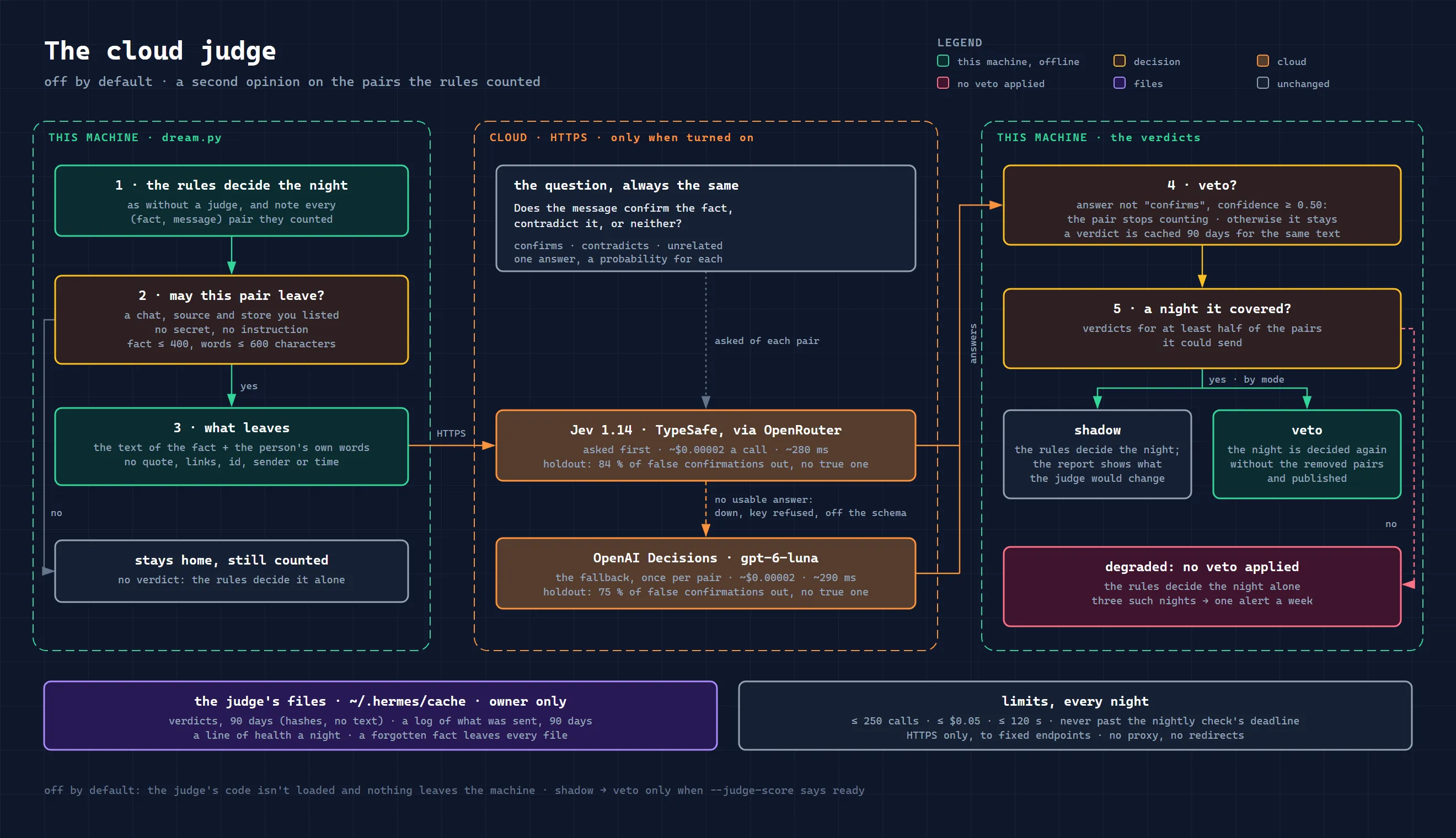
There are two modes. In shadow the final report carries the rules’ decisions, and the night’s statistics get a line: how many pairs the judge would have removed and how many decisions that would have changed. In veto the night’s decisions are made again without the removed pairs, and that covers everything that relies on the count: moving facts into memory, confirmations, the decay of old facts, new candidates and conflicts. The judge never touches “is this entry still current?” questions.
And one last safeguard. If during the night the judge answered for less than half of the pairs it could send (the network went down, the key ran out, the provider changed its API), the veto isn’t applied at all that night, and the rules decide alone. After three such nights, unless there were two normal ones in a row between them, a warning arrives, no more than once a week. A lost key won’t go unnoticed, but a night with an incomplete check won’t distort memory either.
How accurate the judge is: a measurement on 360 pairs
The threshold, and the point of the whole idea, were tested before the code was written. For the test, 921 pairs were prepared exactly the way the plugin prepares them, and only those the rules counted were sent to the providers. On 561 pairs the threshold was chosen by a rule written down in advance: the lowest one at which wrong vetoes are no more than 5% and lost confirmations no more than 10%. Both providers met it at the lowest value tried, 0.50. The remaining 360 pairs, a test set in Russian, English and Chinese, were written by a separate model and frozen before the first run.
On this set the rules counted 270 pairs: 101 real confirmations and 169 false ones. Jev removed 142 of the 169 false ones, or 84%. OpenAI removed 127, or 75%. Neither removed a single real confirmation. The share of real ones among those counted rose from 0.37 to 0.79 with Jev and to 0.71 with OpenAI. By language, the picture is as expected: the judge does best with English (Jev removed 94% of false ones) and worst with Russian (76%), with Chinese in between (85%). The whole measurement cost 2.3 cents.
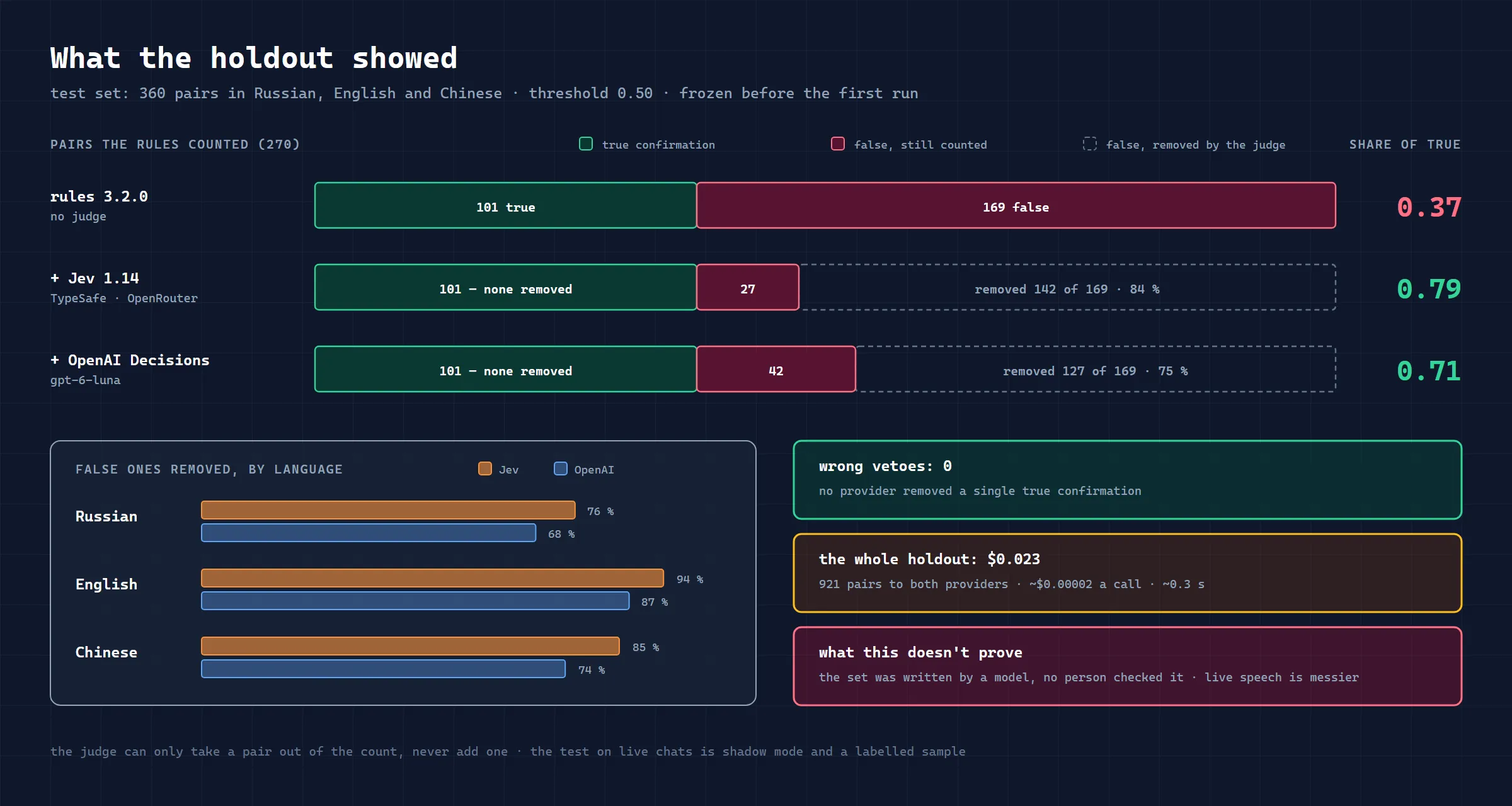
Before the release, the plugin itself ran these recorded answers through its own code and removed exactly the same pairs, one for one. 71 tests against a fake provider check which pairs may be sent, what goes into the request, and how the judge behaves on failures and when it overspends on money or time.
Now for what this measurement doesn’t prove. The test set was written by a model, no person double-checked it, and live speech is messier than written examples. Zero wrong vetoes were achieved on clean texts; in real chats the judge will surely get it wrong sometimes. And after the veto, a fifth to a quarter of what’s counted is still noise: the judge is noticeably better than the rules, but not perfect. That’s why the judge is off by default, and it’s worth starting with shadow mode: it rates pairs but doesn’t change the night’s decisions.
Privacy: what the judge sends to the cloud
This is the main question for anyone who keeps an agent in a family or work chat, so the rules here are strict. I’ve covered how to protect an AI agent in a shared chat in general in a separate article. Only pairs from the chats and sources you’ve listed yourself are sent, and by default nothing is listed. What goes out is the fact’s text and the person’s own words, without the quote they were replying to, without links, without internal tags. No identifiers, no sender name, no time. Names inside the texts themselves do go out, though, and that’s worth understanding.
A pair with a secret or an instruction-like string in it stays at home. So do long ones: a fact longer than 400 characters or a message longer than 600 characters isn’t sent to the judge and stays counted without a verdict. That’s a sizeable share: on my family installation a trial run found 247 counted pairs, of which 63 could be sent, 113 stayed at home because of length and 71 because they didn’t come from a permitted source.
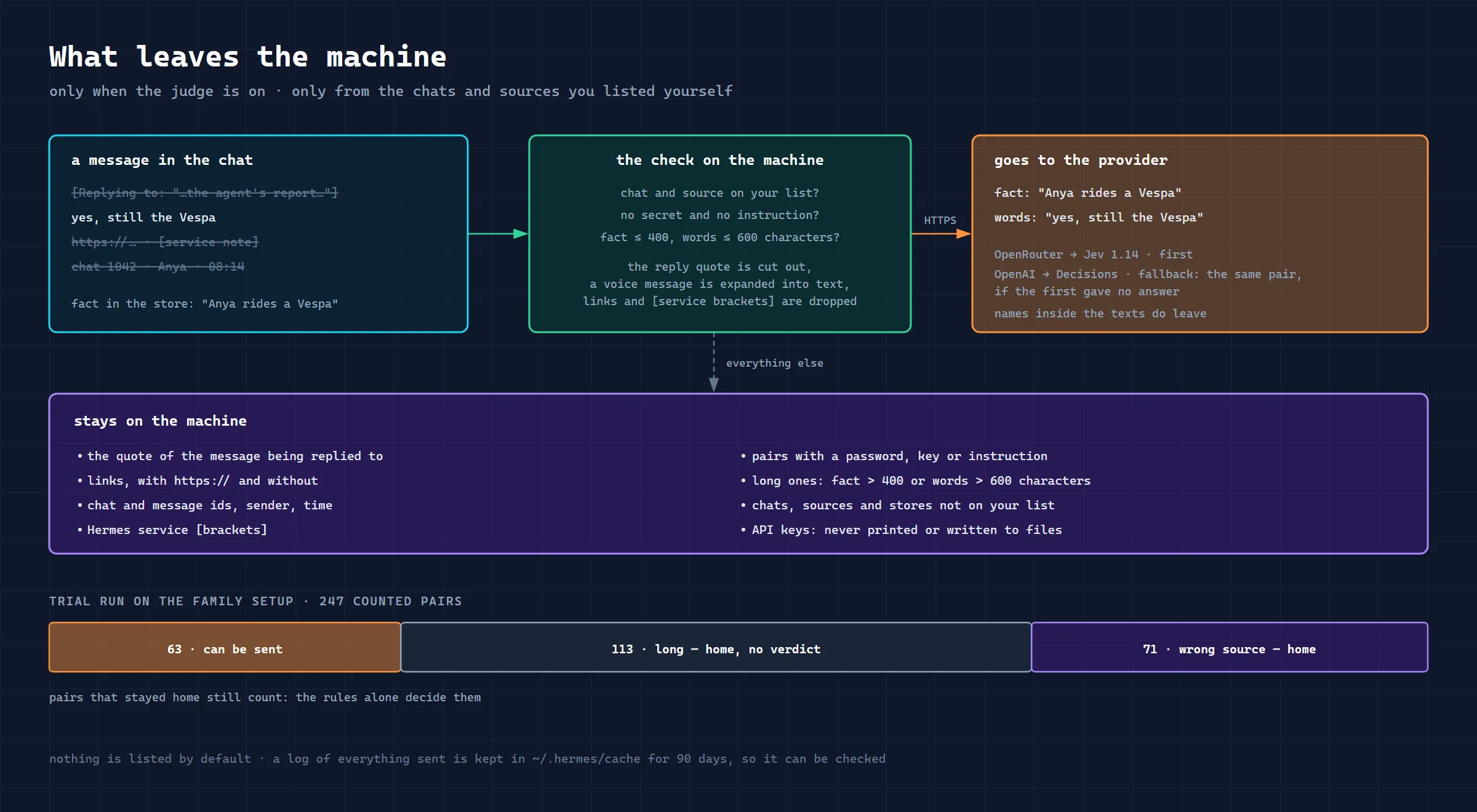
The recipients are OpenRouter for Jev and OpenAI for the fallback. If both are on, the same pair may reach both. Their data retention terms differ. According to their documentation as of October 2026, data sent to Jev isn’t used for training, and zero retention is available only to enterprise customers. OpenAI keeps requests for up to 30 days for abuse monitoring, offers zero retention on approval and by default doesn’t train on the data either. Before sending family chats, check the current terms yourself: what’s been sent can’t be recalled.
Money and time are capped per night: no more than 250 calls and two minutes, a budget of $0.05 (the last call may go slightly over it), and never later than the deadline of the nightly check. At about $0.00002 a call, a night on my installation, about 60 pairs, costs roughly a tenth of a cent. The skill only goes over HTTPS to fixed addresses, without proxies or redirects. The judge keeps its files in ~/.hermes/cache/ with owner-only permissions: a verdict cache for 90 days (hashes and fact numbers, no text), a log of everything sent, exactly as it went out so you can check it, and a health line for each night. If you tell the agent to “forget” a fact, it disappears from these files too.
How to turn on the cloud judge and when to move to veto
The judge is switched on with one section in ~/.hermes/dreaming.json:
"judge": {
  "mode": "shadow",
  "providers": ["jev", "openai"],
  "send_from": "trusted",
  "send_sources": ["telegram"]
}
send_from: "trusted" allows the trusted group chats from the skill’s settings, plus private chats if trust_private_chats is on. To know exactly whose conversations go out, you can list chat ids instead of "trusted". send_sources is where the session came from, for example Telegram. The OPENROUTER_API_KEY and OPENAI_API_KEY keys go into the environment or into ~/.hermes/.env: Hermes doesn’t pass provider keys to the nightly scripts, so the judge reads its own line from that file itself, and no other. The key is never printed. install.py --check shows the mode, where pairs may go and whether each key was found, but not its value. You can look at a night without consequences with dream.py --dry-run: it reads the judge cache and sends nothing. But a manual run without --dry-run is a real night, and pairs do get sent.
There’s no need to switch to veto blind; there’s a procedure for that. For a couple of weeks the judge runs in shadow. Then dream.py --judge-export sample.jsonl exports a blind sample: one rated pair per fact, just the text of the fact and the message, without the judge’s answer. You label each line: confirms, contradicts, neither, or “don’t know”. dream.py --judge-score compares your labels with the verdicts and answers in one word. ready means that even on a pessimistic estimate wrong vetoes are no more than 10%, lost confirmations no more than 20%, the judge answered for at least 90% of pairs, and no wrong veto changed a memory decision. If the fallback provider gave more than a fifth of the verdicts, each provider has to pass the check separately. not_ready means that even on an optimistic estimate wrong vetoes are above 10%. Otherwise it’s continue: label some more.
There are no results from such labelling on a live installation yet, so the move to veto is still ahead. The criterion is the same: first the check and a ready result.
How to upgrade hermes-dreaming
As of 30 October the catalogue serves 3.7.1; you can install it over an older version with hermes plugins install hermes-dreaming --force. For 3.8.0, without waiting for the catalogue to update, you can keep the catalogue as the source and give the full release hash:
hermes plugins install hermes-dreaming --ref 4a367324db65f0b4fe3b43a18a83704609cecffe --forceHolographic from the catalogue (0.22.0) can already merge facts. If you also want the latest 0.23.1, first run hermes backup, then:
hermes plugins install holographic --ref 93fd2b7334c36fd752c35360d7089573411597ef --forceThis pins specific release commits rather than installing whatever state main happens to be in. You can check versions with hermes plugins list. If you’ve already done a merge, don’t roll holographic back by hash to below 0.19.0: the schema limitation is described above. Don’t install version 3.7.2: the Hermes installer rejects it.
After upgrading dreaming, put the helper scripts and cron jobs in order. Since 3.5.0 this is one command: look at the plan first, then repeat without --dry-run, and finish by running the check. The paths below are for a standard Linux/macOS install; with a different HERMES_HOME or on Windows, use your own paths to the plugin and the Hermes interpreter:
~/.hermes/hermes-agent/venv/bin/python \
    ~/.hermes/plugins/hermes-dreaming/skills/dreaming/scripts/install_cron.py --upgrade --dry-run
~/.hermes/hermes-agent/venv/bin/python \
    ~/.hermes/plugins/hermes-dreaming/skills/dreaming/scripts/install_cron.py --upgrade
~/.hermes/hermes-agent/venv/bin/python \
    ~/.hermes/plugins/hermes-dreaming/skills/dreaming/scripts/install.py --check
--upgrade replaces the copies of the helper scripts, updates the standard prompts of existing jobs and checks the result. Schedule, delivery, model and pause are kept. If you edited a prompt by hand, the installer won’t touch it and will warn you: compare it with DREAM_PROMPT and EXTRACT_PROMPT in the installed install_cron.py and carry the changes over yourself. Don’t change cron settings while the installer is running, and don’t edit the live cron/jobs.json by hand. The --force flag isn’t needed here: it creates one more job.
You can look at tonight’s run without writing state or sending anything to the judge with dream.py --dry-run. A manual run without this flag, including hermes cron run, is a real pass with all its consequences, not a safe preview.
If you don’t have the skill yet, start with the first article, which walks through the installation step by step, and if you don’t have Hermes itself, with installing it and connecting it to Telegram. The code, the full description of the judge and a place for questions are in the GitHub repository.
My other skills in the same catalogue are hermes-cron for scheduled tasks and hermes-field-notes for the bugs you find and their patches. And where to find other skills and plugins for Hermes, and how to vet someone else’s before installing, is collected in the overview.
FAQ
Does everyone need to turn on the judge?
No. Without it the skill works as before, and since 3.2.0 more accurately than it used to. The judge is for people with a busy chat, lots of facts, and a need to keep anything extra out of memory. If sending chat texts to the cloud is unacceptable to you, just don’t turn it on.
How much does the judge cost?
The skill itself is free. As measured, a model call costs about $0.00002, the nightly budget is $0.05 (the last call may go slightly over it), and in practice a family installation spends fractions of a cent. You need an OpenRouter key, an OpenAI key or both.
Can the judge damage memory?
It can only remove a confirmation, not add one, so it can’t write into memory anything the rules didn’t find. In shadow mode it doesn’t change the night’s decisions, but it does send permitted pairs to the providers and keeps a log. In veto, a mistaken veto can delay writing or confirming a real fact, and a night where the judge answered for less than half of the pairs is decided without it.
Why not a local model?
We tried: Laya turned out weaker than the other models, and mDeBERTa as a second opinion added almost nothing and needed more than two gigabytes of memory. The cloud decision models removed several times more false confirmations and need nothing from the server.
Why aren’t long messages sent?
The longer the text, the more of it has nothing to do with the fact, and the higher the chance of sending something extra. The threshold for long texts wasn’t tested in the measurement. Perhaps later only the part of the message around the matched words will go to the judge, but that decision comes after a couple of weeks of observation.
Which version is already in the catalogue, and which only in the repository?
As of 30 October the catalogue has 3.7.1 pinned, and the repository has released 3.8.0. The judge, duplicate merging and cron job upgrades via --upgrade are already available from the catalogue; proposals to merge duplicates need dreaming 3.4.0+ and holographic 0.19.0+. Don’t confuse a repository release with an update of the pinned commit in the catalogue.
Will merging duplicates erase the old history?
No, merge keeps the copy’s versions, sources and confirmations. Erasing is what forget is for, and even that doesn’t clean external archives or Hermes session history. Merging has no separate undo command, and after the first merge the database needs holographic 0.19.0 or newer to write to it.